You run the business. You also do the sales, the marketing, the delivery, the bookkeeping, and the inbox. If that sounds familiar, there is a word for you.
This guide answers the question fast, then gets practical. You will see how a solopreneur differs from a freelancer, an entrepreneur, and a small business owner, and which tools a one-person business should buy first, which can wait, and which you may never need.
If you are still deciding what kind of business to start, my solopreneur business ideas guide covers that. This post is about what the role means and how to equip it without wasting money.
What Is a Solopreneur?
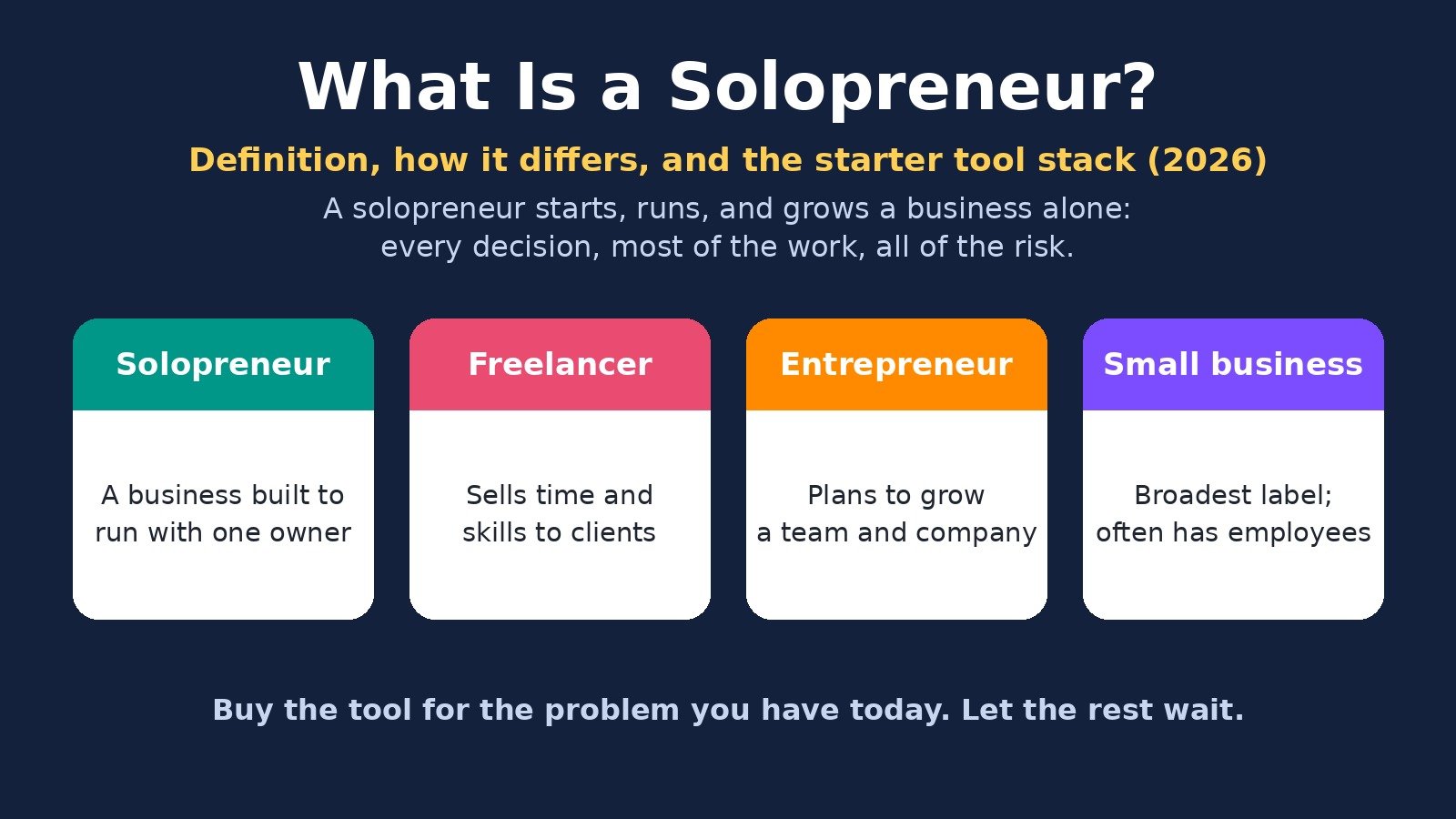
A solopreneur is a person who starts, runs, and grows a business on their own, without a co-founder or partner. They make every decision, do most of the work, and carry all of the risk.
Merriam-Webster defines a solopreneur as "one who organizes, manages, and assumes the risks of a business or enterprise without the help of a partner," and sums it up as "a solo entrepreneur."
In everyday use, the solopreneur meaning is narrower: a one-person business with no employees. Many solopreneurs still hire contractors for specific jobs, like design or bookkeeping, and use software to cover the rest. The business is built around one owner, not around a team.
Solopreneur vs Entrepreneur vs Freelancer vs Small Business Owner
These labels overlap, and people use them loosely. The difference is mostly about goals and structure, not about how much money you make.
Main goal: Solopreneur: A business that runs well with one owner; Freelancer: Paid client work; Entrepreneur: A company that grows beyond the founder; Small business owner: A stable business, often local
Team: Solopreneur: Just you, plus contractors or software; Freelancer: Just you; Entrepreneur: Plans to hire and build a team; Small business owner: Often has employees
What you sell: Solopreneur: Services, products, content, or a mix; Freelancer: Your time and skills; Entrepreneur: Whatever scales; Small business owner: Products or services
Income tied to your hours?: Solopreneur: Less over time, by design; Freelancer: Mostly yes; Entrepreneur: No, by design; Small business owner: Depends on the business
Typical tools focus: Solopreneur: Automation and systems; Freelancer: Invoicing and time tracking; Entrepreneur: Hiring, fundraising, team tools; Small business owner: Operations and staff
Solopreneur vs freelancer. A freelancer sells hours or projects to clients. A solopreneur may start that way, but treats the work as a business to systemize. Think packaged services, digital products, an email list, content that brings in leads, and automations that run without you. Every solopreneur who does client work is freelancing for part of the week. Not every freelancer is building a solo business.
Solopreneur vs entrepreneur. Every solopreneur is an entrepreneur. The difference is the plan for growth. An entrepreneur usually wants to build a team, raise money, or create a company that can run without the founder. A solopreneur chooses to stay small on purpose and grows through systems, pricing, and leverage instead of headcount.
Solopreneur vs small business owner. "Small business owner" is the broadest label. It covers a bakery with ten staff and a consultant working from home. A solopreneur is one specific kind of small business owner: the kind with no employees on the payroll.
What the Work Actually Looks Like
The appeal is easy to see. You choose your clients, your hours, and your prices. The tradeoff is that every job lands on your desk.
A solo business has the same core jobs as any business:
Getting paid: quotes, invoices, payment reminders, and expense tracking.
Getting found: content, social media, search, and referrals.
Staying in touch: an email list and follow-ups with leads and past clients.
Delivering: the actual service, product, or content you sell.
Running the back office: email, scheduling, files, and copying data between apps.
When you are the only person, time is the real budget. Every hour spent chasing an invoice or sorting email is an hour not spent on sales or delivery. That is why the right tools matter more for a solo owner than for a company with staff, and why buying too many tools too early is an easy way to waste money.
The Starter Tool Stack: What to Buy First vs Later
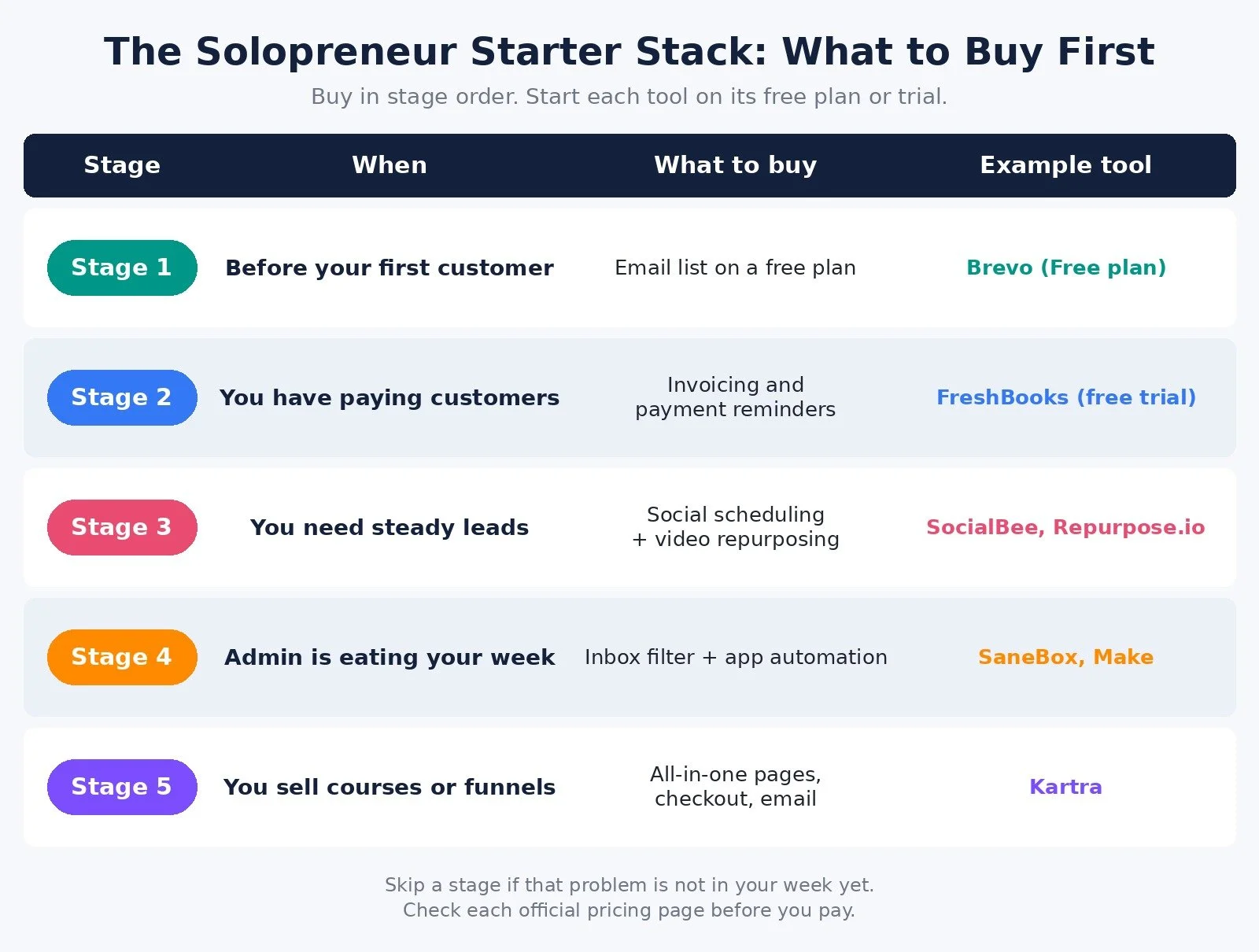
You do not need a big stack on day one. You need the few tools that remove your biggest bottleneck right now. Here is the order I recommend for most solo businesses.
Stage 1: Before your first customer. Keep spending close to zero. You need a way to collect emails from interested people and a place to describe your offer. A free email marketing plan covers the first part. Skip paid automation, schedulers, and all-in-one platforms until people are paying you.
Stage 2: You have paying customers. Fix how you get paid. Invoicing software that sends invoices, tracks who has paid, and reminds clients for you is usually the first paid tool worth buying. Money that arrives late is a bigger problem than any missing feature.
Stage 3: You need steady leads. Marketing has to happen every week, even when client work is busy. A social media scheduler lets you batch posts in one sitting. If you create video, a repurposing tool can send one video to several platforms.
Stage 4: Admin is eating your week. Now buy time back. An inbox filter keeps low-priority email out of your way, and an automation platform moves data between your apps so you stop copying and pasting.
Stage 5: You sell courses, memberships, or funnels. This is when an all-in-one platform can replace several separate tools for pages, checkout, email, and memberships.
What to Buy First: Decision Diagram
Answer each question for your business today, not the business you plan to have next year.
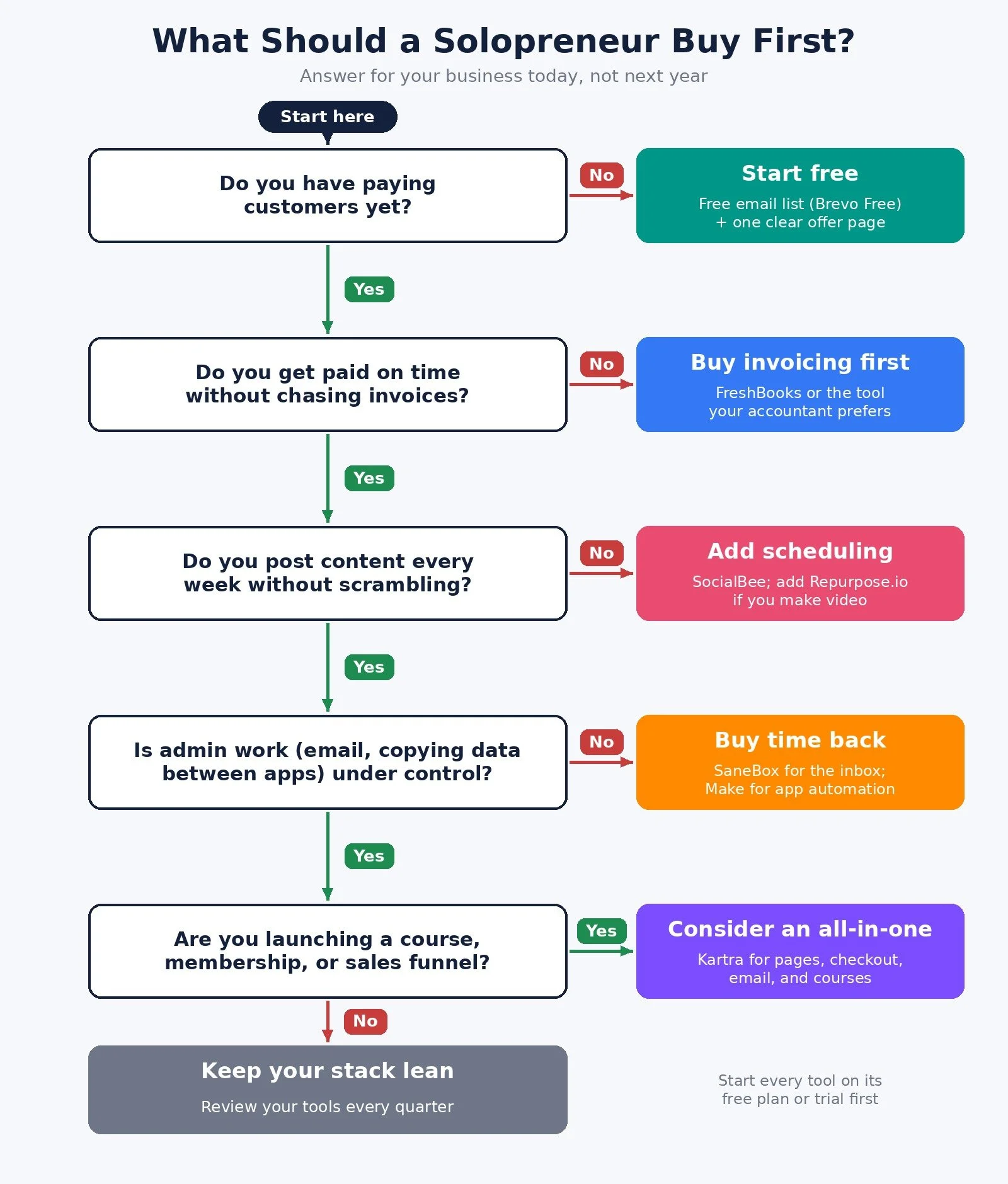
Do you have paying customers yet? No: start with a free email list and one clear offer page. Yes: go to question 2.
Do you get paid on time without chasing invoices? No: buy invoicing software first. Yes: go to question 3.
Do you post content every week without scrambling? No: add a social media scheduler, plus a repurposing tool if you make video. Yes: go to question 4.
Is admin work, like email and copying data between apps, under control? No: add an inbox filter and an automation platform. Yes: go to question 5.
Are you launching a course, membership, or sales funnel? Yes: consider an all-in-one platform. No: keep your stack lean and review it every quarter.
The Recommended Starter Stack
Email list: Tool: Brevo; Free option: Free plan; Buy it when: Day one
Invoicing: Tool: FreshBooks; Free option: Free trial; Buy it when: First paying client
Social scheduling: Tool: SocialBee; Free option: Free trial; Buy it when: You post weekly
Video repurposing: Tool: Repurpose.io; Free option: Free trial; Buy it when: You publish video
Inbox control: Tool: SaneBox; Free option: Free trial; Buy it when: Email takes too long
Automation: Tool: Make; Free option: Free plan; Buy it when: You repeat the same steps
Sales pages and courses: Tool: Kartra; Free option: Money back guarantee; Buy it when: You sell digital products
Prices and limits below come from each official pricing page, checked on October 27, 2026, in US dollars. Prices change and some pages show local currency, so confirm before you pay.
The Tools, One Job Each
Brevo for your email list. Brevo's pricing page lists a Free plan that is "free forever, no credit card needed," and its FAQ says that once your account is approved you can send up to 300 emails per day. That is enough to start a list and send a regular newsletter. Its Starter plan is $9 a month on monthly billing, or $8.08 a month billed yearly, and starts from 5,000 emails a month. You can create a free Brevo account here.
FreshBooks for invoicing. FreshBooks Lite is $23 a month at its regular price, for sending invoices to up to 5 clients, tracking expenses, and accepting card and bank payments. Its pricing page offers a 30-day free trial. If your accountant prefers a different tool, use theirs. The point is to stop chasing payments by hand.
SocialBee for social scheduling. SocialBee's Bootstrap plan is $29 a month on monthly billing, and the page describes it as "best for freelancers and solopreneurs," with up to 5 social profiles. Every plan starts with a 14-day free trial. You can start a SocialBee trial here. For other options, see my best social media scheduling tools guide.
Repurpose.io for video. Repurpose.io publishes one video to several platforms. Its Starter plan is $35 billed monthly or $349 billed yearly, connects up to 3 accounts per social network, and comes with a 14-day free trial. You can try Repurpose.io here. My AI content repurposing tools guide compares it with clip makers and other tools.
SaneBox for your inbox. SaneBox sorts low-priority email out of your inbox so you see what matters first. Its Snack plan, for 1 email account, is $9.49 a month paid monthly, $5.42 a month paid annually, or $4.54 a month billed every 2 years, and it is free for 7 days. You can try SaneBox here. For more inbox tools, see my best email management tools guide.
Make for automation. Make connects your apps so data moves on its own: new form lead to email list, paid invoice to spreadsheet, and so on. Its Free plan includes 1,000 credits a month, and Core is $16 a month on monthly billing, for 10,000 credits a month. You can start on Make's free plan here. If you are choosing between platforms, my Make vs Zapier comparison and n8n pricing guide cover the options.
Kartra for pages, checkout, and courses. Kartra puts landing pages, checkout, email, and memberships in one platform. Its Essentials plan is $59 a month billed monthly or $52 a month billed annually, and the page lists 500 contacts, 10,000 emails a month, and 5% transaction fees. Kartra lists a 30-day money back guarantee. It makes sense once you sell digital products, not before. You can see Kartra's plans here, or read my Kartra review first.
Common Mistakes When Buying Your First Tools
Buying for the business you want, not the one you have. An all-in-one funnel platform is not useful before you have an offer people buy.
Paying for overlap. If your all-in-one platform already sends email, you may not need a separate email tool. Check what each tool already covers before you add another.
Skipping the free plan or trial. Most tools in this list offer a free plan or trial. Use it on one real task, like sending one invoice or scheduling one week of posts, before you pay.
Automating a messy process. Automation makes a clear process faster. It does not fix an unclear one. Write the steps down first, then automate them.
FAQ
Is a solopreneur the same as a sole proprietor?
No. A sole proprietorship is a legal and tax structure. Solopreneur describes how you run the business: alone. A solopreneur can be a sole proprietor or can set up another structure, depending on where they live. Ask an accountant which one fits you.
Can a solopreneur hire help?
Yes. Many solopreneurs hire contractors for specific jobs, like design, editing, or bookkeeping. The business stays solo because you are the only owner and decision maker, not because you do every task yourself.
Do I need all of these tools to start?
No. Most solo businesses can start with a free email list and simple invoicing. Add the other tools only when the problem they solve shows up in your week.
What to Do Next
Write down your biggest bottleneck this month: getting paid, getting found, or getting time back.
Walk through the decision diagram above and pick only the tool for that stage.
Start on the free plan or trial and use it on one real task this week.
Browse Best Tools for the full list of tools I recommend for solo businesses.
Need business ideas first? Start with my solopreneur business ideas guide.
If you want help setting up systems and automations that give you your week back, I take on automation strategy projects through my services.
Disclosure: some links in this post are affiliate links (Brevo, SocialBee, Repurpose.io, SaneBox, Make, and Kartra). If you sign up through them I may earn a commission at no extra cost to you. It does not change which tools I recommend or the order I recommend them in.
Make more. Spend less. Work less. Buy the tool for the problem you have today, and let the rest wait.