When you are the whole marketing team, social media never ends. A scheduling tool lets you batch posts once and get your week back.
Most comparison lists are written for agencies and skip what matters to a solo business: what you will pay for the profiles you actually run.
This is a decision guide, not a setup tutorial. No walkthroughs and no template files. Just four schedulers that fit most solo businesses, SocialBee, Buffer, Later, and Publer: how each charges, what it costs at 3, 5, and 8 profiles, and who it fits.
If you want the deep dive on SocialBee alone, my SocialBee review covers it feature by feature. This post is the wider decision.
The Short Answer
SocialBee if you want evergreen posts that keep publishing for you. Buffer if you want to start free and pay per channel. Later if your business lives on Instagram and TikTok. Publer if the lowest cost per account decides it.
Most solos only need one of these.
First, Count Your Profiles
Count the profiles you will actually post to. A Facebook page, an Instagram account, a LinkedIn profile, and a LinkedIn company page are four profiles, not three platforms.
Then look at how each tool charges, because they all do it differently:
Per plan: SocialBee plans include a set number of profiles (5, 10, or 25), with extra profiles sold in packs of 5.
Per channel: Buffer charges for each connected channel.
Per social set: Later sells sets, and one set holds one profile from each platform it supports.
Per account and member: Publer's price depends on how many social accounts and extra members you add.
Per user: Hootsuite charges per user seat.
Quick Comparison
SocialBee: Best for: Evergreen content in categories, posted on a schedule; How it charges: Per plan by profile count, plus 5-profile add-ons; Free option: 14-day trial of Pro, no credit card
Buffer: Best for: Starting free and paying per channel; How it charges: Per channel, cheaper at higher volume; Free option: Free plan for up to 3 channels
Later: Best for: Visual planning for Instagram and TikTok; How it charges: Per plan by social sets; Free option: 14-day trial
Publer: Best for: Low per-account pricing; How it charges: By social accounts and extra members; Free option: Free plan for 3 accounts (not X)
All prices below were checked on official pricing pages on October 21, 2026. Prices change, so confirm before you pay.
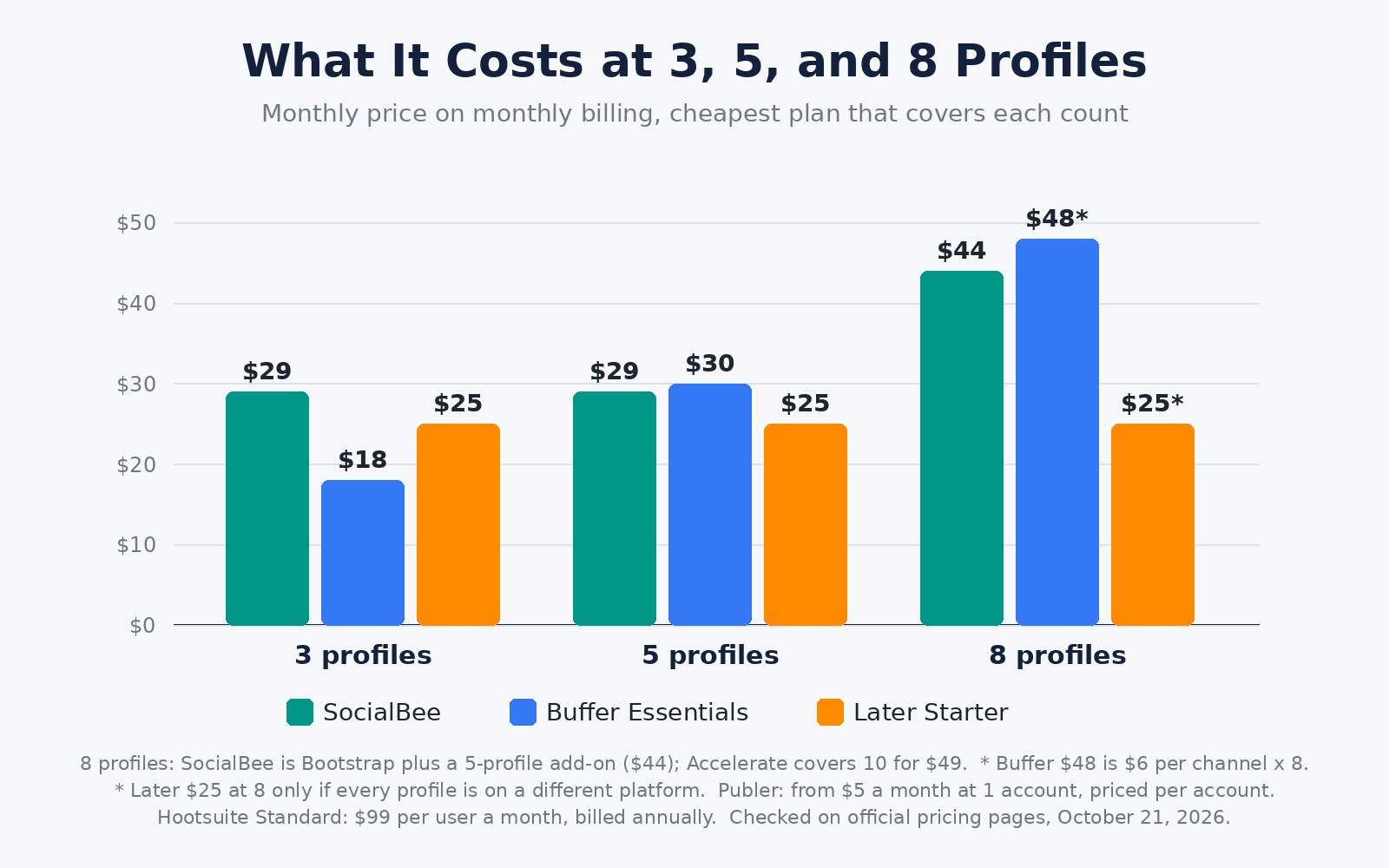
What It Costs at 3, 5, and 8 Profiles
Monthly billing, cheapest plan that covers each count. Hootsuite only showed annual-billing prices. Yearly billing is cheaper for every tool.
3: SocialBee: $29 (Bootstrap); Buffer Essentials: $18; Later: $25 (Starter); Hootsuite Standard: $99 per user, billed annually
5: SocialBee: $29 (Bootstrap); Buffer Essentials: $30; Later: $25 (Starter); Hootsuite Standard: $99 per user, billed annually
8: SocialBee: $44 (Bootstrap $29 plus $15 add-on, our math) or $49 (Accelerate); Buffer Essentials: $48; Later: $25 if all 8 are on different platforms; Hootsuite Standard: $99 per user, billed annually
Buffer's 8-channel figure is its $6 per-channel rate multiplied out, not a number printed on its page. Later's Starter set holds one profile per platform, so two Instagram accounts push you to Growth at $50. Publer is not in the table because its total changes with your account count; its calculator starts at $5 a month for 1 account.
At 3 profiles, Buffer is cheapest, and its free plan may cover you. At 5, the top three are within a few dollars, so features decide.
1. SocialBee: Best for Evergreen Content on Autopilot
Who it fits: solos who post the same kinds of content every week, such as tips, blog posts, and offers, and want that mix to keep going without writing every post from scratch.
What it does: SocialBee sorts posts into content categories and lets you set a posting schedule for each profile. Its pricing page lists recycling top-performing or evergreen posts at a later date, and expiring posts after a set number of shares or on a set date. It also has an AI Copilot, AI captions and images, RSS imports from your blog, and an engagement inbox. It posts directly to Facebook, Instagram, Threads, LinkedIn, X, Pinterest, TikTok, YouTube, Google Business Profile, and Bluesky.
Pricing model: plans by profiles, categories, and users. When I checked socialbee.com/pricing, Bootstrap (5 profiles, 1 user, 10 categories, 3 months of analytics) was $29 a month or $290 a year. Accelerate (10 profiles, 50 categories, post approval, CSV uploads, advanced analytics) was $49 a month or $490 a year. Pro (25 profiles, 3 users per workspace, 5 workspaces) was $99 a month or $990 a year. Five extra profiles cost $15 a month. The 14-day trial includes Pro with no credit card, and there is a 30-day money-back guarantee. The partner signup page linked below listed 50% off for 3 months on SocialBee monthly plans with code SOLOPRENEUR50X3; confirm the discount at checkout. For a plan-by-plan breakdown, see my SocialBee pricing guide.
Limits to know: there is no free plan, and posting stops when the trial ends. Bootstrap is 1 user with 3 months of analytics. Categories take some setup time first.
Pick it if: you want a content library that keeps publishing while you work on clients. Start the SocialBee free trial here.
2. Buffer: Best for Starting Free and Paying Per Channel
Who it fits: solos on 1 to 3 channels who want a simple queue, and anyone who wants to test a scheduler before paying.
What it does: Buffer gives you a posting queue, a visual calendar, an ideas board, an AI Assistant, a community inbox for comments, a Start Page for link in bio, and analytics. Paid plans add first-comment scheduling, a hashtag manager, and unlimited scheduled posts under a fair use policy.
Pricing model: per channel. When I checked buffer.com/pricing, Free covered up to 3 channels, 10 scheduled posts per channel at a time, 1 user, and 30 days of insights. Essentials was $6 per channel a month, or $5 billed yearly, for 1 to 10 channels, so 5 channels cost $30 a month or $25 billed yearly. Team was $12 per channel, or $10 billed yearly, adding unlimited team members and approvals. Rates drop past 10 channels, and paid plans have a 14-day trial.
Limits to know: every new channel raises the bill. Its pricing page does not list post recycling, so evergreen posts need re-queuing by hand. The free plan's 10-post limit per channel fills fast if you batch a month at once.
Pick it if: you run a few channels and want the lowest cost to start. See Buffer's plans here.
3. Later: Best for Instagram and TikTok First Businesses
Who it fits: creators and visual businesses growing on Instagram, TikTok, Pinterest, and short video.
What it does: Later centers on a visual calendar with auto-publishing to Instagram, Facebook, TikTok, Threads, YouTube, Pinterest, LinkedIn, and Snapchat. It suggests best times to post and includes Link in Bio.
Pricing model: per social set, with one profile per platform in each set, up to 8 profiles. When I checked later.com/pricing, Starter (1 set, 1 user, 30 posts per profile per month, 3 months of analytics) was $25 a month or $18.75 a month billed yearly. Growth (2 sets, 2 users, 180 posts per profile per month) was $50, or $37.50 billed yearly. Scale (6 sets, 4 users) was $110, or $82.50 billed yearly. Starter cannot buy add-ons. There is a 14-day trial and no free plan.
Limits to know: X is not on Later's list of supported platforms. Two profiles on one platform need a second set.
Pick it if: your content is visual first and your audience lives on Instagram and TikTok. See Later's plans here.
4. Publer: Best Budget Pick, Priced by Account
Who it fits: solos who want the lowest monthly cost and do not mind pricing it account by account.
What it does: Publer handles cross-posting with previews, a calendar, bulk scheduling by CSV, RSS automations, an AI assistant, and analytics. Its Business plan adds post recycling for evergreen content and best times to post.
Pricing model: by social accounts and extra members. Each page or profile counts, so 2 Facebook pages and 2 Instagram accounts are 4 accounts, and for every 9 accounts the 10th is free. When I checked publer.com/pricing at the default of 1 account, Professional was $5 a month or $4 billed yearly, with a 7-day trial. Business was $10 a month or $8 billed yearly, with a 14-day trial. Free covers 3 accounts (not X) with 10 scheduled posts per account. Use the calculator on the pricing page for your exact count.
Limits to know: recycling is on Business, not Professional. The free plan keeps published posts for only 24 hours.
Pick it if: cost per account is your main filter. See Publer's plans here.
Also Considered: Hootsuite and Metricool
Hootsuite is built for teams. Standard was $99 per user a month based on annual billing, for up to 10 social accounts, with a 14-day trial, adding brand and competitor monitoring. For one person that is a lot. My SocialBee vs Hootsuite review covers that matchup.
Metricool is priced by brand. Its free plan covers 1 brand (excluding LinkedIn and X) with 20 posts a month, and Starter starts at $25 a month, or $20 billed annually, for up to 5 brands.
SocialBee vs Buffer: The Real Difference
Buffer is about getting each post out on time. You fill the queue, and you pay for each channel.
SocialBee is about keeping a content mix running without refilling it every week. Categories, a schedule per profile, and recycling keep evergreen posts going out after you write them once.
A simple test: if you happily write fresh posts each week, Buffer is enough. If you keep running out of things to post, SocialBee fits better.
On cost, Buffer is cheaper or free at 3 channels. From 5 up, the two are close, so you are choosing on features.
Pick by Situation
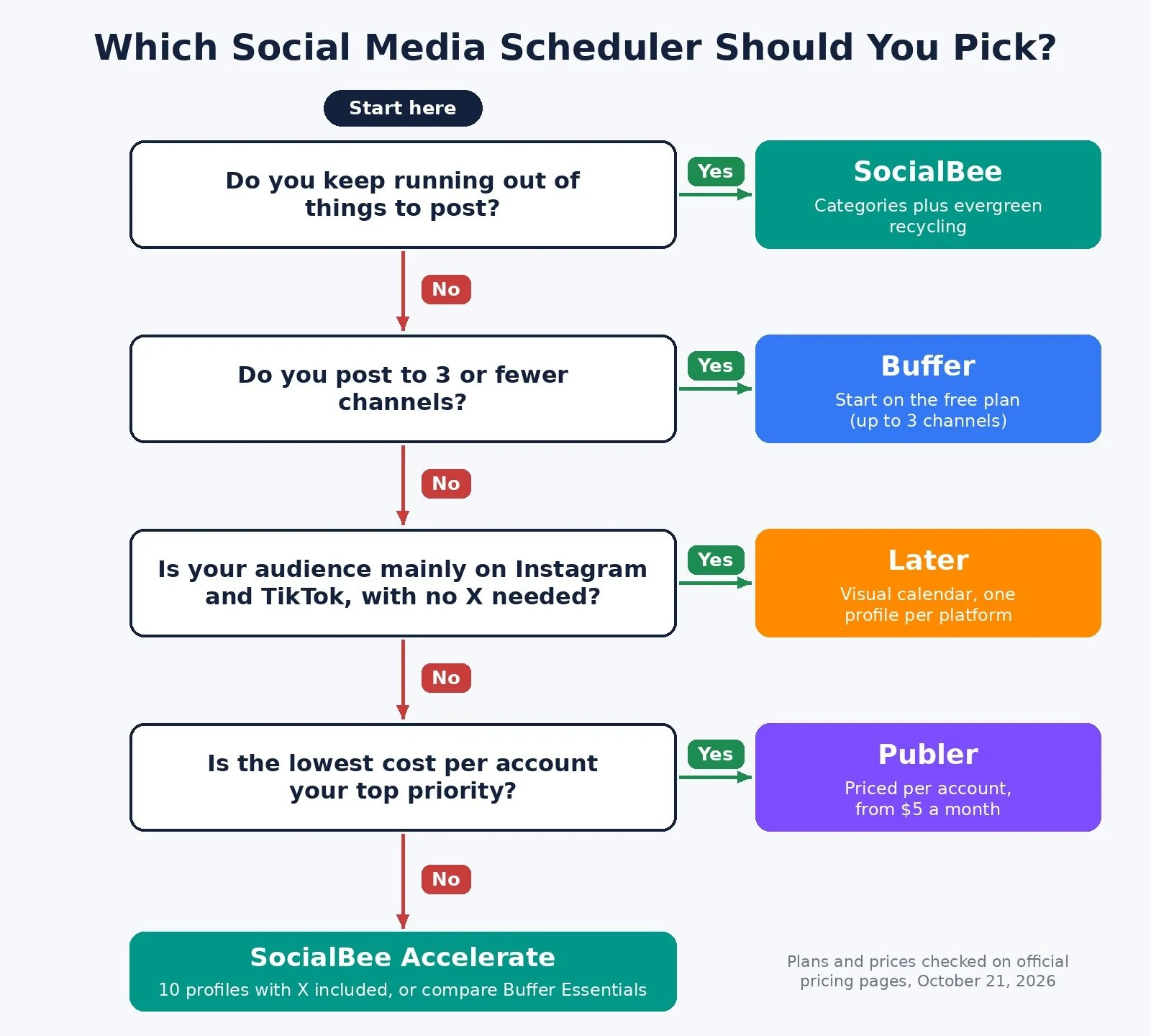
You keep running out of things to post: Pick: SocialBee; Why: Categories and evergreen recycling
1 to 3 channels and you want to start free: Pick: Buffer; Why: Free plan for up to 3 channels
Instagram and TikTok drive your business: Pick: Later; Why: Visual calendar, one profile per platform per set
Lowest cost per account is the priority: Pick: Publer; Why: Professional from $5 a month for 1 account
You need X plus up to 10 profiles with recycling: Pick: SocialBee Accelerate; Why: 10 profiles, X included
Deep reporting or monitoring matters most: Pick: Metricool or Hootsuite; Why: Analytics and monitoring focus
How to Choose in 30 Minutes
List every profile you will post to, counting pages and accounts separately.
Check platforms. If X matters, rule out Later.
Decide whether you will write fresh posts weekly or want evergreen posts to recycle.
Price your real profile count on each shortlisted pricing page, monthly and yearly.
Start one trial or free plan with a week of real posts. If batching is not faster, cancel before the trial ends.
Common Mistakes
Comparing headline prices instead of your profile count. A low per-channel price can pass a flat plan once you add channels.
Letting AI post without review. Every post carries your name. My post on the AI social media mistake explains why.
Recycling posts with an expiry date. Recycle evergreen content only.
FAQ
Is there a free social media scheduler?
Yes. Buffer has a free plan for up to 3 channels, Publer for 3 social accounts (not X), and Metricool for 1 brand. SocialBee, Later, and Hootsuite offer free trials instead.
What are the best Buffer alternatives?
SocialBee if you want evergreen recycling and a flat plan by profile count, Later for Instagram-first visual planning, and Publer for budget per-account pricing.
What are the best SocialBee alternatives?
Buffer for a simple per-channel queue with a free plan, Later for visual planning, and Publer for lower per-account pricing.
Is SocialBee worth it?
It is worth testing if you post the same types of content every week and want a library that keeps publishing. My SocialBee review covers the features in detail.
What to Do Next
Count your profiles and decide whether you need evergreen recycling.
If you do, start the SocialBee free trial and load one category of evergreen posts first.
If you only post to a few channels, start on Buffer's free plan and upgrade when you hit its limits.
For the wider stack I recommend, browse Best Tools.
If you want help with a system where content, leads, and follow-ups run without eating your week, I take on automation strategy projects through my services.
Disclosure: some links in this post are affiliate links (SocialBee). If you sign up through them I may earn a commission at no extra cost to you. It does not change which tool I tell you to pick.
Make more. Spend less. Work less. Let your posts go out on schedule so you can get back to the work that pays.