Zapier is the name most people know. n8n is the one technical friends keep recommending. Both connect your apps and move data while you work on something else.
They are built for different people. Zapier is made so that anyone can connect two apps in a few minutes. n8n is made for people who want more control over logic, code, and where their workflows run, and who are fine with a steeper start.
This is a decision guide, not a setup tutorial. No build steps and no template files. Just how the two differ on who builds, how you pay, apps, AI and code, and data control, plus when Make is the better pick than either.
If you already lean toward n8n and only want the cost details, my n8n pricing guide covers plans and self-hosting costs. This post is about which tool fits you.
The Short Answer
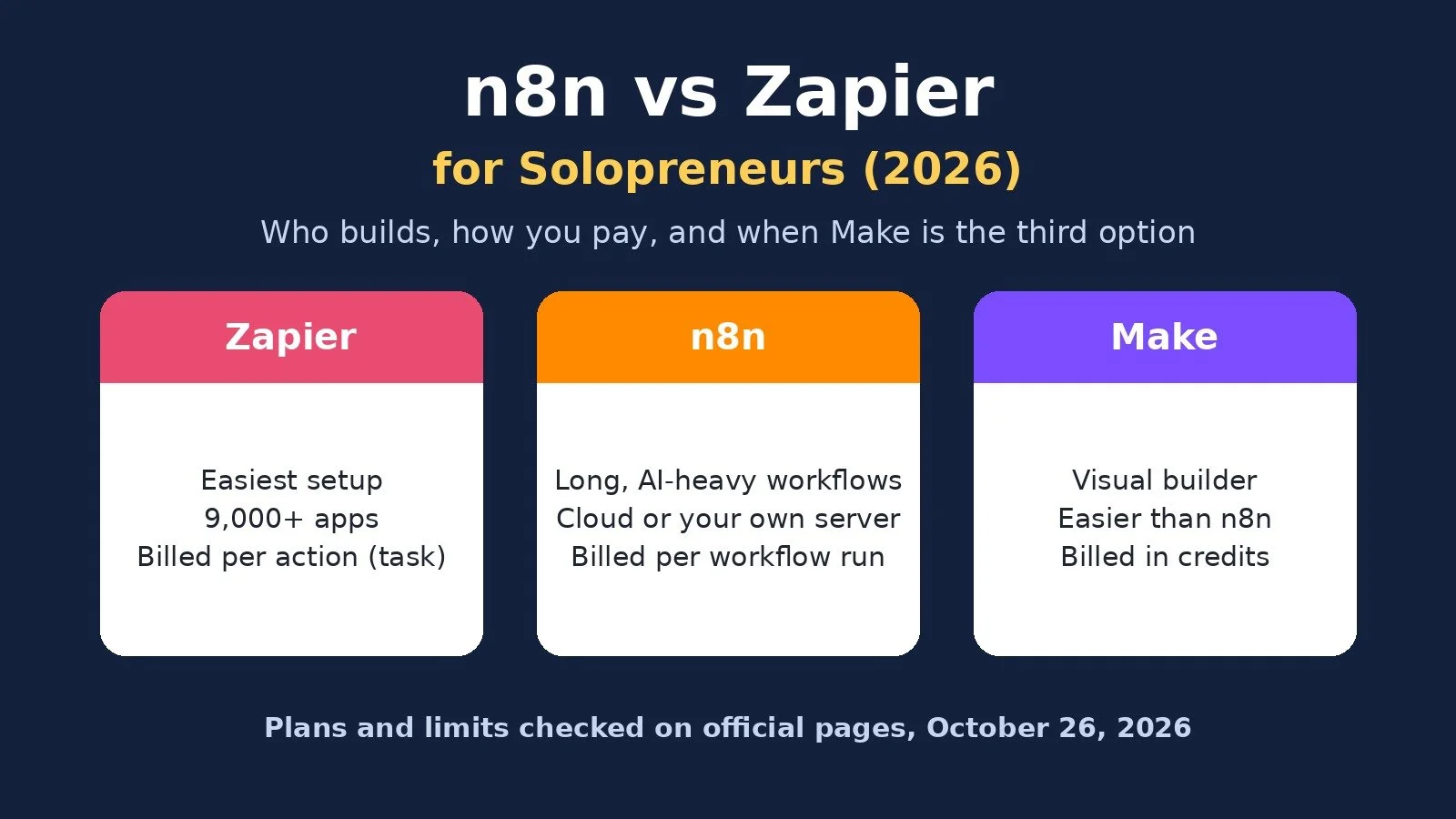
Pick Zapier if you want the fastest path to simple automations and need its huge app library. Pick n8n if your workflows are long, use AI or code, or you want to own where they run. If you want a visual builder that is easier than n8n and usually cheaper than Zapier, look at Make.
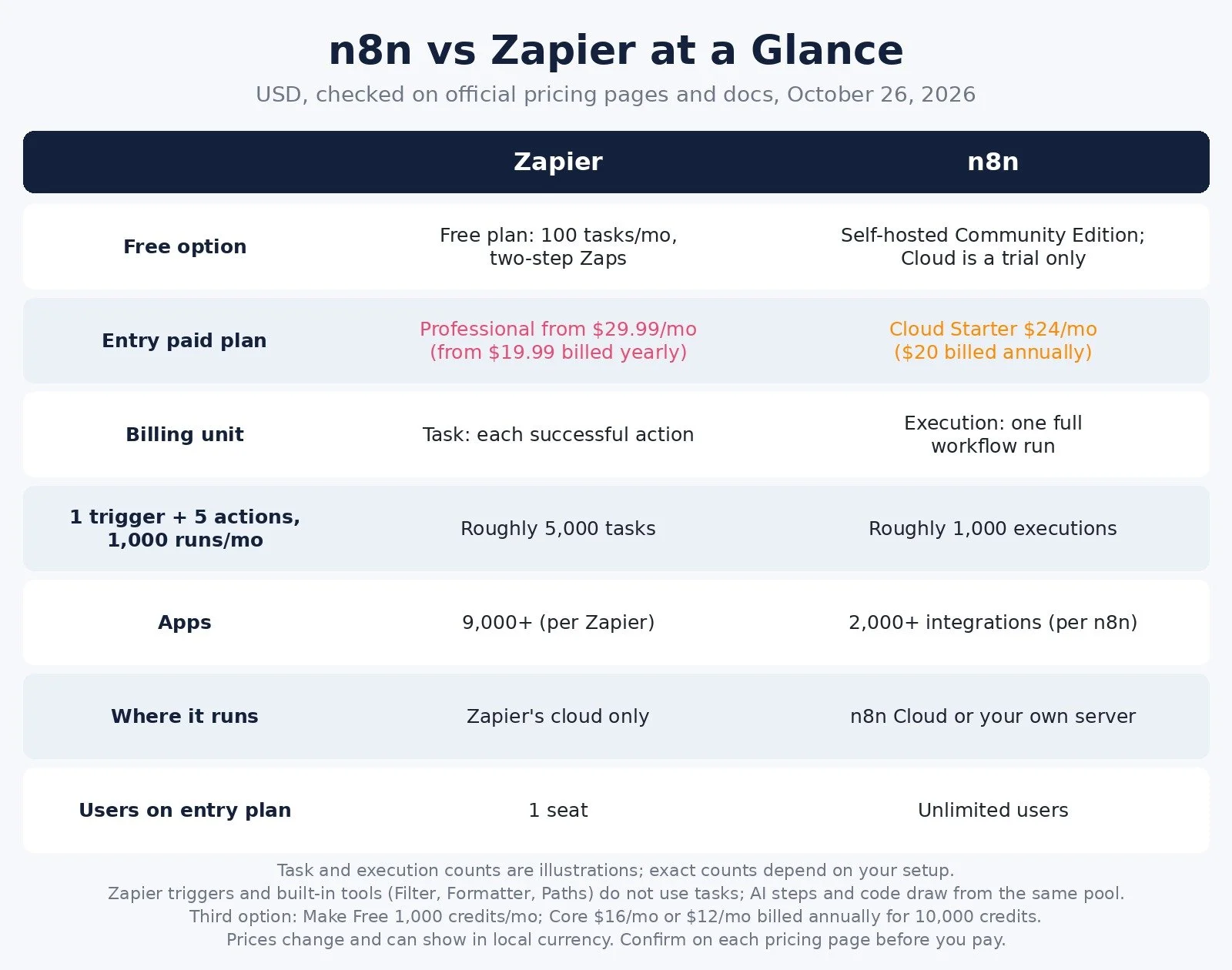
n8n vs Zapier at a Glance
Figures come from the official pricing pages and docs, checked on October 26, 2026, in US dollars.
Best for: Zapier: Fast, simple connections; n8n: Long, logic-heavy, or AI workflows
Free option: Zapier: Free plan, 100 tasks a month, two-step Zaps; n8n: Free self-hosted Community Edition; Cloud is a trial only
Entry paid plan: Zapier: Professional from $29.99 a month, or $19.99 billed yearly; n8n: Cloud Starter $24 a month, or $20 billed annually
Billing unit: Zapier: Task (each successful action); n8n: Execution (one full workflow run)
Apps: Zapier: 9,000+ per Zapier; n8n: 2,000+ integrations per n8n
Where it runs: Zapier: Zapier's cloud only; n8n: n8n Cloud or your own server
Code steps: Zapier: Code by Zapier, short runtime limits; n8n: JavaScript and Python steps on every plan
Users on entry plan: Zapier: 1 seat on Professional; n8n: Unlimited users on every plan
Prices change and some pages show local currency. Confirm on each pricing page before you pay.
Zapier vs n8n: Who Builds and Who Hosts
Most comparisons start with price. For a solo business, the better first question is who will build and fix the workflows.
Zapier assumes you are not a developer. Its own FAQ answers "Do I need to know how to code?" with "Nope!" You pick a trigger, pick an action, map a few fields, and turn it on. When something breaks, the fix is usually a reconnect or a field change.
n8n gives you a canvas of nodes, branches, and data you can inspect at every step. That power is why technical users like it, and also why non-technical users stall. n8n's own docs recommend n8n Cloud for anyone who does not have technical expertise, and say self-hosting requires it.
The second question is who hosts. Zapier only runs in Zapier's cloud. n8n runs either on n8n Cloud, where n8n handles hosting, updates, and scaling, or on a server you manage yourself. That choice is where n8n's control comes from, and also where its extra work comes from.
The rule of thumb: if you will build every workflow yourself and you dislike debugging, Zapier's simplicity is worth paying for. If you enjoy logic and want room to grow, n8n rewards the learning time.
How Each One Bills You
This is where the two tools split hardest.
Zapier bills in tasks. Its FAQ says each successful action in a Zap counts as a separate task. Triggers do not count, and built-in tools like Filter, Formatter, Paths, and Delay do not either. Zapier's pricing page also notes that AI steps, code, and connector calls draw from the same task pool, and that rates vary by AI model and code runtime.
n8n bills in executions. Its pricing FAQ defines an execution as "a single run of your entire workflow," no matter how many steps it has.
Here is what that means for a typical solo workflow. Say a new lead fills in your form, and the workflow adds them to your CRM, tags them, sends a welcome email, creates a follow-up task, and posts a note to Slack. That is one trigger and five actions.
At 300 leads a month, n8n counts roughly 300 executions. Zapier counts roughly 1,500 tasks.
At 1,000 leads a month, n8n counts roughly 1,000 executions, well inside Starter's 2,500. Zapier counts roughly 5,000 tasks.
Exact counts depend on your setup. The pattern holds: every step you add costs more on Zapier and nothing extra on n8n. The flip side is that a simple two-step Zap gains nothing from n8n's model. One run is one task on Zapier and one execution on n8n.
Zapier shows its Professional price as "starting from," and the actual price depends on the task tier you pick on its slider. Zapier says higher tiers lower the cost per task. Zapier also says that when you hit your limit, it can switch you to pay-per-task billing at a higher rate, or pause your Zaps if that is turned off. For the full n8n plan breakdown, see my n8n pricing guide.
Free Plans: What You Actually Get
Zapier Free is free forever, with 100 tasks a month and two-step Zaps only. Zapier's comparison table lists a 15-minute polling time on Free, against 2 minutes on Professional. That is fine for testing an idea or one light automation. It is not enough to run client onboarding.
n8n has no free Cloud plan. n8n Cloud has a free trial with no credit card, capped at 1,000 executions. n8n's docs describe the trial as 14 days. The free option is the self-hosted Community Edition, which n8n describes as free "with almost the complete feature set." Free here means no license fee. You still pay for a server and spend your own time on updates, backups, and security.
So for a non-technical solo who wants to spend $0, Zapier Free is the easier start. For a technical solo who wants $0 and real capacity, self-hosted n8n wins.
Apps and Integrations
Zapier says it connects to 9,000+ apps, "more than any other automation tool." n8n lists 2,000+ integrations on its integrations page. Both can reach apps outside their libraries through webhooks or API requests. Zapier lists webhooks as a Professional plan feature; n8n includes webhook triggers and custom API requests on every Cloud plan.
In practice, the gap only matters if you rely on a niche app. Before you choose n8n, check that each app in your stack has a native n8n node. If one does not, ask whether you are comfortable connecting it through its API. If the answer is no, Zapier's library is the safer bet.
AI, Code, and Complex Logic
Both tools now lean hard into AI.
n8n lists agents, MCP, and AI nodes on every Cloud plan, plus code steps in JavaScript and Python and custom API requests. Because n8n bills per run, a workflow that loops through records or calls several AI steps still counts as one execution. Watch the run limits instead: on n8n Cloud Starter, the maximum execution duration is 5 minutes and you get 5 concurrent executions. Pro raises that to 40 minutes and up to 50 concurrent.
Zapier offers AI by Zapier, Zapier Agents, Copilot, and Zapier MCP, and its Professional plan adds multi-step Zaps and webhooks. Code by Zapier is limited to 1 second of included runtime per step on Free and 30 seconds on Professional. Its pricing page says one Zapier MCP tool call uses two tasks.
If your automations are mostly "when X happens, do Y and Z," both are plenty. If you want branching logic, loops, and AI agents that pull from several tools, n8n gives you more room for the money.
Data, Control, and Hosting
Zapier runs your Zaps on its own infrastructure. You get convenience, and you accept Zapier's limits and pricing.
n8n gives you a real choice. n8n's pricing FAQ says hosted plans store data in the EU, on servers in Frankfurt, Germany. If you self-host, your workflows and data live wherever you put them. That matters if you handle client data under strict agreements or simply want ownership.
One licensing note if you self-host and sell automation services: the self-hosted Community Edition uses n8n's Sustainable Use License. Its License FAQ says you may build automations for clients on your own instance as long as clients cannot create or edit them. Hosting n8n as a service where clients build their own workflows is not allowed.
When Zapier Is the Right Pick
Pick it if: you are not technical, you want automations live today, your workflows are short, or you depend on an app only Zapier supports.
Skip it if: your workflows run many steps at high volume. Every action is a task, and the bill grows with each step you add.
Zapier is the comfortable default for a reason. If your list of automations is five two-step Zaps, the time you save on setup can be worth more than any task math.
When n8n Is the Right Pick
Pick it if: you are comfortable with logic and data structures, your workflows are long or AI-heavy, or you want the option to self-host.
Skip it if: you want zero learning curve, or you would never look at a failed run until a client complained.
A sensible path is to start on n8n Cloud, so there is no server to manage, then consider self-hosting once your volume and skills justify it. My self-host n8n guide covers what that involves. You can start an n8n Cloud trial here and test one of your longest workflows first.
n8n vs Zapier vs Make: When Make Fits Better
Some solos find Zapier too expensive and n8n too technical. That is the gap Make fills.
Make is a visual builder that is easier to learn than n8n and bills in credits, where most module actions use 1 credit. Its Free plan includes 1,000 credits a month with a 15-minute minimum interval between runs. Core is $16 a month, or $12 billed annually, for 10,000 credits, with scheduling down to the minute. Make lists 3,500+ apps.
Make is the managed option I recommend for most non-technical solos who have outgrown Zapier Free. You can start on Make's free plan here. For the head-to-head details, see my Make vs Zapier comparison and Make vs n8n comparison. If you are leaving Zapier for cost reasons, my Zapier alternatives guide lists more options.
Pick by Situation
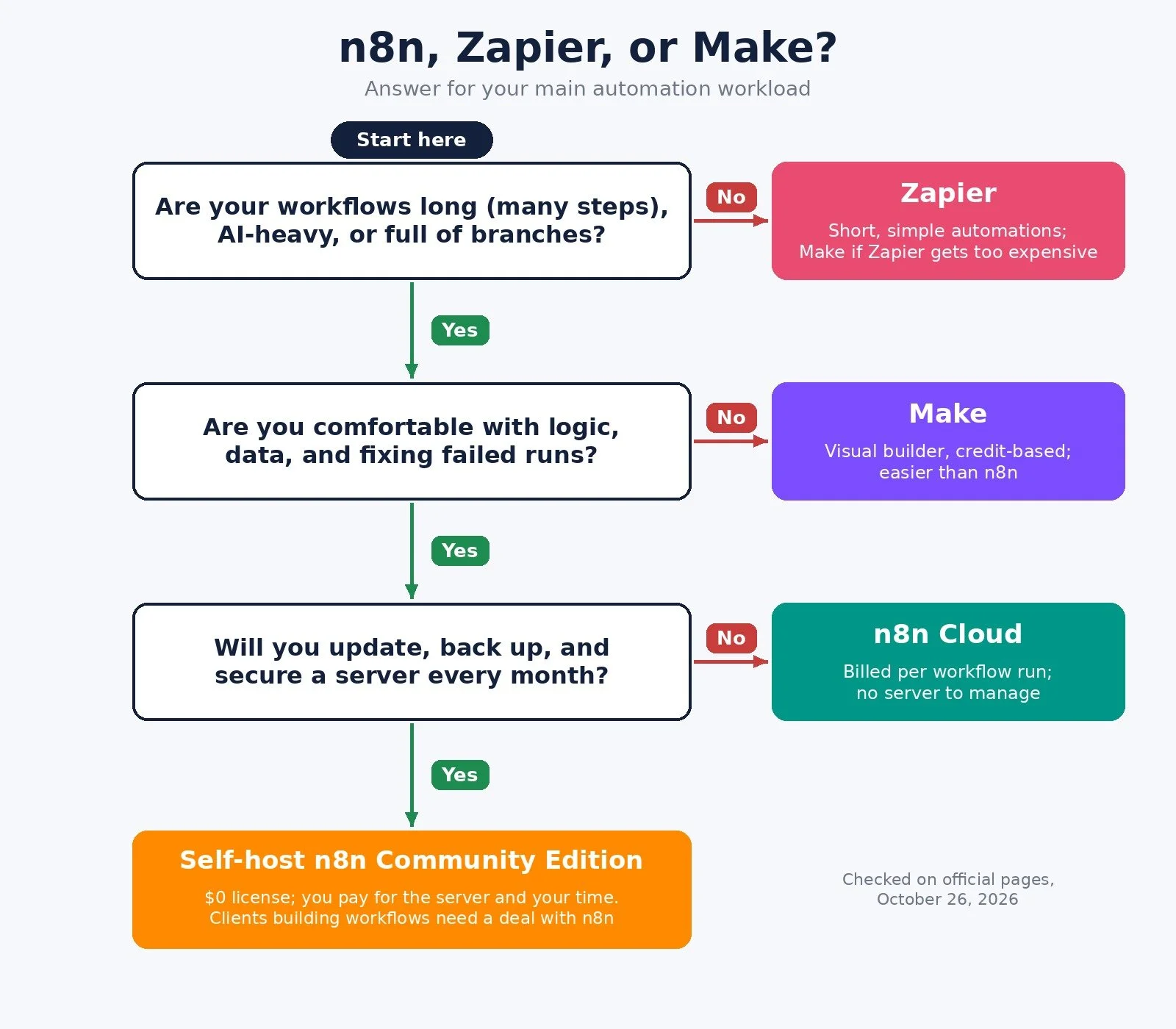
Non-technical, a few short automations: Pick: Zapier; Why: Fastest setup, largest app library
Long or AI-heavy workflows, no server: Pick: n8n Cloud; Why: Billed per run, not per step
High volume and you can run a server: Pick: n8n Community Edition; Why: $0 license, your infrastructure
Outgrew Zapier Free, want visual and cheaper: Pick: Make; Why: Credit-based, easier than n8n
Rely on a niche app with no n8n node: Pick: Zapier; Why: 9,000+ apps, per Zapier
Client data must stay on your own server: Pick: Self-hosted n8n; Why: You control where data lives
FAQ
Do failed runs count against my limit?
On Zapier, an action that does not complete successfully does not count against your task limit, according to its FAQ. n8n's pricing page says "If it doesn't run, you don't pay," and that you only pay when a workflow runs from start to finish.
Should I switch from Zapier to n8n?
Only if your bill or your logic has outgrown Zapier. If most Zaps are two or three steps and work fine, switching costs time you could spend on clients. If you run long, high-volume workflows, compare a month of your Zapier task usage against n8n's execution count first.
Where does n8n Cloud store my data?
n8n says hosted plans store data in the EU, on servers in Frankfurt, Germany. If you need data somewhere else, self-hosting lets you choose the location.
What to Do Next
List your top five automations with their steps and monthly runs.
If most are short and you want the easiest setup, Zapier Free is a fine place to test.
If they are long, AI-heavy, or high volume, start an n8n Cloud trial and rebuild your busiest one.
If you want a middle path, start on Make's free plan.
For the wider stack I recommend, browse Best Tools.
If you want help choosing a platform or building automations that do not eat your week, I take on automation strategy projects through my services.
Disclosure: some links in this post are affiliate links (n8n and Make). If you sign up through them I may earn a commission at no extra cost to you. It does not change which tool I tell you to pick.
Make more. Spend less. Work less. Pick the tool that fits how you build, not the one with the loudest fans.