If you run a 1-person business, every hour you spend copying data between apps is an hour you are not selling, creating, or resting. Automation fixes that. The question is which platform should carry the load.
Make and Zapier are the two names most solopreneurs hear first. Both connect your apps. Both can run multi-step workflows. Both now ship AI features. But they bill differently, feel different to build in, and fit different kinds of solo operators.
This is a decision guide, not a build-along. No step-by-step scenario walkthroughs and no template files. Just a plain answer to one question: which tool fits how you actually work?
If you are still comparing the wider field, my Zapier alternatives for solopreneurs roundup covers more options. If n8n is also on your list, read Make vs n8n after this one.
The Short Answer
Zapier for the simplest setup and the biggest app catalog. Make for visual multi-step logic and more room before cost becomes a problem.
That one line covers most cases. The rest of this guide helps you figure out which side of it you are on.
Quick Verdict
You want 2 or 3 simple automations running today: Zapier. Fastest path from idea to working Zap.
Your workflows have branches, loops, or lots of data mapping: Make. Visual canvas makes complex logic easier to read and debug.
You rely on a niche app with a small user base: Zapier. Largest catalog (9,000+ apps listed on its pricing page).
You are watching costs as your volume grows: Make. Credit model plus a free tier with 1,000 credits a month to test.
You never want to think about how billing works: Zapier. Tasks are easy to understand, and built-in tools do not use them.
You want to see exactly what happened in each run: Make. Run history shows data moving through every module.
How the Two Tools Think
Zapier is built around the Zap: a trigger, then one or more actions in a straight line. You can add filters and paths for branching on paid plans, but the core idea is "when this happens, do that." It is easy to explain and easy to hand off.
Make is built around the scenario: a visual map of modules connected on a canvas. Routers split the flow, iterators handle lists, aggregators combine results. It looks more like a flowchart than a checklist. That takes a little longer to learn, and it pays off once your workflows stop being straight lines.
Neither approach is better in general. The right one depends on how messy your processes are.
Pricing Model: Tasks vs Credits
Both tools charge for work done, not for the number of workflows you build. The difference is what counts as work.
Zapier: you pay in tasks
Zapier counts a task each time a step in a Zap successfully completes an action. Triggers do not count, and neither do Zapier's built-in tools such as Filter, Formatter, Paths, Delay, and Looping. Failed actions are not counted either. Some steps, like AI by Zapier or extended Code runtime, can cost more than one task.
When I checked zapier.com/pricing on October 16, 2026, the Free plan included 100 tasks a month with two-step Zaps only. Professional started at $19.99 a month billed annually ($29.99 billed monthly) for 750 tasks, with multi-step Zaps, webhooks, and premium apps. Higher task tiers cost more in total but less per task. New accounts get a 14-day Professional trial with no credit card. Prices change, so check the page before you commit.
One thing to watch: if you go over your task limit with pay-per-task turned on, extra tasks are billed at a higher overage rate. Turn it off and your Zaps pause until the next cycle instead.
Make: you pay in credits
Make bills in credits. Most module actions use 1 credit: reading a record, searching, creating or updating data, transforming data with built-in tools. Some advanced AI features use more. Routers and error handler modules do not use credits.
The Free plan includes 1,000 credits a month. Paid plans (Core, Pro, Teams) scale by how many credits you buy, and annual payment is cheaper than monthly. When I checked make.com/en/pricing on October 16, 2026, the page did not show plan prices in a form I could verify, so I am not quoting dollar figures here. Check the live page for current numbers in your currency.
Two details matter for solos. Credits expire at the end of the term, so do not overbuy. And if you run out, scenarios stop until you add credits, though incoming webhooks queue up and get processed once you top up.
What this means in practice
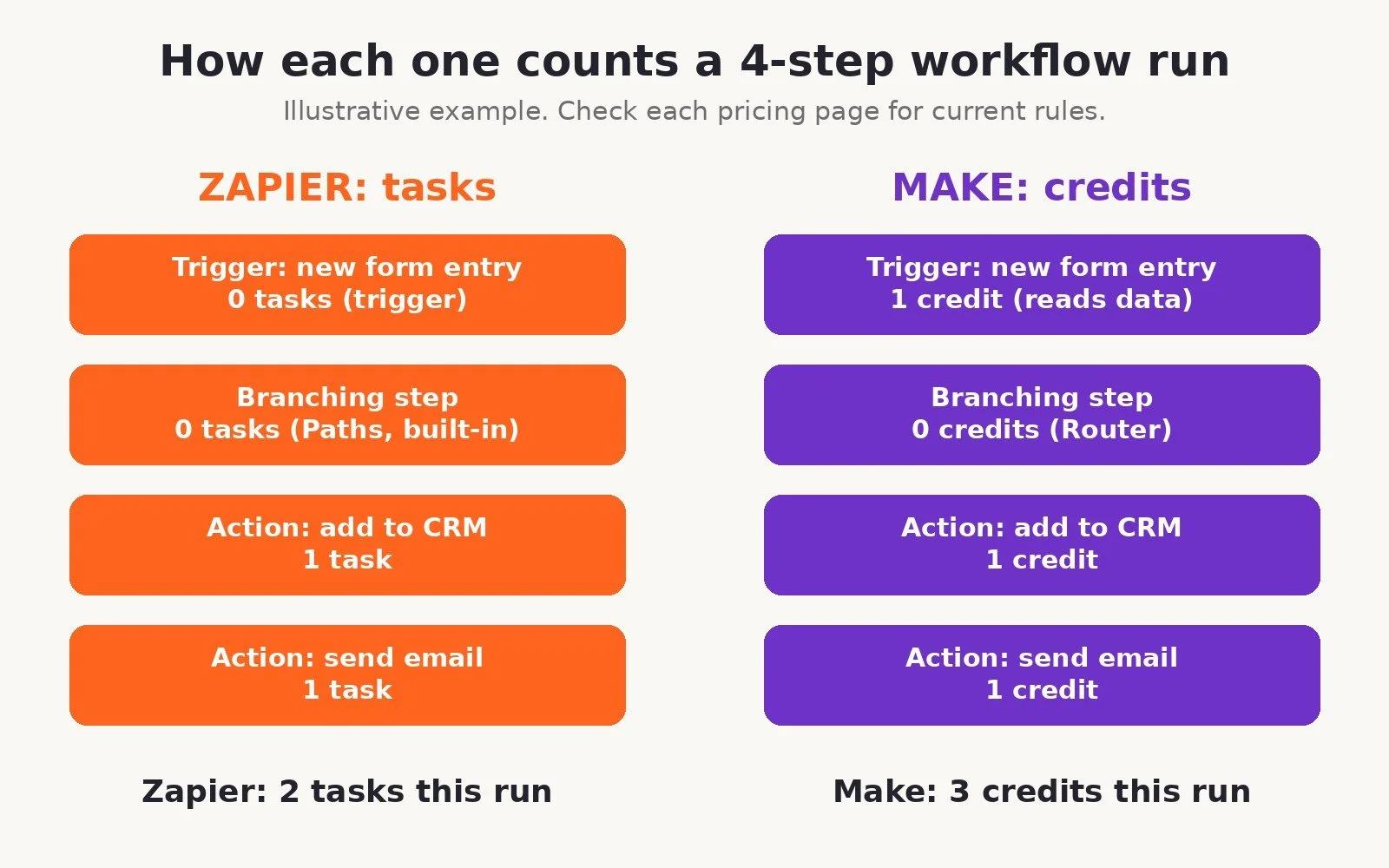
Zapier's model is easy to predict for short, simple Zaps, and the free built-in tools help. Make's model rewards clean design: filter early, use webhooks instead of frequent polling, and keep scenarios lean.
The honest way to compare cost is not a pricing page. It is your own workflows. Count how many steps your top 3 automations run and how often they fire each month, then estimate tasks on Zapier and credits on Make. Many solos with multi-step workflows find Make gives them more room for the money, but your stack decides, not a blog post.
Learning Curve
Zapier has the gentlest start of any major automation tool. You pick an app, pick a trigger, pick an action, map a few fields, and test. Most people get a first Zap running in minutes. Copilot can also draft a Zap from a plain description.
Make takes longer up front. You need to understand modules, mapping, routers, and how data bundles move through a scenario. Plan on an afternoon to feel comfortable, not ten minutes. Once it clicks, complex workflows are easier to build and much easier to debug, because you can see every step and its data on the canvas.
If you are curious what Make looks like once you are past the basics, my 15 things every solopreneur should automate with Make post covers the jobs worth automating first.
Integrations
Zapier's catalog is its biggest advantage. Its pricing page lists 9,000+ connected apps. If you use a small or niche tool, Zapier is more likely to have a ready-made connection.
Make's pricing page lists integrations with more than 1,000 third-party apps, each with many actions. That covers the usual solo stack: forms, email platforms, CRMs, Google Sheets, Notion, Slack, Stripe, calendars, and AI APIs. When a native app is missing, Make's HTTP and custom app options can connect to most tools with a public API.
Before you choose, list every app you need to connect and check both directories. That 5-minute check beats any comparison table.
AI Features
Both platforms are adding AI fast, so treat this as a snapshot.
Zapier offers AI by Zapier steps inside Zaps (on paid plans), Copilot for building Zaps by chat, AI troubleshooting for errors, and separate add-on products for Agents and Chatbots. Agents use their own billing unit called activities, separate from tasks.
Make lets you add AI steps to scenarios, and some advanced AI features use more credits than a standard action. You can also connect your own AI provider through its apps and HTTP modules.
For most solos, the AI question is simple: can the tool send text to a model, get a result back, and use it in the next step? Both can. Pick on the other factors first.
Who Should Choose Zapier
Choose Zapier if most of these are true:
You want a few simple automations live today with almost no learning.
Your workflows are mostly straight lines: new lead to CRM, new sale to spreadsheet, new form to email.
You depend on a niche app that only Zapier supports.
You will hand automations to a VA or contractor who needs to understand them fast.
Your monthly volume is low, so task costs stay small.
Who Should Choose Make
Choose Make if most of these are true:
Your workflows branch, loop over lists, or need a lot of data mapping.
You want to see what happened at every step when something breaks.
You are hitting Zapier's task limits or paying for a higher tier mainly because of multi-step Zaps.
You are willing to spend an afternoon learning a visual builder.
You want a free tier big enough to test real workflows (1,000 credits a month).
Typical solo wins on Make: form to CRM plus Slack alert plus welcome email in one scenario, payment to onboarding, blog post to social drafts, weekly ops digest. If you want to try it, start on Make's free plan and rebuild your most annoying workflow first.
What About n8n?
If you are technical, want custom code, or want to self-host, n8n is the third option worth knowing. It bills cloud usage per workflow execution rather than per step, and the Community Edition can run on your own server. It also asks more of you. The full breakdown is in Make vs n8n, or you can look at n8n directly.
A Simple Decision Test
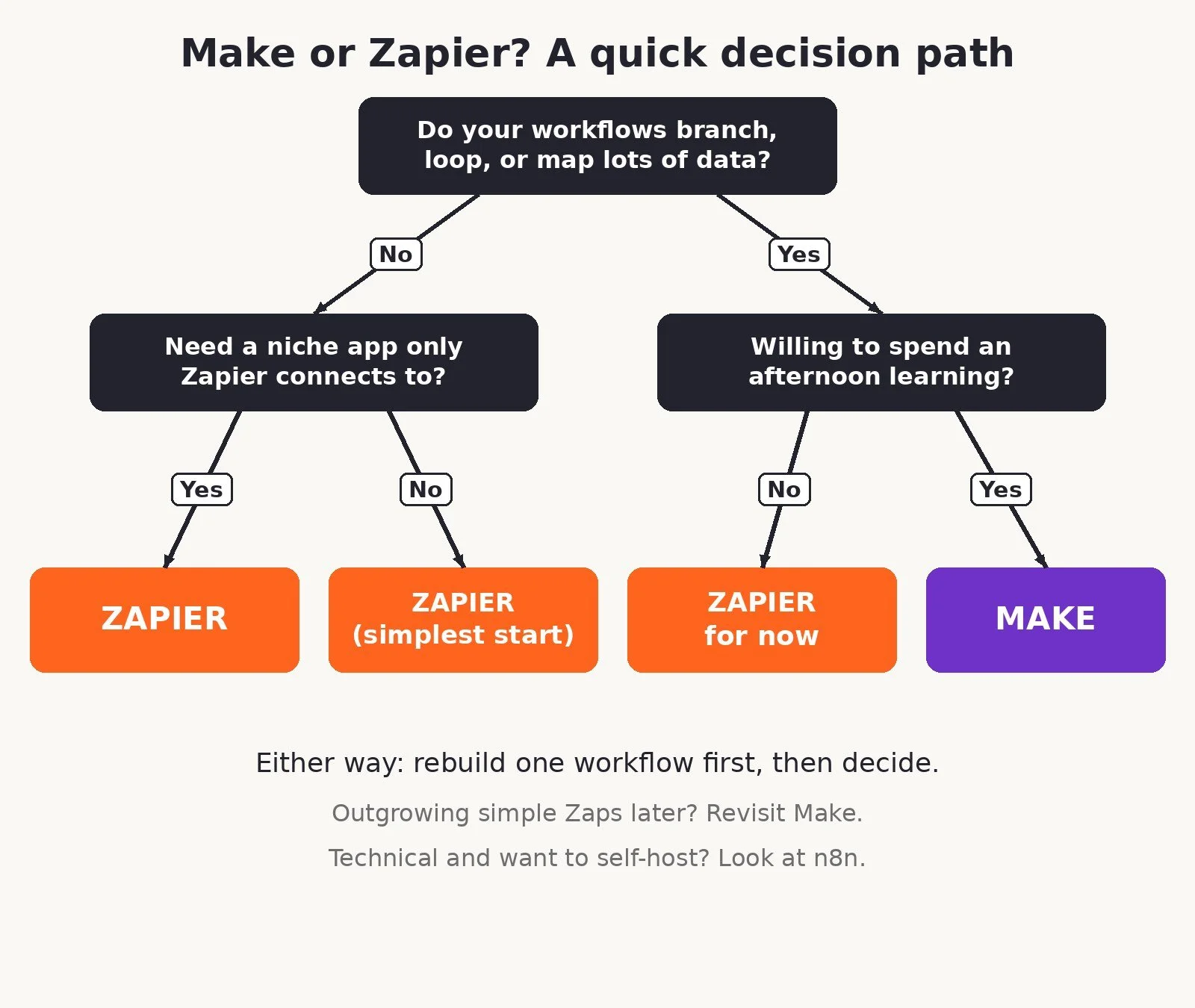
Write down your top 3 workflows by business impact: leads, money, delivery.
For each one, count the steps and how many times it runs per month.
Check that every app you need is supported on both platforms.
If all 3 are short and simple, start with Zapier. If any of them branch or carry lots of data, start with Make.
Rebuild only workflow #1 on the platform you picked. Break it on purpose and confirm you can find and fix the error.
Estimate a full month of usage in tasks or credits before you upgrade.
Prove one workflow. Then decide.
Migration Tips: Moving From Zapier to Make
If you already run on Zapier and want to move, do not migrate everything in one weekend.
Start with the expensive or fragile Zaps. Those are where the switch pays off first.
Rebuild, do not copy. A 6-step Zap may become a cleaner 4-module scenario with a router. Use the move to simplify.
Run both in parallel for a few days on anything that touches revenue. Turn off the Zap only after the scenario has run cleanly.
Switch triggers to webhooks where your apps support them. That cuts wasted polling.
Keep Zapier for the odd niche app if Make does not support it. Running two tools for a short time is fine. Running two half-finished systems forever is not.
Write down what each workflow does before you rebuild it. You will forget the edge cases otherwise.
Common Mistakes
Picking a tool based on the app count alone, without checking your actual apps.
Building giant Make scenarios that poll every few minutes and burn credits for nothing.
Staying on a pricey Zapier tier for one complex Zap that would be simpler on Make.
Ignoring run history. Silent failures cost more than any subscription.
Moving your whole stack before you have proven one workflow.
FAQ
Is Make cheaper than Zapier?
Often, for multi-step workflows, but not always. Zapier does not charge tasks for triggers or its built-in tools, and Make charges credits for most module actions. Estimate your own monthly tasks and credits before deciding.
Is Make harder to learn than Zapier?
Yes, a little. Zapier is faster for a first automation. Make takes an afternoon to get comfortable with, then makes complex workflows easier to understand and fix.
Does Zapier have a free plan?
Yes. When I checked on October 16, 2026, Zapier Free included 100 tasks a month with two-step Zaps. Multi-step Zaps need a paid plan.
Does Make have a free plan?
Yes. Make's Free plan includes 1,000 credits a month, which is enough to test a real workflow.
Can I use Make and Zapier together?
Yes. Some solos keep Zapier for one niche app connection and run everything else on Make. Pick one primary platform so you are not maintaining two systems.
Which is better for AI workflows?
Both can call AI models inside a workflow. Zapier has more packaged AI products like Agents and Chatbots. Make gives you more control over how AI steps fit into complex scenarios. Choose on workflow complexity first.
What to Do Next
List your top 3 workflows and run the decision test above.
If you picked Make, open a free Make account and rebuild workflow #1 this week.
If you picked Zapier, start the free plan or the 14-day Professional trial and build your first Zap.
For more options, read Zapier alternatives for solopreneurs and Make vs n8n.
For the wider stack I recommend, browse Best Tools.
If you want help designing or fixing a system so it actually saves time, I take on automation strategy and build projects through my services.
Disclosure: some links in this post are affiliate links (Make and n8n). If you sign up through them I may earn a commission at no extra cost to you. Zapier is not an affiliate. It does not change which tool I tell you to pick.
Make more. Spend less. Work less. Pick the tool you will actually maintain.