You keep hearing that n8n is free. Then you open the pricing page and see monthly plans.
Both things are true. n8n has a free edition you run on your own server, and a paid cloud version the company runs for you. Which one is cheaper for a solo business depends less on the sticker price and more on how much server work you are willing to own.
This is a buyer guide, not a setup tutorial. No install walkthroughs and no template files. Just what is free, what the cloud plans cost, what an execution is, what self-hosting really asks of you, and when Make or Zapier is the better fit.
If you are still choosing between platforms, my Make vs n8n comparison covers that decision. This post is about the money.
The Short Answer
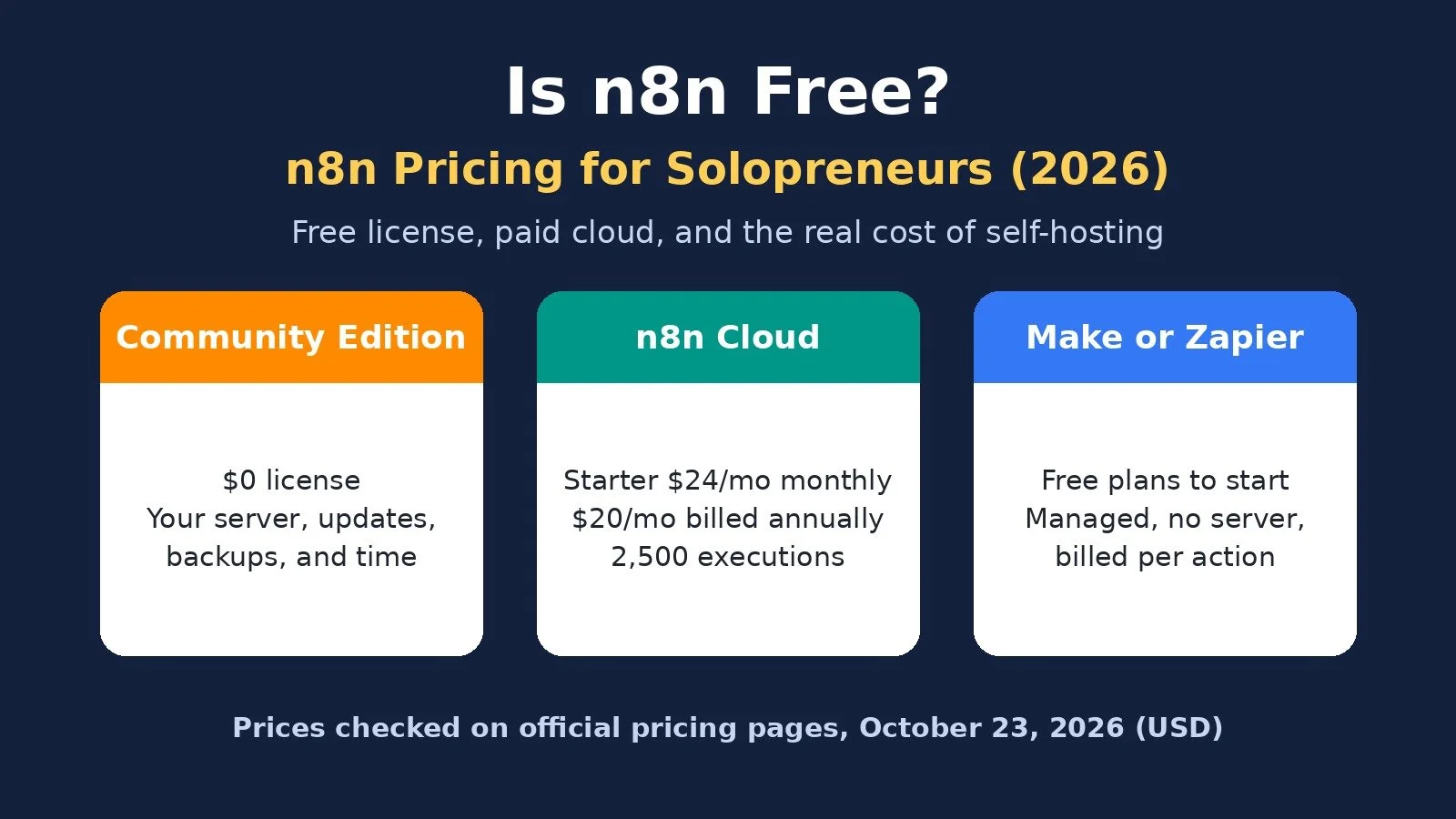
Yes, n8n can be free: the self-hosted Community Edition costs $0 in license fees. n8n Cloud is not free after the trial. Starter is $24 a month billed monthly, or $20 billed annually, for 2,500 executions. If you will not run a server, compare n8n Cloud against Make and Zapier, not against $0.
Is n8n Actually Free?
n8n comes in two forms, and only one of them is free.
Community Edition (self-hosted): n8n's docs say that without a license key, n8n runs as the free Community edition. You install it on your own server or computer. n8n describes it as free "with almost the complete feature set."
n8n Cloud: hosted by n8n on its own servers. There is a free trial, then a paid plan.
What the free edition leaves out
According to n8n's Compare editions page, Community Edition does not include projects, sharing of workflows and credentials, SSO, environments, Git version control, external secrets, log streaming, or custom variables. For one person, most of that is team tooling.
You can also register your Community instance with an email address for a free license key that unlocks folders, debug in editor, and custom execution data. Still free.
The license is "fair-code," not open source
n8n uses the Sustainable Use License. In its own docs, n8n says it does "not call ourselves open source," because that license limits commercial use. The practical rule for solos, from n8n's License FAQ:
You can: use it to run your own business, build automations for clients on your instance as long as clients cannot create or edit them, and charge for workflow setup, maintenance, training, and consulting.
You cannot: host n8n as a service where clients build their own workflows, white-label it, or fork it into your own automation product.
If you sell automation services, that line matters. When unsure, n8n says to email license@n8n.io.
n8n Cloud Plans and Prices
Prices below come from n8n.io/pricing, checked on October 23, 2026, in US dollars. The page showed euros in one of our checks, so you may see your local currency. Confirm before you pay.
Community Edition: Billed monthly: $0; Billed annually: $0; Executions per month: No n8n meter; Where it runs: Your server
Starter: Billed monthly: $24; Billed annually: $20 per month; Executions per month: 2,500; Where it runs: n8n Cloud
Pro: Billed monthly: $60; Billed annually: $50 per month; Executions per month: 10,000; Where it runs: n8n Cloud
Business: Billed monthly: $960; Billed annually: $800 per month; Executions per month: 40,000; Where it runs: Self-hosted only
Enterprise: Billed monthly: Contact sales; Billed annually: Contact sales; Executions per month: Custom; Where it runs: Cloud or self-hosted
Annual billing was labeled "Save 17%." Every plan includes unlimited users, unlimited workflows, and every integration. Pro lists other execution tiers in a dropdown; the prices above are the default 10,000 tier.
Business targets companies under 100 employees that need SSO, environments, and Git. It is self-hosted only, and most solos will never need it.
The limits that matter more than the price
The comparison table on the pricing page shows what separates Starter from Pro for a solo:
Concurrent executions: 5 on Starter, up to 50 on Pro.
Max execution duration: 5 minutes on Starter, 40 minutes on Pro. Long AI or data jobs can hit the Starter cap.
Saved execution history: 2.5k on Starter, 25k on Pro, with 7 and 30 days of log retention. n8n says hitting a history limit does not stop your workflows; it only trims old history.
The free trial
n8n's pricing page says the Cloud trial needs no credit card, includes Pro-level features, and is capped at 1,000 executions, 5 concurrent executions, and a 180-second execution timeout. n8n's "Choose how to use n8n" doc describes it as 14 days. Enough to test one real workflow, not to run a business on.
What an Execution Means (and Why It Changes Your Bill)
n8n's pricing FAQ defines an execution as "a single run of your entire workflow." It does not matter how many steps the workflow has or how much data it processes.
That is the key difference from the other two tools:
Zapier bills in tasks. Each successful action in a Zap counts as a separate task. Triggers do not, and built-in tools like Filter, Formatter, and Paths do not either.
Make bills in credits. Most module actions use 1 credit, including reading data from an app or webhook.
n8n Cloud bills in executions. One run is one execution, whether it has 3 steps or 30.
A simple illustration: a workflow with one trigger and five actions that runs 1,000 times a month is 1,000 executions on n8n. On Zapier it is roughly 5,000 tasks, since the trigger is free. On Make it is roughly 6,000 credits, since the trigger module counts too. Exact counts depend on your setup.
To estimate your own usage, n8n's FAQ suggests counting how often each workflow runs. A daily schedule is 30 or 31 executions a month. A workflow that runs every 5 minutes is about 8,600 to 8,900, which would outgrow Starter on its own.
The rule of thumb: long, many-step workflows favor n8n's execution model. Short, two-step workflows that run constantly do not get the same advantage.
The Hidden Costs of Self-Hosting
A $0 license is not a $0 tool. n8n's own comparison table lists self-hosting as requiring technical expertise, with infrastructure and maintenance as "your responsibility." None of this shows up on a pricing page.
A server. You rent a server or cloud instance from a hosting provider. n8n's docs list setup guides for providers like DigitalOcean, Hetzner, AWS, Google Cloud, and Azure. That bill is separate from n8n.
Setup. The one-line setup requires Docker. Docker Compose is the route n8n's docs describe for production, with a database and other services.
Updates. n8n's docs have a whole section on monitoring, logging, and updating your instance. Someone has to apply updates and check nothing broke. That someone is you.
Backups and restores. Your workflows, credentials, and execution history live on your server. If the disk fails and you have no backup, they are gone.
Security. Your instance holds API keys for your email, CRM, and payment tools. Patching the server, managing SSL, and locking down access are on you.
Uptime. If the server goes down while you are with a client, your lead routing and onboarding stop with it.
Your time. This is the biggest cost. Every hour spent fixing a server is an hour not spent on paying work.
Self-hosting pays off when you already have those skills or want to learn them. My guide to self-hosting n8n covers what you are signing up for. If the list above sounds like a second job, n8n Cloud or a managed tool is the cheaper option once you count your hours.
n8n vs Make vs Zapier: What the Entry Plans Cost
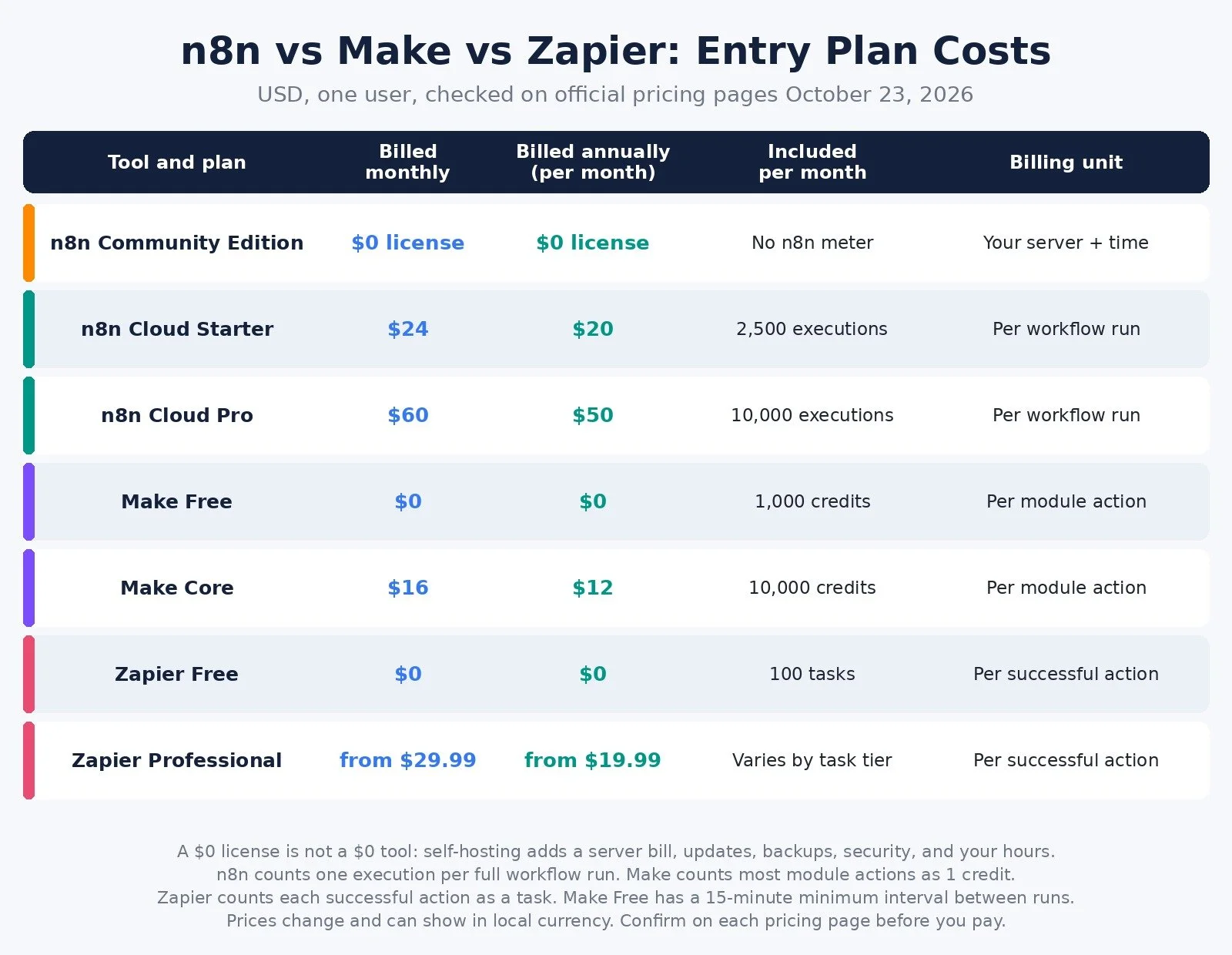
Monthly billing unless noted, one user, checked on official pricing pages on October 23, 2026.
n8n Community Edition: Billed monthly: $0 license; Billed annually: $0 license; Included usage: No n8n meter; Billing unit: Your server and time
n8n Cloud Starter: Billed monthly: $24; Billed annually: $20 per month; Included usage: 2,500 executions; Billing unit: Per workflow run
n8n Cloud Pro: Billed monthly: $60; Billed annually: $50 per month; Included usage: 10,000 executions; Billing unit: Per workflow run
Make Free: Billed monthly: $0; Billed annually: $0; Included usage: 1,000 credits; Billing unit: Per module action
Make Core: Billed monthly: $16; Billed annually: $12 per month; Included usage: 10,000 credits; Billing unit: Per module action
Zapier Free: Billed monthly: $0; Billed annually: $0; Included usage: 100 tasks; Billing unit: Per successful action
Zapier Professional: Billed monthly: From $29.99; Billed annually: From $19.99 per month; Included usage: Varies by task tier; Billing unit: Per successful action
The cheapest sticker is not always the cheapest bill. Make Free has a 15-minute minimum interval between runs. Make credits expire at the end of the term. Zapier says that when you hit your task limit, your Zaps pause unless you turn on pay-per-task billing, which costs more per task.
When n8n Cloud Fits
Pick it if: your workflows have many steps, include AI calls, or branch a lot, and you do not want to run a server.
n8n Cloud gives you the execution model without the server work. Starter suits a handful of daily or webhook-driven workflows. Pro makes sense once you need longer runs, more history, or more than 2,500 executions a month.
Skip it if: your whole automation stack is three or four short flows. A free Make or Zapier plan may cover that for $0.
You can start an n8n Cloud trial here and test your highest-volume workflow before choosing a plan.
When Self-Hosting n8n Fits
Pick it if: you are comfortable with servers and Docker, you run high volumes that would push you past Pro, and you are building workflows for your own business or for clients who will not edit them.
Skip it if: you have never maintained a server, your automations touch revenue, and you would not notice a failed update until a client did.
A sensible middle path: start on n8n Cloud, and self-host only once your volume and skills justify it.
When Make or Zapier Fits Better
Not every solo needs n8n.
Make is the managed option I recommend for most non-technical solos. The visual builder is easier to learn, there is no server, and the Free plan includes 1,000 credits a month. Core is $16 a month, or $12 billed annually, for 10,000 credits. You can start on Make's free plan here. My Make vs Zapier comparison goes deeper.
Zapier still fits very simple two-step connections and apps that only Zapier supports. Its Free plan includes 100 tasks a month, and Professional starts from $29.99 a month, or $19.99 billed yearly. If cost is why you are looking around, my Zapier alternatives guide lists the options.
If you want to compare n8n with other self-hosted tools across your stack, my open-source alternatives guide covers scheduling, analytics, files, and more.
Pick by Situation
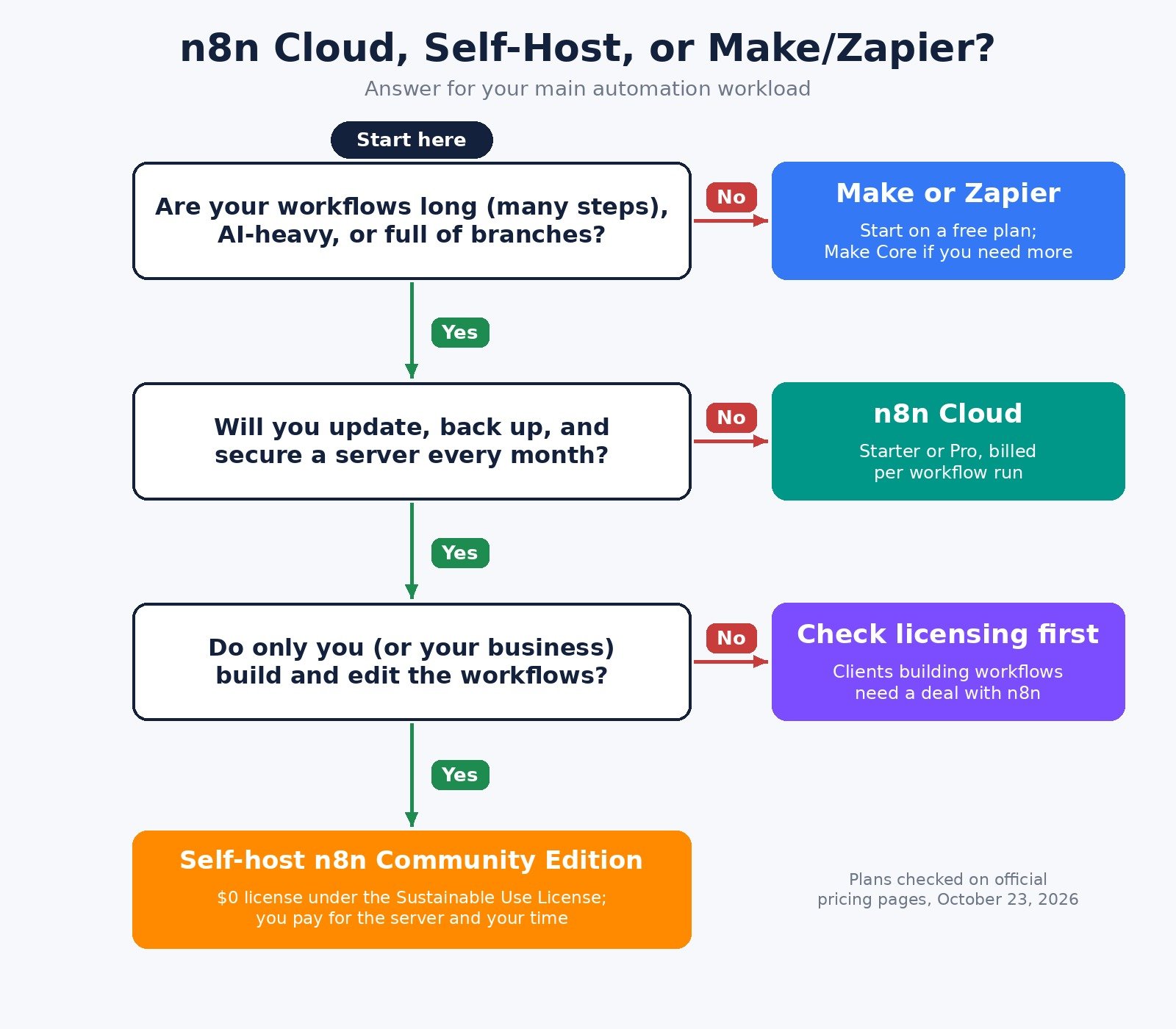
A few short automations, tight budget: Pick: Make Free or Zapier Free; Why: $0 to start, no server
Easiest visual builder, no servers: Pick: Make Core; Why: Managed, credit-based
Long, many-step, or AI-heavy workflows, no servers: Pick: n8n Cloud Starter or Pro; Why: Billed per run, not per step
High volume and you can run a server: Pick: n8n Community Edition; Why: $0 license, no n8n meter
Clients need to build their own workflows: Pick: Ask n8n about licensing first; Why: Not allowed under the free license
Simple two-step connections to niche apps: Pick: Zapier; Why: 9,000+ apps, per Zapier
FAQ
Is n8n free for commercial use?
The self-hosted Community Edition is free to use for your own business, including building automations for clients on your instance, as long as clients cannot create or edit workflows. Hosting n8n as a service for clients requires a separate agreement with n8n.
Does n8n Cloud have a free plan?
No. n8n Cloud has a free trial with no credit card, capped at 1,000 executions. After that you need a paid plan. The free option is self-hosting.
Is n8n cheaper than Zapier?
On sticker price, n8n Cloud Starter at $24 a month is below Zapier Professional at $29.99 a month, both billed monthly. The bigger difference is the billing unit. n8n counts a whole workflow run once, while Zapier counts every successful action. For many-step workflows, that gap grows with volume.
What to Do Next
List your top three workflows and count their steps and monthly runs.
If you want ownership and can maintain a server, read my self-host n8n guide. If you want n8n without the server, start an n8n Cloud trial.
If your workflows are short and you want the easiest builder, start on Make's free plan.
For the wider stack I recommend, browse Best Tools.
If you want help choosing a platform or building automations that do not eat your week, I take on automation strategy projects through my services.
Disclosure: some links in this post are affiliate links (n8n and Make). If you sign up through them I may earn a commission at no extra cost to you. It does not change which tool I tell you to pick.
Make more. Spend less. Work less. Price your automation by what it costs to run, not by what the license costs.