Make's pricing page looks simple: five plans and a slider. Then you notice the price changes as you drag the slider, and every plan is measured in something called credits.
For a one-person business, the real question is not which plan is cheapest. It is how many credits your automations will use, how often they need to run, and whether you will ever need the features locked in the higher plans.
This is a buyer guide, not a setup tutorial. No build-alongs and no template files. Just what each plan costs, how credits work, the costs that are easy to miss, and which plan fits which kind of solo business. If you are still deciding between platforms, my Make vs Zapier comparison covers that choice first.
Make.com Pricing: The Short Answer
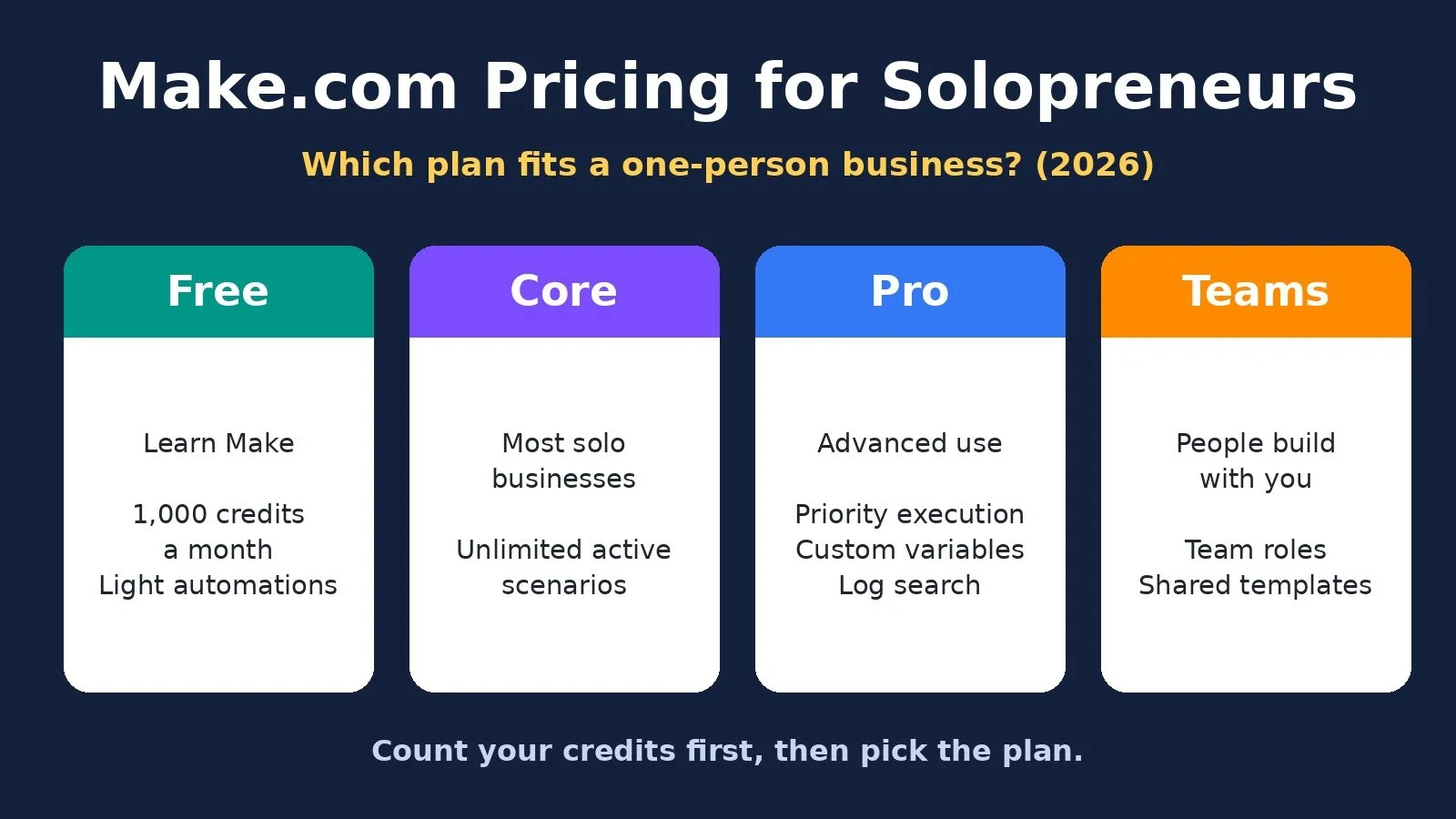
Make has a Free plan with 1,000 credits a month. Core is $16 a month billed monthly, or $11 a month billed annually, for 10,000 credits. Most solopreneurs should start on Free, move to Core once they need more than a couple of scenarios or faster schedules, and only pay for Pro or Teams when they need a specific feature in those plans.
Make.com Plans and Prices
Prices below come from make.com/en/pricing, checked on November 2, 2026, at the default 10,000 credits a month. Prices change, and the page may show your local currency, so confirm before you pay.
Free: Billed monthly: $0; Billed annually: $0; Credits per month: 1,000; Built for: Trying Make
Core: Billed monthly: $16; Billed annually: $11 per month; Credits per month: 10,000 and up; Built for: Your own business automations
Pro: Billed monthly: $28; Billed annually: $20 per month; Credits per month: 10,000 and up; Built for: Heavier or advanced use
Teams: Billed monthly: $51; Billed annually: $36 per month; Credits per month: 10,000 and up; Built for: Several people building together
Enterprise: Billed monthly: Custom; Billed annually: Custom; Credits per month: Custom; Built for: Larger organizations
The slider sets the price. Core, Pro, and Teams are priced by how many credits you buy each month. Move the slider to 20,000 credits and every paid plan costs more, while the price per 1,000 credits drops. On annual billing, Core goes from $11 for 10,000 credits ($1.10 per 1,000) to $20 for 20,000 ($1.00 per 1,000). Make's help center says Core now goes up to 300,000 credits a month and Pro up to 8 million.
Free. 1,000 credits a month, two active scenarios, the visual builder, routers and filters, and a 15-minute minimum interval between runs. Good for learning Make and running one or two light automations.
Core. Everything in Free, plus unlimited active scenarios, schedules that can run down to the minute, higher data transfer limits, and access to the Make API. This is the plan most solo businesses actually need.
Pro. Everything in Core, plus priority scenario execution, custom variables, and full-text search of your execution logs. With annual billing, Pro also lets you prepay credits that expire after 12 months instead of each month.
Teams. Everything in Pro, plus teams, team roles, and the ability to create and share scenario templates.
Enterprise. Custom pricing for larger organizations, with custom functions, enterprise apps, SSO, audit logs, overage protection, and 24/7 support. A one-person business will not need it.
How Make Credits Work
Make switched its billing unit to credits on August 27, according to its pricing page. Its help center says credits replaced operations as the term, and that existing plans and the cost of credits did not change.
The basic rule is simple: each action a module performs uses credits, and most actions use 1 credit. Make's pricing FAQ lists what counts:
Reading data from an app or webhook
Searching, creating, updating, or deleting data in an app
Transforming data with the built-in tools
Aggregating or iterating rows of data
Two kinds of modules use no credits: the Router and the error handler modules (Rollback, Break, Resume, Commit, and Ignore).
AI steps can use more
AI is where credit math gets less predictable. Make's help center explains three cases:
Third-party AI apps with your own connection, like OpenAI or Anthropic Claude: 1 credit per operation, and you pay the AI provider for tokens.
Make's AI Provider, used in Make AI Agents and Make AI Toolkit on all plans: credits are based on tokens and operations, so a long prompt uses more.
Features that pick an AI provider for you, like Make AI Web Search and Make AI Content Extractor: credits are based on tokens, operations, and other usage factors.
Since November 2025, all paid plans can use a custom AI provider connection, so Core users can bring their own API key and pay the provider directly for tokens.
How Many Credits Do You Need?
Make's FAQ puts it plainly: a single scenario run can use anywhere from two credits to thousands. So estimate from your own workflows, not from the plan name.
A simple way to do it:
Count the modules in each scenario, including the trigger.
Count how often it runs in a month.
Multiply, then add room for loops. If a scenario handles a list of 20 rows, the modules after the iterator run 20 times.
Two illustrations, assuming each run processes one record:
A lead form scenario with 4 modules that runs about 100 times a month uses roughly 400 credits. That fits inside Free.
The same 4-module scenario on an hourly schedule runs about 720 times a month and uses roughly 2,880 credits. That needs Core.
These are estimates. Your real count depends on how your scenarios are built, so check the usage figures in your Make account after the first week.
The Costs Beyond the Sticker Price
Unused credits expire. Make's FAQ says credits expire at the end of the term. On Core with annual billing, the help center says your regular credits reset monthly.
Extra credits cost more. If you run out, you can buy extra credits in bundles of 1,000 or turn on auto-purchasing in blocks of 10,000. Since November 2025, Make's help center says extra credits cost 25% more than the credits in your plan, whether you buy them by hand or automatically. Make's help center also says bigger tiers have a lower cost per credit, so if you buy extras every month, moving up a tier is usually cheaper.
Extra credits expire too. On monthly plans they expire after one month. On Core with annual billing, they expire at each monthly reset. On annual Pro and Teams, they last until the end of the year.
Running out stops your scenarios. When credits run out, scenarios stop until credits are added. Incoming webhooks queue up to your plan's queue size, and polling scenarios pick up records from their last successful run.
Data limits scale with credits. Make's FAQ ties data transfer and storage to credits: for every 10,000 credits you get 5 GB of data transfer and 10 MB of data storage. The help center adds that using up data transfer can trigger an auto-purchase even if you still have credits.
Downgrades can stop scenarios. If you downgrade, any active scenario that uses a feature from a higher plan will be stopped.
Monthly or Annual Billing?
On November 2, 2026, the pricing page labeled annual billing at 10,000 credits as saving 31% on Core and 29% on Pro and Teams. The discount is real, but annual billing commits you for a year.
Pick monthly if you are new to Make, your volume is still changing, or you are not sure Make is the right platform. You can move up or down while you learn.
Pick annual if you have run Make for a few months, your credit use is steady, and you know which plan you need. On Core, remember that annual credits still reset monthly. Pro and Teams let you prepay annual credits that last 12 months.
Make vs Zapier vs n8n: Entry Plan Costs
Entry plans on each official pricing page, checked on November 2, 2026. One user, prices in US dollars except n8n, which lists prices in euros (EUR).
Make Free: Billed monthly: $0; Billed annually: $0; Included usage: 1,000 credits; Billing unit: Per module action
Make Core: Billed monthly: $16; Billed annually: $11 per month; Included usage: 10,000 credits; Billing unit: Per module action
Zapier Free: Billed monthly: $0; Billed annually: $0; Included usage: 100 tasks; Billing unit: Per successful action
Zapier Professional: Billed monthly: From $29.99; Billed annually: From $19.99 per month; Included usage: Varies by task tier; Billing unit: Per successful action
n8n Cloud Starter: Billed monthly: 24 EUR; Billed annually: 20 EUR per month; Included usage: 2,500 executions; Billing unit: Per workflow run
The billing units matter more than the sticker price. Zapier says triggers and built-in tools like Filter, Formatter, and Paths do not use tasks, while Make counts the trigger module. n8n counts a whole workflow run as one execution, however many steps it has. My n8n pricing guide covers that model, and my Make vs n8n comparison covers which platform fits whom. If cost is why you are leaving Zapier, my Zapier alternatives guide lists the options.
Which Make Plan Should You Choose? Decision Diagram
Answer for your business today.
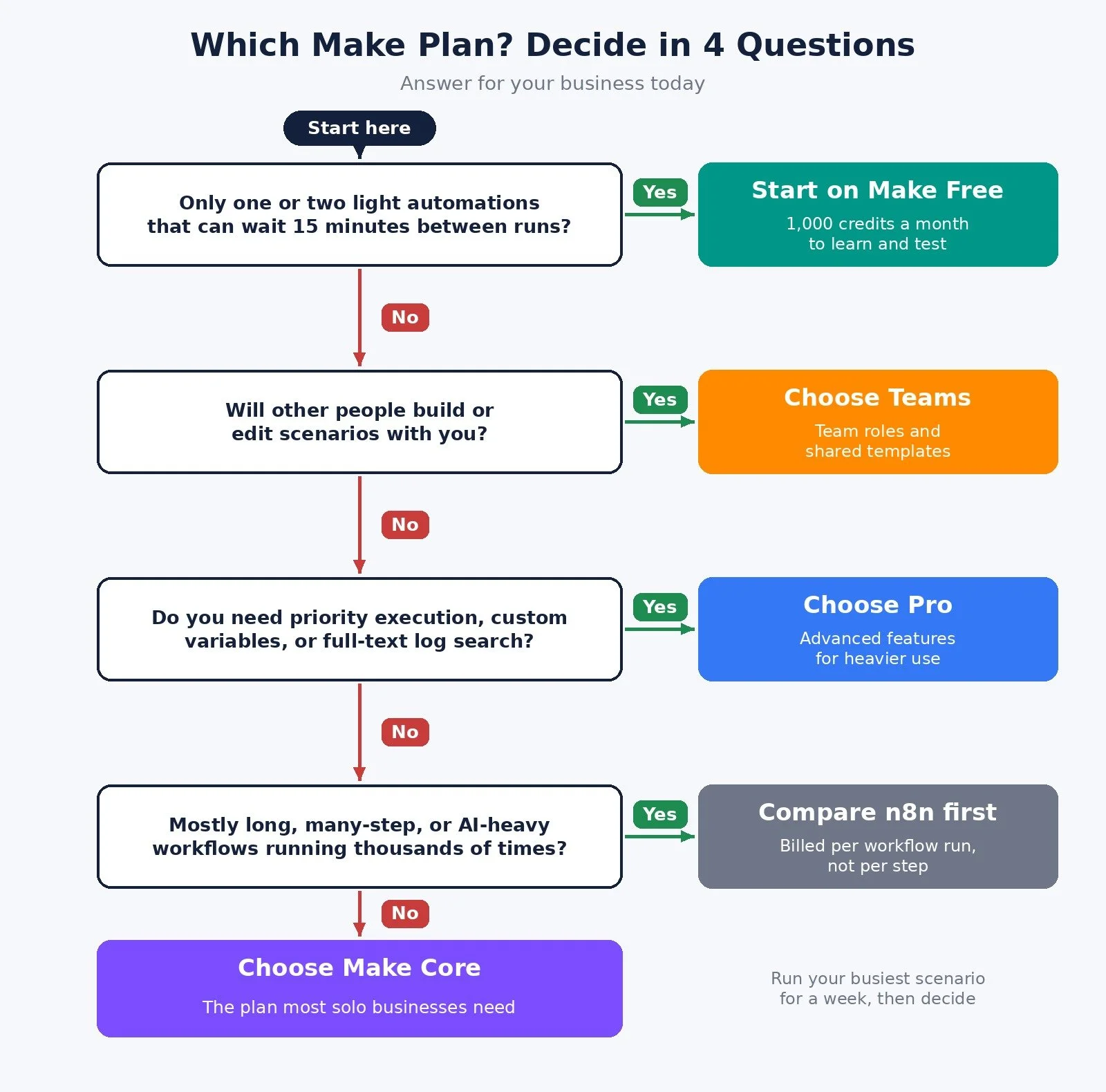
Do you only need one or two light automations that can wait 15 minutes between runs? Yes: start on Make Free. No: go to question 2.
Will other people build or edit scenarios with you? Yes: choose Teams. No: go to question 3.
Do you need priority execution, custom variables, or full-text log search? Yes: choose Pro. No: go to question 4.
Are most of your workflows long, many-step, or AI-heavy, and running thousands of times a month? Yes: compare Make with n8n's per-run pricing before you buy. No: choose Make Core.
The Recommended Plan for Each Type of Solopreneur
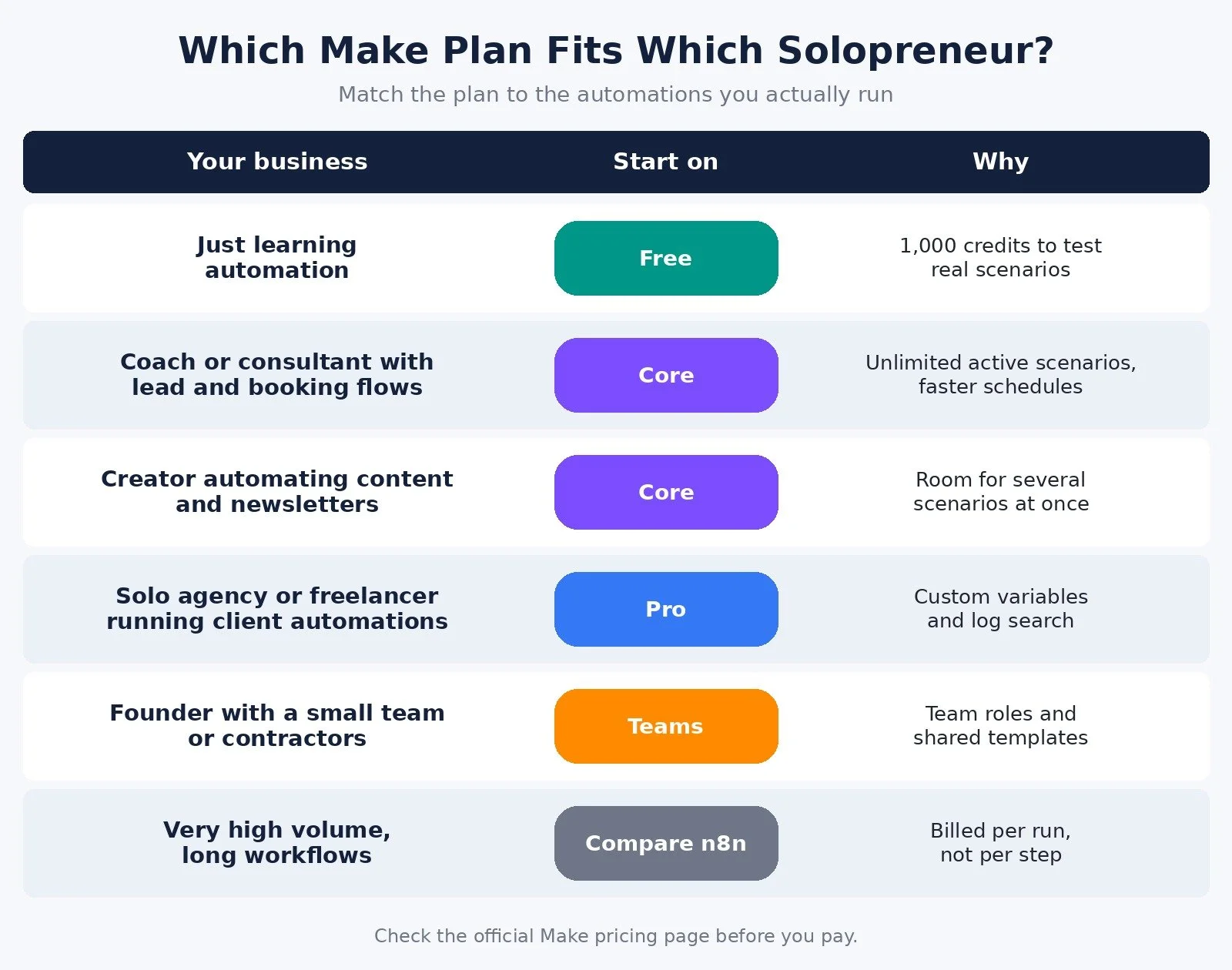
Just learning automation: Plan to start on: Free; Why: 1,000 credits to test real scenarios
Coach or consultant with lead and booking flows: Plan to start on: Core; Why: Unlimited active scenarios, faster schedules
Creator automating content and newsletters: Plan to start on: Core; Why: Room for several scenarios at once
Solo agency or freelancer running client automations: Plan to start on: Pro; Why: Custom variables and log search
Founder with a small team or contractors: Plan to start on: Teams; Why: Team roles and shared templates
Very high volume, long workflows: Plan to start on: Compare n8n; Why: Billed per run, not per step
How to Test Before You Pay
Make's Free plan costs nothing, so test it with your real work, not demo scenarios:
Build your highest-volume scenario first. It decides your plan more than any other.
Run it for a week, then check the credits it used and multiply to a month.
Watch AI modules separately. Their credit use depends on prompt length and the model.
If the numbers fit inside 1,000 credits, stay on Free. If not, Core at 10,000 credits is the next step. You can start on Make's free plan here. For quick wins once you are inside, my Make.com shortcuts guide and Make playbook cover workflows worth building first.
Common Mistakes When Choosing a Make Plan
Buying annual on day one. Annual saves money only once you know your volume.
Ignoring loops. A scenario that iterates a list can use far more credits than its module count suggests.
Treating extra credits as a plan. They cost 25% more. If you buy them every month, move up a tier.
Paying for Pro features you will not use. Most solo businesses never need priority execution or custom variables.
FAQ
Is Make.com free?
Yes. Make's Free plan includes 1,000 credits a month with two active scenarios and a 15-minute minimum interval between runs. It is enough to learn Make and run light automations.
How much does Make.com cost?
At 10,000 credits a month, Core is $16, Pro is $28, and Teams is $51 billed monthly. Annual billing lowers that to $11, $20, and $36 a month. Enterprise is custom.
What happens if I run out of Make credits?
Your scenarios stop until credits are added. You can upgrade, buy extra credits at a 25% premium, or turn on auto-purchasing on Core, Pro, or Teams.
Is Make cheaper than Zapier?
On monthly billing, Make Core is $16 for 10,000 credits, while Zapier Professional starts at $29.99 a month for its lowest task tier. Compare billing units too: Zapier does not count triggers, and Make does.
What to Do Next
List your top three automations and count their modules and monthly runs.
Walk through the decision diagram above and note the plan it points to.
Start on Make's free plan and run your busiest scenario for a week.
Browse Best Tools for the rest of the stack I recommend.
If you want help choosing a platform or building automations that do not eat your week, I take on automation strategy projects through my services.
Disclosure: the Make links in this post are affiliate links. If you sign up through them I may earn a commission at no extra cost to you. It does not change which plan I tell you to pick.
Make more. Spend less. Work less. Pay for the credits you actually use, not the plan you might grow into.