You do not need 50 automations. You need a handful that remove the same busywork every week.
Most solopreneurs I talk to are stuck in the same loop: copy a lead into a sheet, send a welcome email by hand, chase a follow-up, paste a blog into three social tools, update a CRM when someone pays. None of that is hard. All of it eats hours.
Make is the tool I reach for when those jobs should run as visual scenarios instead of living in my head. You connect apps, map fields once, and let the scenario handle the next 100 runs.
This guide covers 15 business jobs every solopreneur should automate, with Make as the build tool. They are grouped by lead capture, email, content and repurposing, CRM and ops, and AI helpers. Each item is a planning outline: trigger, actions, and why it saves time. Steal the pattern, rebuild it in your own Make account, and stop doing the same click path every Monday.
These are not downloadable Make blueprint files. Make's product blueprints are importable scenario files. Shipping 15 tested import files would mean building and maintaining each scenario for real. What you get here is the map: enough structure to rebuild the right automation in an afternoon, without pretending a ZIP of blueprints is attached.
If you are brand new to Make's interface, start with my Make.com shortcuts for automation beginners, then come back and pick 1 job below.
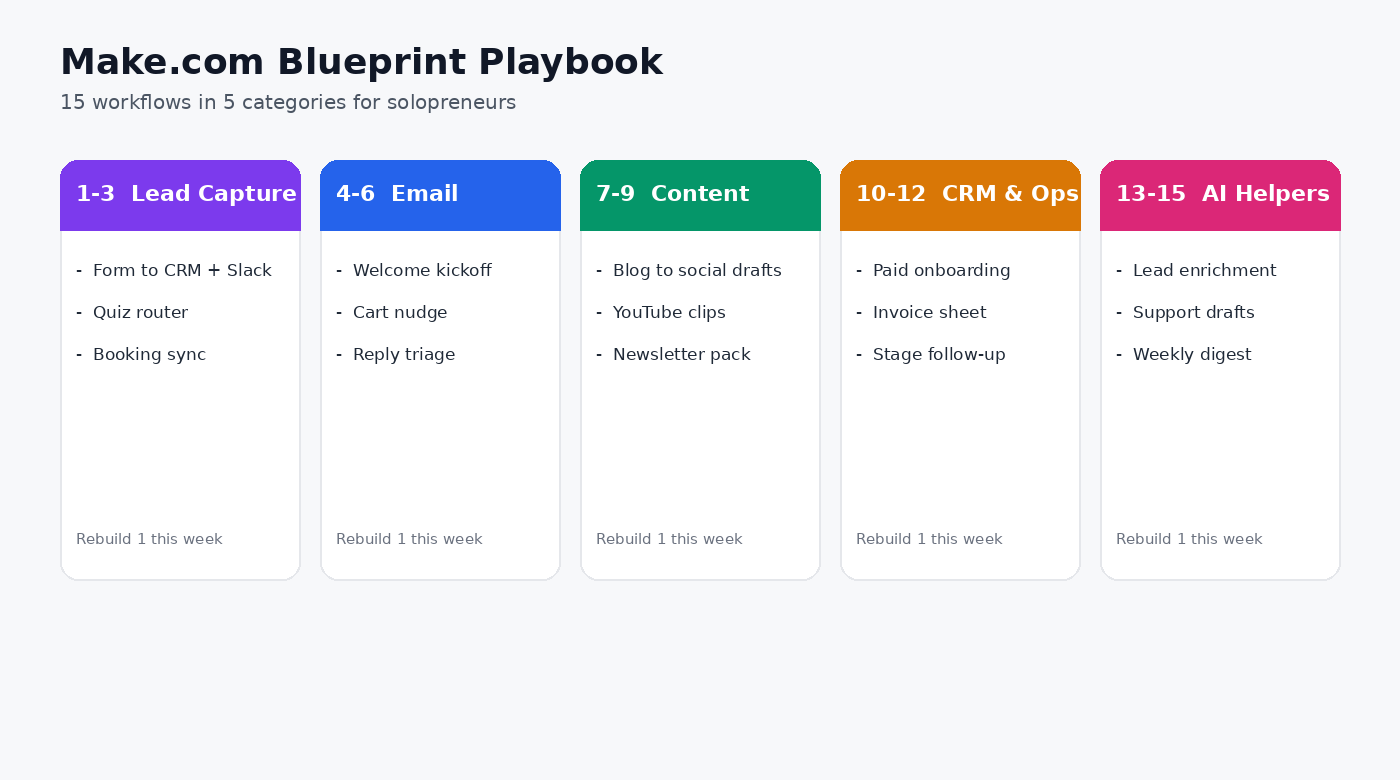
What These Are (and Why Solos Care)
In Make, you build scenarios: a trigger, then modules that pass data along a canvas. In this guide, each numbered item is a business job you should stop doing by hand. Make is how you encode that job once so it keeps running.
Why that matters for a 1-person business:
You can see routers, filters, and errors on one screen.
Multi-step logic is usually cheaper and clearer than stacking simple Zaps.
You can start with a free or low tier, prove the job pays for itself, then scale operations only where the automation buys hours back.
Quick comparison: Zapier is often easiest for a 2-step connection. Make usually wins when you need branching, data mapping, and readable multi-app logic. n8n wins when you want deep control or self-hosting (I cover that in how to self-host n8n). For most solopreneurs starting from zero, Make is the default I recommend. Start free here: https://www.make.com/en/register?pc=startfree
How to Use This Guide
Pick 1 job that matches a weekly pain (leads, email, content, ops, or AI).
Rebuild it in Make with your real apps (forms, email, CRM, Sheets, Slack, Stripe).
Run a test with fake data, then force a failure and check the run history.
Only then turn it on for live traffic.
Document the filter logic in a note. Future you will forget why it exists.
Do not build all 15 this month. Build the one that buys back the most hours.
Lead Capture (1 to 3)
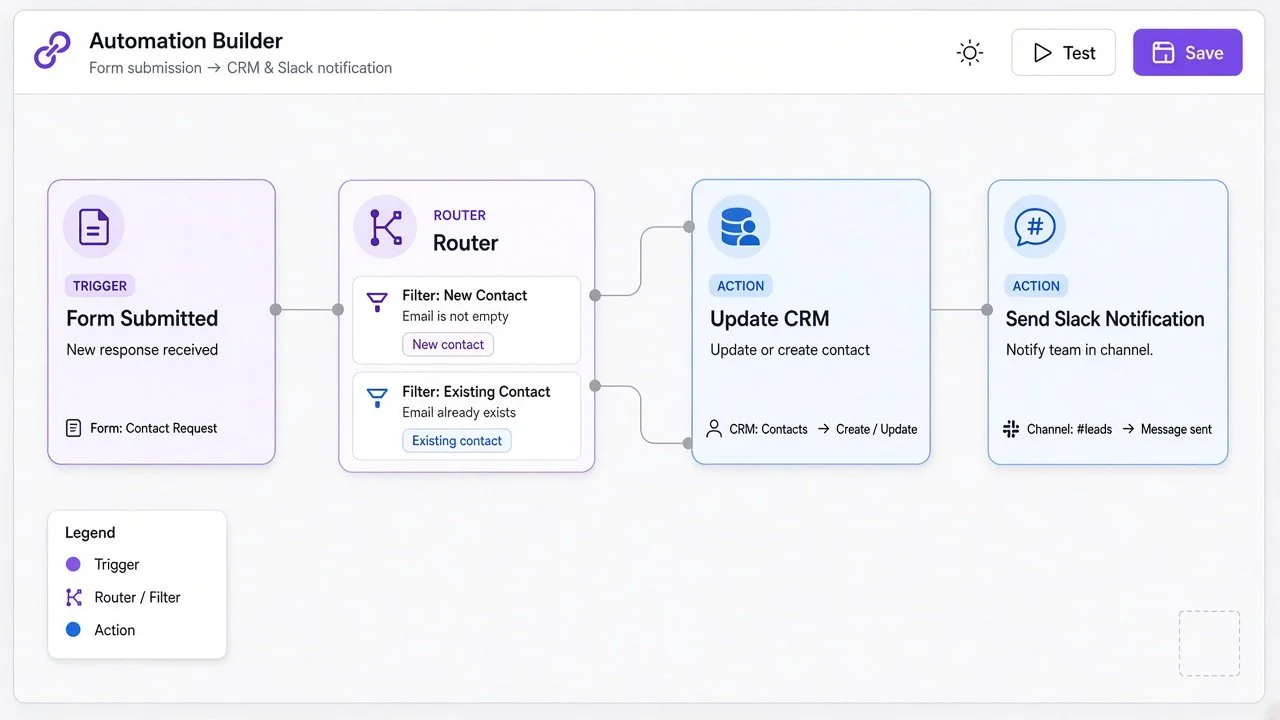
1. Form to CRM + Instant Slack Alert
Trigger: New form submission (Typeform, Google Forms, Webflow, Involve.me, or similar).
Actions: Create or update the contact in your CRM, tag the source, send a Slack or email alert with name, email, and offer interest.
Why it saves hours: You stop refreshing inboxes and pasting leads into a sheet. The first response window shrinks because someone (even if that someone is you) gets notified immediately.
Build tip: Add a filter so spam or incomplete emails never create CRM records.
2. Quiz Lead Router
Trigger: Quiz completion with a score or segment.
Actions: Route by result (for example, "agency" vs "creator"), add the right CRM tag, and enroll in the matching email sequence.
Why it saves hours: Manual segmentation is where good leads go to die. The quiz answers become the routing rules.
Build tip: Keep segment names identical across quiz tool, CRM, and email so the router never invents a new label mid-path.
3. Webinar or Call Booking Sync
Trigger: New booking or webinar registration.
Actions: Create the contact, add event details to a calendar or sheet, send a confirmation, and queue a reminder 24 hours before.
Why it saves hours: No more double entry between the booking tool and your CRM. Missed reminders are usually a process problem, not a willpower problem.
Build tip: Store the booking ID as an external key so reschedules update the same record instead of creating duplicates.
Email (4 to 6)
4. Welcome Sequence Kickoff
Trigger: New subscriber or paid customer.
Actions: Add to your email tool, apply the welcome tag, and optionally send a personal "got your signup" notification so you can reply to high-intent people first.
Why it saves hours: Onboarding should not depend on you remembering. Pair this with a solid newsletter stack; I walk through one path in my Brevo automated newsletter setup guide
Build tip: Separate "free subscriber" and "paid customer" tags so the welcome path can branch without a rewrite later.
5. Abandoned Checkout or Cart Nudge
Trigger: Checkout started but not completed (Stripe, Shopify, or your checkout webhook).
Actions: Wait a set delay, check if payment completed, then send a single helpful nudge (not a spam blast).
Why it saves hours: You stop hunting half-finished checkouts in dashboards. One clean scenario beats a messy manual list.
Build tip: Always re-check payment status before sending. Never nudge someone who already paid.
6. Reply Triage to Sheet + Priority Flag
Trigger: New email matching a label or inbox filter.
Actions: Log sender, subject, and snippet to Google Sheets, flag VIP senders, and ping Slack for anything marked "urgent" or from known clients.
Why it saves hours: Inbox zero is not the goal. Visibility is. You get a searchable log without living in Gmail all day.
Build tip: Maintain a small VIP list (clients, partners, press) and match on domain or exact address before you escalate to Slack.
Content and Repurposing (7 to 9)
7. Blog Publish to Social Draft Queue
Trigger: New blog post (RSS, CMS webhook, or Sheets row).
Actions: Create draft posts in your scheduler, attach the canonical URL, and notify you to approve before publish.
Why it saves hours: Distribution should not be a second writing job. You still approve voice and timing. The scenario handles the copy-paste.
Build tip: Force “draft only” on day one. Auto-publish is a later upgrade after you trust the copy.
8. YouTube Upload to Clip and Caption Pipeline
Trigger: New YouTube video (or a Drive folder drop).
Actions: Send the asset to your clipping or caption tool, write a short description draft with an AI module, and drop links into a content tracker sheet.
Why it saves hours: Long-form to short-form is where solos lose evenings. Keep the cloud steps in Make when connectors exist. If the pipeline gets heavy on custom code, agents, or self-hosted media tools, lean on n8n for that part of the stack. My automated faceless videos with n8n walkthrough shows a related pattern.
Build tip: Write the tracker row first, then hand off to clipping tools, so you always have a source-of-truth URL even if a downstream tool fails.
9. Newsletter Issue to Archive and Promo Pack
Trigger: Newsletter sent or a “publish” row in Sheets.
Actions: Save the HTML or link to Drive or Notion, create 3 social promo drafts, and add a “repurpose later” task.
Why it saves hours: One email should feed a week of reminders. The scenario creates the stubs. You edit for voice.
Build tip: Name promo drafts with the issue date so you can find last month’s angle without opening every file.
CRM and Ops (10 to 12)
10. New Paid Customer Onboarding Pack
Trigger: Successful payment (Stripe or PayPal).
Actions: Update CRM stage to Customer, create an onboarding checklist in Notion or Asana, grant access (or send the access email), and notify you in Slack.
Why it saves hours: Delivery delays after payment kill trust. Automate the handoff so the only manual step is real client work.
Build tip: Include the payment amount and product name in the Slack ping so you know which offer just sold without opening Stripe.
11. Invoice Paid to Bookkeeping Sheet
Trigger: Invoice marked paid.
Actions: Append date, amount, client, and product to a finance sheet, and optionally create the next invoice draft for retainers.
Why it saves hours: Month-end reconciliation gets lighter when every payment already landed in one place.
Build tip: Use one sheet per year and freeze the header row. Future you will thank present you at tax time.
12. Lead Stage Change to Task + Follow-Up Reminder
Trigger: CRM stage changes (for example, Qualified to Proposal).
Actions: Create a dated follow-up task, send yourself a reminder, and log the stage change time for later review.
Why it saves hours: Pipeline stalls when follow-ups live only in your memory. The scenario makes the next action visible.
Build tip: Set the follow-up date from the stage (for example, Proposal = +3 days) so every transition carries a default next step.
AI Helpers (13 to 15)
13. Lead Enrichment Summary
Trigger: New CRM contact with a company domain.
Actions: Call an AI or research module with a tight prompt (“summarize company, likely pain, and 1 personalized opener”), write the result to a CRM note field.
Why it saves hours: You walk into calls with context instead of a blank LinkedIn tab. Keep prompts short and store the output where you actually look.
Build tip: Cap enrichment to contacts with a company domain. Personal Gmail leads usually do not need the same research spend.
14. Support Inbox Draft Replies
Trigger: New support email or helpdesk ticket.
Actions: Draft a reply with AI using your FAQ snippet, save as a draft (do not auto-send on day 1), and notify you to approve.
Why it saves hours: Drafting is the slow part. Sending without review is the risky part. Start with drafts only.
Build tip: Feed the AI a short FAQ paste and a hard rule: if confidence is low, leave the draft blank and ping you instead.
15. Weekly Ops Digest
Trigger: Schedule (every Monday 8am).
Actions: Pull last week’s leads, payments, and content publishes from Sheets or your apps, ask AI to summarize in 5 bullets, email the digest to yourself.
Why it saves hours: You get a single view of the business without clicking 6 dashboards. Treat it as a briefing, not a vanity report.
Build tip: Keep the digest under one screen. If it needs scrolling, your inputs are too noisy.
Build Order I Recommend
/
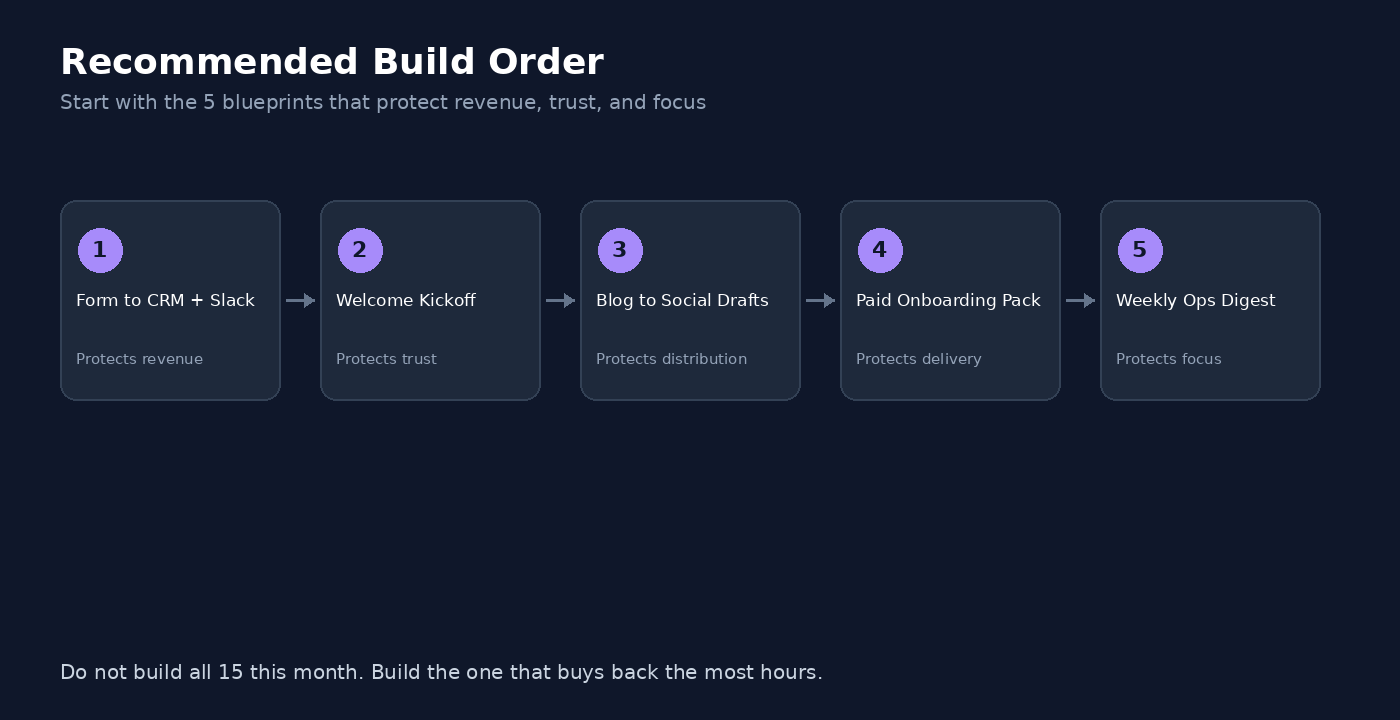
If you want a simple sequence that compounds:
1) Form to CRM + Slack (item 1). Protects revenue.
2) Welcome Sequence Kickoff (item 4). Protects trust.
3) Blog to Social Draft Queue (item 7). Protects distribution time.
4) Paid Customer Onboarding Pack (item 10). Protects delivery.
5) Weekly Ops Digest (item 15). Protects focus.
That set covers capture, nurture, content, delivery, and review. Everything else is optional leverage.
Scenario Tips (So These Jobs Do Not Break)
• Name modules clearly. “Create CRM contact” beats “HTTP 3.”
• Use filters early. Bad data should die at the start of the scenario.
• Log errors somewhere you will see. Slack or email on failure is enough for a solo.
• Prefer idempotent updates. Update-or-create beats duplicate contacts.
• Version your scenarios. Duplicate before a big edit so you can roll back.
• Watch operations. Rebuild your highest-volume Zap first and compare a week of usage before you migrate everything.
• Keep scenarios small. One job per scenario is easier to debug.
When to Use Make vs n8n
• App-to-app jobs with branching → Make — Visual scenarios, strong solo fit
• Full control, custom code, or self-host n8n — Flexibility and long-term cost if you can maintain it
• Heavy content or agent-style pipelines → n8n or Make + selective n8n — Deeper code and execution models for complex graphs
• Make is the tool I actively recommend for most solos when the fit is right. When you need deeper control or self-hosting, start with n8n. Zapier is not an affiliate partner here. For a wider stack, browse Best Tools.
FAQ
What should a small business automate first with Make.com?
Start with lead capture to CRM, welcome email kickoff, payment to onboarding, and a weekly digest. Those four cover money, trust, delivery, and visibility. Expand into content and AI helpers after those are stable.
What business processes can Make.com automate to save time?
Anything that is repetitive and rule-based: form handling, CRM updates, email enrollment, invoice logging, social draft creation, meeting reminders, and AI-assisted summaries. If you do the same click path every week, it is a candidate.
Are these rebuild outlines good for beginners?
Yes, if you treat them as patterns, not magic. Use the outline, connect your apps, test with sample data, then go live. My Make beginners shortcuts guide covers the UI habits that make rebuilding less scary.
Is Make better than Zapier for multi-step jobs?
Often yes for solos who need routers, filters, and readable multi-app logic. Zapier can still win for ultra-simple 2-step jobs or niche apps. Rebuild your most expensive Zap in Make and compare real usage before you decide.
What to Do Next
1) Open Make and rebuild item 1 (Form to CRM + Slack) this week.
2) Skim the Make.com shortcuts for beginners.
3) If a job outgrows Make, explore n8n and the self-host n8n guide.
4) When you want more stack options, use Best Tools.
If you want help designing or fixing a scenario so it actually saves time, I take on automation strategy and build projects through my services. Automation Nation is where I share the jobs worth copying each week.
Make more. Spend less. Work less. A good automation is just leverage you can turn on once and keep.