HeyGen is one of the best-known AI avatar tools. You type a script, pick an avatar or a custom one of yourself, and get a talking-head video without setting up a camera.
For a one-person business, the real question comes first: do you need an avatar at all? Many solo creators get further by filming a quick phone video and letting AI handle the captions and clips.
This guide covers both paths: when to stay on HeyGen, when Synthesia or Captions fits better, and when to skip avatars for Submagic or OpusClip. For the wider list of tools that turn one video into many posts, my AI content repurposing tools roundup covers that.
HeyGen Alternatives: The Short Answer
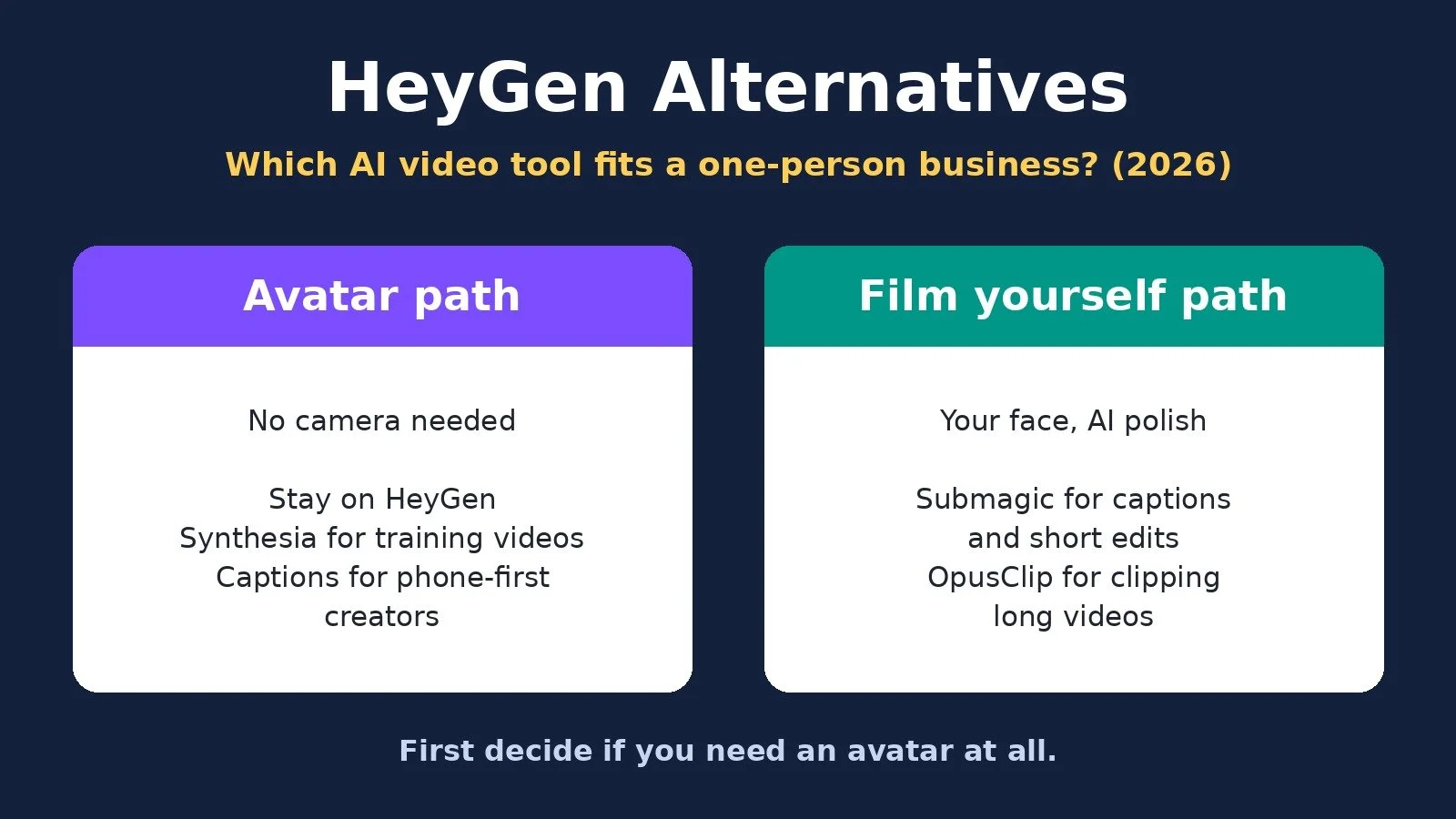
Stay on HeyGen if you want a custom avatar of yourself for marketing and social videos. Choose Synthesia if your videos are mostly training, onboarding, or course lessons. Choose Captions if you want to film, edit, and make avatar videos from your phone. Skip avatars and use Submagic or OpusClip if you are willing to film yourself.
Do You Need an AI Avatar at All?
An avatar solves one problem: a talking-head video without filming. That is worth paying for if you dislike being on camera, need several languages, or plan more videos than you could record.
If none of that is true, an avatar can be the expensive way to do a cheap job. And if you already record long videos, podcasts, or webinars, you may have plenty of clips sitting in your files. Pick a branch:
Avatar path: HeyGen, Synthesia, or Captions.
Film yourself path: Submagic for captions and editing, or OpusClip for cutting long videos into clips.
What Each Tool Is Built For
HeyGen. HeyGen turns scripts into videos with AI avatars and AI voices. Its plans include ready-made presenters, a Custom Video Avatar of your own likeness, and on paid plans, 175+ languages and dialects.
Synthesia. Synthesia also makes avatar videos from a script. Its pricing page leans toward training, listing roleplays, surveys, interactive avatars, and learner seats next to its video editor.
Captions. Captions is a phone-first AI video app. It covers both branches: avatar features like AI Twin, plus tools for footage you film yourself, such as a teleprompter, AI Edit, and clips from long videos.
Submagic. Submagic adds AI captions and short-form polish to videos you have already filmed, priced per member with a monthly video count.
OpusClip. OpusClip uses AI to cut long videos into short clips, adds animated captions, and gives each clip a virality score.
Pricing Compared
Prices below come from each official pricing page, checked on October 30, 2026, in USD. Prices change, so confirm on the official page before you pay.
HeyGen: Free option: 3 videos a month, up to 1 minute, watermarked; Entry plan, monthly billing: Creator, $29 a month; Entry plan, annual billing: $24 a month, billed yearly ($288); What you are metered on: Credits (600 a month on Creator)
Synthesia: Free option: Basic: 10 minutes of video a month, watermarked; Entry plan, monthly billing: Starter, $19 a month; Entry plan, annual billing: $14 a month, billed yearly; What you are metered on: Credits (1,250 a month on Starter)
Captions: Free option: Free version, basic editing, no AI credits; Entry plan, monthly billing: Max, $24.99 a month (iOS price); Entry plan, annual billing: Discount mentioned, price not listed; What you are metered on: Credits (500 a month on Max)
Submagic: Free option: Free to start, no credit card, limits not listed; Entry plan, monthly billing: Starter, $19 per member a month; Entry plan, annual billing: $12 per member a month, billed yearly; What you are metered on: Videos (15 a month, up to 2 minutes each)
OpusClip: Free option: 60 credits a month, watermarked; Entry plan, monthly billing: Starter, $15 a month; Entry plan, annual billing: Monthly only on Starter; What you are metered on: Credits (150 a month on Starter)
HeyGen plans. Free covers 3 watermarked videos a month, up to 1 minute each, with one Custom Video Avatar. Creator is $29 a month, or $24 a month billed yearly ($288), with 600 credits, 1080p export, no HeyGen branding, and videos up to 30 minutes. Pro is $49 a month, or $41 a month billed yearly ($488), with 1,000 credits and 4K export. Business is $149 a month, with 1,500 credits, videos up to 60 minutes, and extra team members at $20 a seat per month.
Synthesia plans. Basic is free with 10 minutes of video a month, and those videos carry a Synthesia watermark. Starter is $19 a month, or $14 a month billed yearly ($168), with 1,250 credits a month. Pro is $89 a month, or $59 a month billed yearly ($708), with 6,000 credits a month and 5 personal avatars.
Captions plans. The free version includes basic tools like trimming and transitions but no AI credits. Max is $24.99 a month with 500 credits, and Frontier starts at $69.99 a month with 1,400 credits. Both are listed as iOS prices, so check the price where you subscribe. A yearly plan is mentioned as discounted, but no yearly price is listed.
Submagic and OpusClip plans. Submagic Pro is $39 per member a month, or $23 per member a month billed yearly, for 40 videos up to 5 minutes. OpusClip Pro is $29 a month, or $14.50 a month billed yearly ($174), with 300 credits a month.
The Costs Beyond the Sticker Price
Credits, not videos. HeyGen, Synthesia, Captions, and OpusClip all meter usage in credits. Synthesia's page estimates video at 100 credits per minute and notes that actual use varies. Check how many credits one typical video uses.
Rollover limits. HeyGen says Creator credits roll over one month. OpusClip Pro rolls unused credits over for 2 months, and Captions lets you save up to two extra months of unused credits.
Avatar add-ons. HeyGen sells extra Custom Video Avatars as an add-on on Creator and Pro. Synthesia's Studio avatar is a $1,000 a year add-on for annual plans only.
Seats and members. HeyGen Business charges $20 a seat per month for extra team members, and Submagic prices every plan per member. If an assistant needs a login, price that in.
Free plan limits. HeyGen, Synthesia, and OpusClip free plans add watermarks, and OpusClip's free clips can no longer be exported after 3 days.
HeyGen vs Synthesia: The Closest Avatar Alternative
If you want to keep using an AI avatar, Synthesia is the most direct swap. Both turn a script into a presenter video, offer avatars of yourself, and have a watermarked free plan. The differences for a solo business:
Free plan. HeyGen Free gives you 3 videos a month, up to 1 minute each. Synthesia Basic gives you 10 minutes of video a month.
Entry price. Synthesia Starter is $19 a month, and HeyGen Creator is $29 a month.
Your own avatar. HeyGen includes one Custom Video Avatar even on Free. Synthesia Pro lists 5 personal avatars.
Output. HeyGen Pro adds 4K export, and paid HeyGen plans allow videos up to 30 minutes. Synthesia Pro adds up to about 60 minutes of video a month on top of the free allowance.
Focus. HeyGen's pricing speaks to creators and marketers. Synthesia's speaks to training teams, with roleplays, surveys, and learner seats.
Choose Synthesia for lessons, onboarding, or explainers at a lower entry price. Stay on HeyGen for marketing and social videos built around your own face and voice.
When to Stay on HeyGen
You already have an avatar that looks like you. Rebuilding it in another tool costs time. My tutorial on creating a realistic AI avatar shows the HeyGen setup I recommend: a video avatar paired with a recording of your real voice.
The problem is your plan, not the tool. Unused credits mean drop a tier. Running out means compare Pro's 1,000 credits with Creator's 600.
You want a simple daily routine. My AI avatar videos guide walks through script, HeyGen avatar, Submagic edit, and posting.
When Captions Is the Better Fit
You run your content from your phone. Captions' pricing notes that the plans shown are iOS plans, and its tools include a teleprompter and AI Edit for videos you record on the spot.
You want both branches in one app. Captions offers an AI Twin of yourself and editing for footage you filmed, so you can mix avatar videos and real ones.
The Film Yourself Path: Submagic or OpusClip
Submagic for short talking-head videos. Record a short video on your phone, and Submagic adds captions and b-roll. Its pricing page also lists AI tools that remove bad takes and silences. Plans cap video length at 2 minutes on Starter and 5 on Pro, so it suits shorts. My Submagic review covers who it fits.
OpusClip for long videos you already have. If you publish YouTube videos, podcasts, or webinars, OpusClip finds clips inside them and captions them for you. My OpusClip tutorial shows how to turn long videos into clips and post them everywhere.
Which One Should You Choose? Decision Diagram
Answer for your business today.
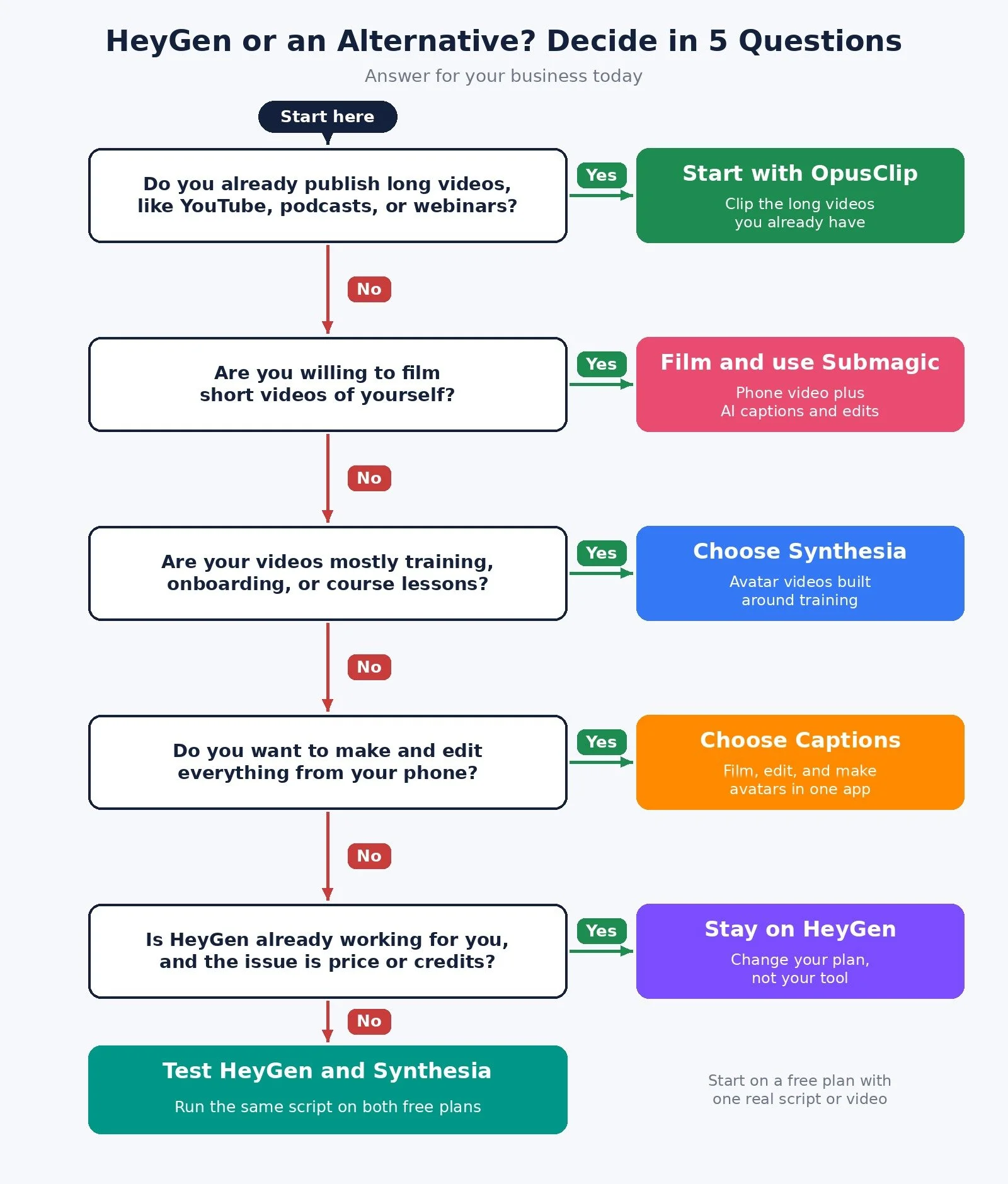
Do you already publish long videos, like YouTube videos, podcasts, or webinars? Yes: start with OpusClip and clip what you have. No: go to question 2.
Are you willing to film short videos of yourself? Yes: film on your phone and polish with Submagic. No: go to question 3.
Are your videos mostly training, onboarding, or course lessons? Yes: choose Synthesia. No: go to question 4.
Do you want to make and edit everything from your phone? Yes: choose Captions. No: go to question 5.
Is HeyGen already working for you, and the issue is price or credits? Yes: stay on HeyGen and change your plan. No: run the same script through HeyGen Free and Synthesia Basic, then pick.
The Recommended Pick for Each Type of Solopreneur
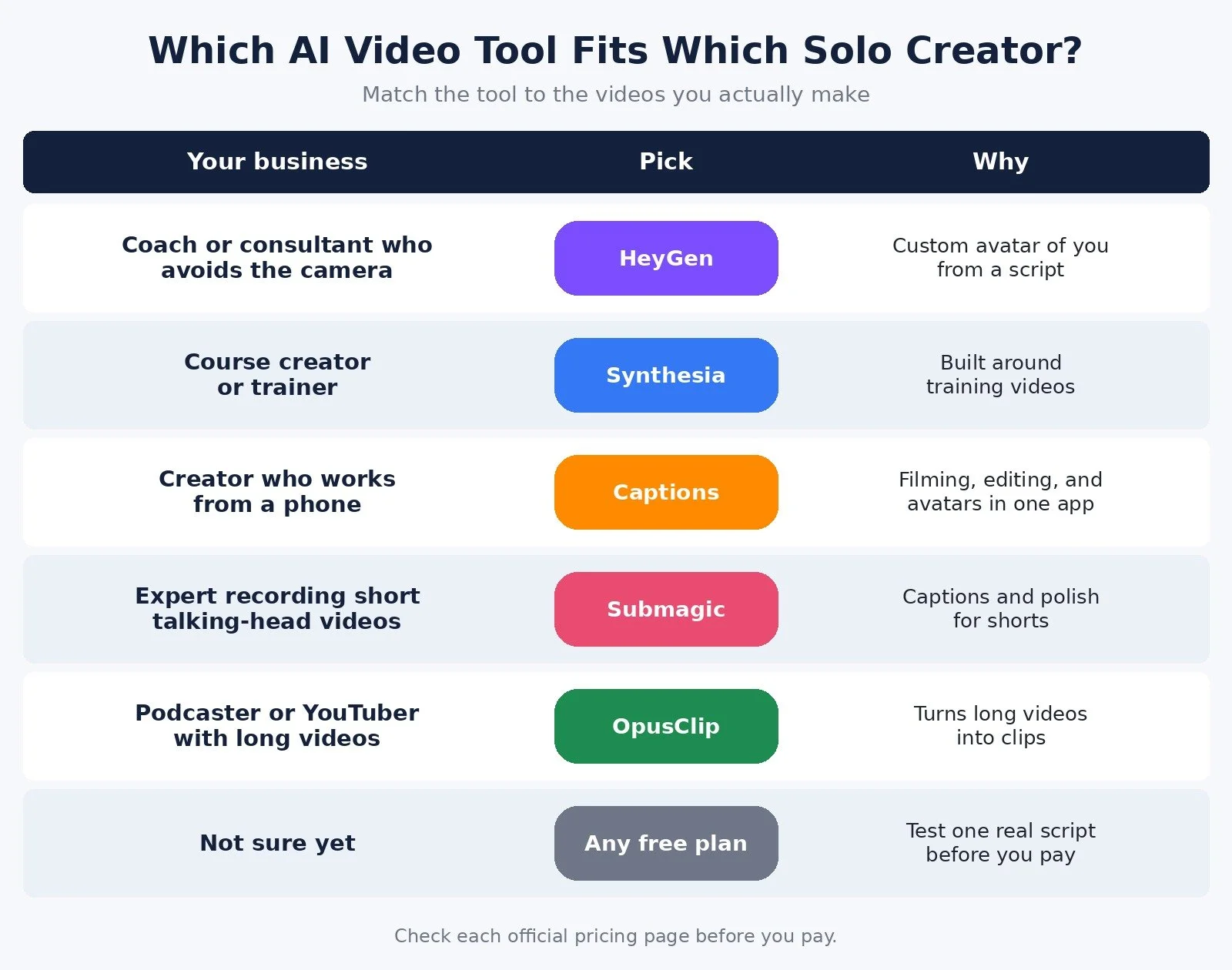
Coach or consultant who avoids the camera: Pick: HeyGen; Plan to start on: Free, then Creator; Why: Custom avatar of you from a script
Course creator or trainer: Pick: Synthesia; Plan to start on: Basic, then Starter; Why: Built around training videos
Creator who works from a phone: Pick: Captions; Plan to start on: Free version; Why: Filming, editing, and avatars in one app
Expert recording short talking-head videos: Pick: Submagic; Plan to start on: Starter; Why: Captions and polish for shorts
Podcaster or YouTuber with long videos: Pick: OpusClip; Plan to start on: Free, then Starter; Why: Turns long videos into clips
Not sure yet: Pick: Any free plan; Plan to start on: Free; Why: Test one real script before you pay
How to Test Before You Commit
HeyGen, Synthesia, and OpusClip have free plans, Captions has a free version, and Submagic says no credit card is required to start.
Test one real job, not every feature:
Run one 60-second script through HeyGen Free and Synthesia Basic, then watch both on your phone.
Check the credits each video used against the plan you would buy.
If you would rather film, record one short video and run it through Submagic, or upload one long video to OpusClip Free.
You can try HeyGen free here, start Submagic here, or try OpusClip on the free plan. Synthesia and Captions can be started from their official websites.
Common Mistakes When Choosing an AI Video Tool
Buying an avatar to avoid a short recording. If a 60-second phone video would do the job, an avatar subscription may be solving the wrong problem.
Comparing prices instead of credits. A cheaper plan with fewer credits can cost more per video.
Switching tools to fix a plan problem. Wrong credit totals are usually a tier issue.
FAQ
What is the best HeyGen alternative for solopreneurs?
Synthesia is the closest avatar alternative, especially for training content. Captions fits phone-first creators. If you will film yourself, Submagic or OpusClip may replace the avatar.
Is HeyGen or Synthesia cheaper?
At the entry level, Synthesia Starter is $19 a month and HeyGen Creator is $29 a month on monthly billing. Compare the credits each plan includes against how many videos you make.
How much does HeyGen cost?
HeyGen has a free plan. On monthly billing, Creator is $29 a month, Pro is $49, and Business is $149 plus $20 per extra seat.
Is OpusClip a HeyGen alternative?
Only if you already have long videos. OpusClip clips footage you recorded; HeyGen creates video from a script.
What to Do Next
Decide whether you need an avatar or will film yourself.
Count your videos per month and how long they run.
Walk through the decision diagram above and note which tool it points to.
Test one real script or video on the free plan before you pay.
Browse Best Tools for the rest of the tools I recommend for solo businesses.
If you want help connecting your video tools to your posting workflow so videos go out without you, I take on automation strategy projects through my services.
Disclosure: the HeyGen, Submagic, and OpusClip links in this post are affiliate links. If you sign up through them I may earn a commission at no extra cost to you. They do not change which tool I recommend for which kind of business.
Make more. Spend less. Work less. Pick the video tool that matches how you actually show up, and let the rest wait.