Zapier is easy to get started with, which is why so many solo operators end up using it. That ease is the whole appeal. You connect a couple of apps, flip a switch, and something in your business runs without you.
The problem usually shows up later, when task limits climb and multi-step Zaps get expensive. You start paying more every month for workflows that should feel like infrastructure, not a recurring tax on your time. If you run a one-person business, that sting is real. Every extra $30 to $100 a month is money that could go into ads, tools that sell for you, or just keeping more profit.
I have used Zapier for years, and I still reach for it when it is the cleanest connector for a specific stack. For most solopreneurs I talk to, though, the better move in 2026 is a cheaper or more flexible alternative that still gets the job done.
This guide covers the Zapier alternatives I actually recommend for solo operators: Make for visual multi-app workflows, and n8n when you want control or self-hosting. You will also get a migration playbook and clear picks by use case.
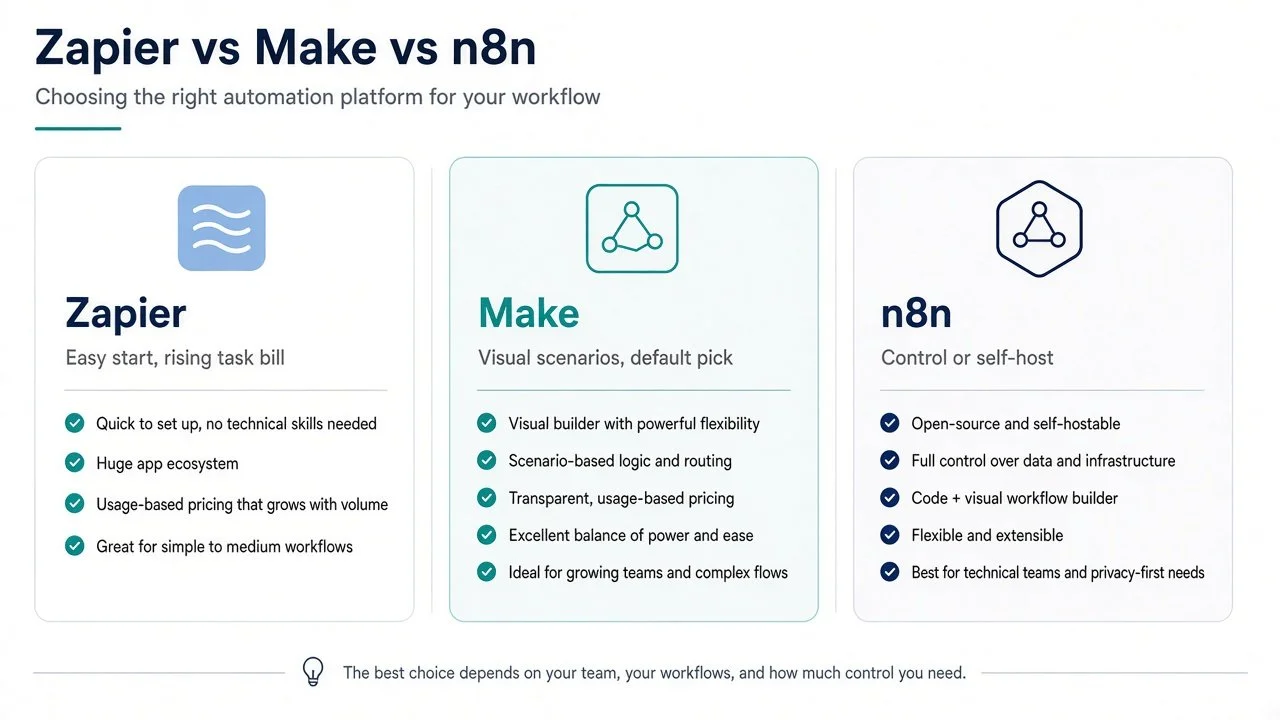
Comparison of Zapier, Make, and n8n as Zapier alternatives for solopreneurs in 2026.
Who Should Switch (and Who Should Stay)
Switch if these sound familiar
Your Zapier bill keeps rising because of task volume, not because your business got dramatically more complex.
You need branching logic, loops, or data mapping that feels expensive inside Zapier.
You need custom HTTP, code steps, or deeper control than a simple Zap chain.
You want a free or near-free path while you prove a workflow.
You are comfortable learning a new builder if the monthly savings stick.
Stay on Zapier if
Your stack only needs a few simple Zaps and the bill is still low.
Someone else on the team needs the most familiar UI in the market.
A critical integration only works well in Zapier today.
You value speed of setup over cost, and your margins support that.
Switching for the sake of switching wastes time. Switch when cost or flexibility is the real bottleneck.
How to Evaluate Zapier Alternatives
Feature lists are noisy. For a solo operator, I care about 4 things.
1. Price at real solo volume
Look past “starts free.” Estimate monthly cost at your actual run rate: leads captured, invoices sent, form submissions, content publishes, CRM updates.
A cheap tool that forces you into a higher plan early is not cheap. Price the same volume in the alternative before you commit.
2. Learning curve
You do not have an ops team. If the tool takes 2 weeks to feel usable, that is a real cost.
Ask yourself: can I rebuild my most important Zap in one sitting?
3. Reliability
Broken automations create silent failures: missed leads, unpaid invoices, unposted content. Prefer tools with clear run history and easy retries.
If you cannot see why a run failed in under a minute, you will stop trusting the system.
4. Integrations that matter for solos
You do not need 7,000 apps. You need the ones you actually run: email, CRM, forms, Stripe or PayPal, Google Sheets, Slack, Notion, social tools, AI APIs.
When a native connector is missing, Make and n8n both give you HTTP and mapping options so you are not stuck waiting on a catalog.
Those 4 criteria drive the picks below.
Make: The Default Zapier Alternative for Most Solos
Make is the alternative I send most solopreneurs to first.
Why: the visual scenario builder makes multi-step workflows easier to understand than a long Zap chain, and pricing is usually kinder once you leave the “simple Zap” zone. You can see routers, filters, and data mapping on a canvas instead of hunting through nested steps.
That matters when you are the only person who will debug it.
Where Make wins
Visual scenarios that stay readable as they grow
Strong value when you need branching and multi-step logic
Good fit for lead routing, content pipelines, CRM updates, and AI-assisted workflows
Easier to audit what a scenario is doing when something breaks
Cloud-hosted, so you are not maintaining a server on top of your business
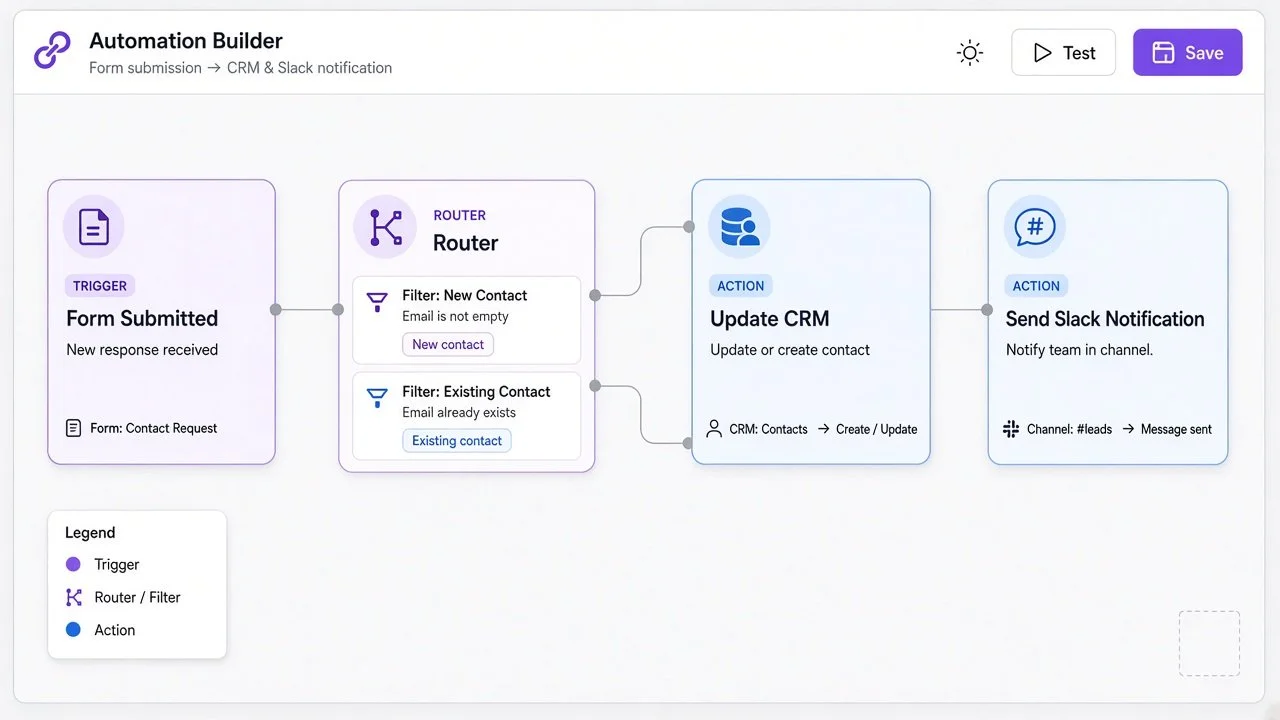
Make scenario canvas example for solo lead routing
Where Make loses
The interface has more depth than Zapier’s basic builder, so day 1 can feel denser
Extremely niche apps may still connect better in Zapier
If you want full ownership of the stack and custom code as a habit, you may outgrow Make’s sweet spot
When to start with Make
Start with Make if you are leaving Zapier because of cost and complexity, and you want results this week.
A practical path:
Pick your most expensive or most fragile Zap.
Rebuild it as one Make scenario.
Run both systems in parallel for a few days.
Compare operation usage against your Zapier task bill.
Only then move the next workflow.
I wrote a beginner walkthrough of useful shortcuts here: Make.com shortcuts for automation beginners.
Next step: try Make on one expensive Zap first. Rebuild the highest-cost workflow, compare usage for a week, then decide. Start here: Make.
n8n and Self-Hosting: When Control Beats Convenience
n8n is the option people mean when they say “Zapier alternative with more control.” You can use n8n Cloud or self-host.
I cover self-hosting in detail here: how to self-host n8n. For a concrete content workflow example, see automated faceless videos with n8n.
Where n8n wins
Lower long-term cost if you self-host and have the skills to maintain it
Flexible workflows, custom code nodes, and deeper control
Strong fit for technical solos and builders who want to own the stack
Useful when you are gluing messy APIs or building agent-style graphs
Where n8n loses
Steeper learning curve than Zapier or Make for many people
Self-hosting means you own uptime, updates, and backups
Not a “set and forget” choice if you hate infrastructure
Cloud pricing can still climb if you stay on managed hosting
When n8n is the right call
Pick n8n when control and cost matter more than convenience. Pick self-hosting when you are comfortable with a VPS and want flat monthly costs.
If you are not technical and you just want the bill to drop, start with Make. You can move a subset to n8n later.
Other Options Worth a Look
A few more tools show up in “Zapier alternatives” searches. Useful in specific cases, not my default stack for most solos:
Pabbly Connect: often priced for high task volume. Worth a look if your main complaint is Zapier task math and you want a simpler connector style.
Activepieces: open-source-friendly automation with a growing connector set. Interesting if you want something closer to the self-host mentality without jumping straight to n8n.
Evaluate both against the same 4 criteria: real volume price, learning curve, reliability, and the integrations you actually use. One primary stack beats tool sprawl.
Migration Playbook: Zapier to a Cheaper Stack
Do not migrate everything in one weekend. Migrate the expensive and fragile stuff first.
Step 1: Export your Zap inventory
List every Zap, trigger, action apps, monthly task usage, and business impact (revenue, leads, ops). A simple spreadsheet is enough.
Step 2: Rank by cost and risk
High-task, high-value Zaps move first. Low-volume Zaps can wait. If a Zap is cheap and stable, leave it alone for now.
Step 3: Pick the right destination per workflow
Most app-to-app logic goes to Make. Choose n8n if you are technical and want control, custom code, or self-hosting.
Step 4: Rebuild 1 workflow end to end
Prove the happy path. Then force a failure and confirm you can see the error and retry it.
Step 5: Run both systems in parallel
Keep the Zap and the new scenario running together for 3 to 7 days. Compare outputs before you turn the Zap off.
Step 6: Turn off the Zap and watch
Watch for 1 week. Check lead counts, invoices, and notifications daily.
Step 7: Document the new scenario
Future you will forget why a filter exists. Write one short note: trigger, filters, and where data goes.
Step 8: Migrate the next Zap
Momentum beats big-bang rewrites.
Migration is a cost project, not a purity project. Leave cheap, stable Zaps on Zapier until there is a clear reason to move them
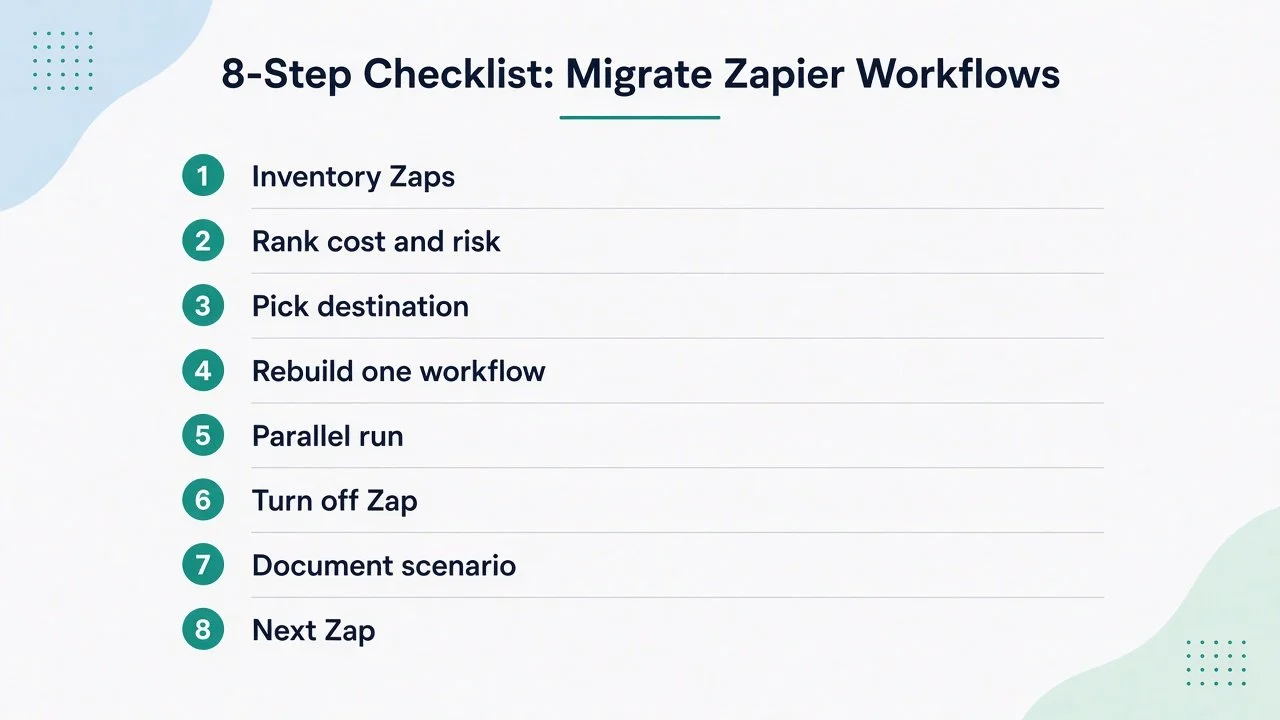
Eight-step Zapier migration playbook for solopreneurs
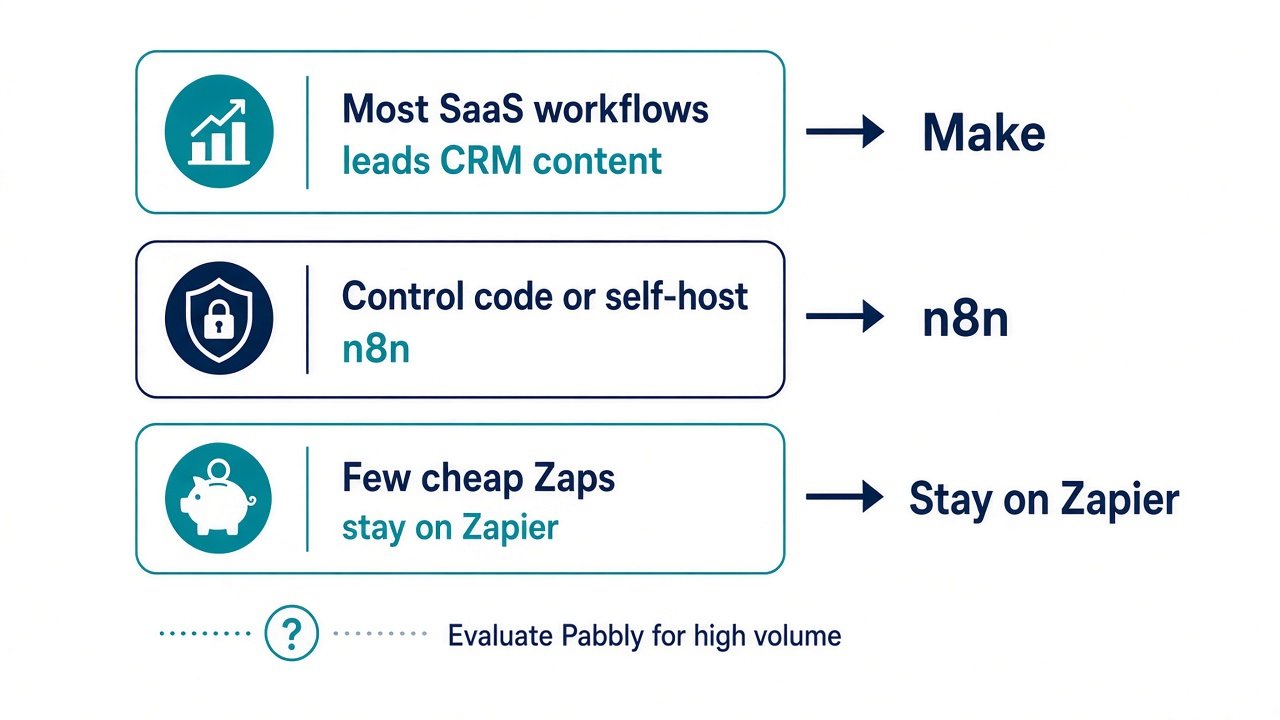
Zapier alternative picks by solopreneur use case
Recommendation by Use Case
Most solopreneur workflows (leads, CRM, content, billing handoffs): start with Make. Best balance of power, clarity, and cost for solos.
Technical builder who wants control or self-hosting: n8n. Flexibility and long-term cost control when you are willing to own the system.
Complex graphs, custom code, or messy APIs: n8n. Code nodes and HTTP glue without fighting a simple Zap chain.
Tiny stack, a few simple Zaps, low bill: stay on Zapier. Switching cost is higher than the savings.
Extremely high task volume on simple connectors: evaluate Pabbly or similar. Pricing models can win on raw volume when the workflows stay simple.
If you only remember 1 line: Make for most SaaS workflows, n8n when you want to own the stack.
FAQ
What is the best free Zapier alternative for solopreneurs?
“Free” usually means a free tier with limits. Make’s free plan is enough to test real scenarios. n8n can be free if you self-host, but your time and server cost are not free. Start with free tiers, measure real usage, then pay only where the workflow pays you back.
Is Make cheaper than Zapier?
Often yes for multi-step solo workflows, which is why Make is my default recommendation when cost is the reason you are shopping. Your result depends on operations vs tasks and how complex your scenarios are. Rebuild your top 1 or 2 Zaps in Make and compare a month of projected usage before you commit.
Make vs Zapier: which should a solopreneur pick in 2026?
If your Zaps are simple and cheap, Zapier is fine. If you are paying for multi-step logic, branching, and volume, Make is usually the better solo pick.
Make vs n8n: which should I learn first?
Most solos should pick Make first. It is the fastest path to readable multi-step workflows without owning infrastructure. Pick n8n first if you are technical, want custom code or agents, or plan to self-host for long-term cost control.
Is n8n hard for beginners?
Harder than Zapier for most non-technical users. Self-hosting adds another layer. If you want the fastest path to lower cost without infrastructure, choose Make first. If you enjoy building systems and want control, n8n is worth the climb. Start with self-host n8n if that is your direction.
Should I migrate all my Zaps at once?
No. Migrate the expensive or fragile ones first. Leave cheap, stable Zaps alone until there is a clear reason to move them.
What to Do Next
If Zapier is costing you more than it should, pick 1 path today:
Rebuild your most expensive Zap in Make.
If you want ownership and are technical, explore self-hosting n8n.
For a broader stack beyond automation, browse the tools I actually recommend on Best Tools.
If you want practical automation ideas each week, Automation Nation is where I share the workflows worth copying. And if you need help designing or fixing a system so it actually saves time, I take on automation strategy and build projects through my services.
Make more. Spend less. Work less. Automation should support that, not fight it.