Open-Source Alternatives to SaaS for Solopreneurs (2026): What to Swap and When to Stay
Every tool in a solo business starts cheap. Then the subscriptions stack up, and each one charges more as you grow: more tasks, more seats, more contacts, more pageviews.
Open-source alternatives look like the way out. Sometimes they are. Sometimes they just trade a monthly bill for a server you now have to babysit.
This is a decision guide, not a setup tutorial. No install walkthroughs and no template files. Just six open-source swaps that fit a one-person business, what each costs, how much running it yourself asks of you, and when to stay on SaaS.
If automation is your only question, my Make vs n8n comparison goes deeper on that one decision. This post covers the wider stack.
The Short Answer
Open source pays off when a SaaS bill grows with your usage and you are willing to own a server. If you are not, use the open-source tool's own hosted plan. Keep revenue-critical jobs, like email delivery, on a managed service until you know you can run them.
Swap one tool at a time, not the whole stack.
First, Know the Three Ways to Run an Open-Source Tool
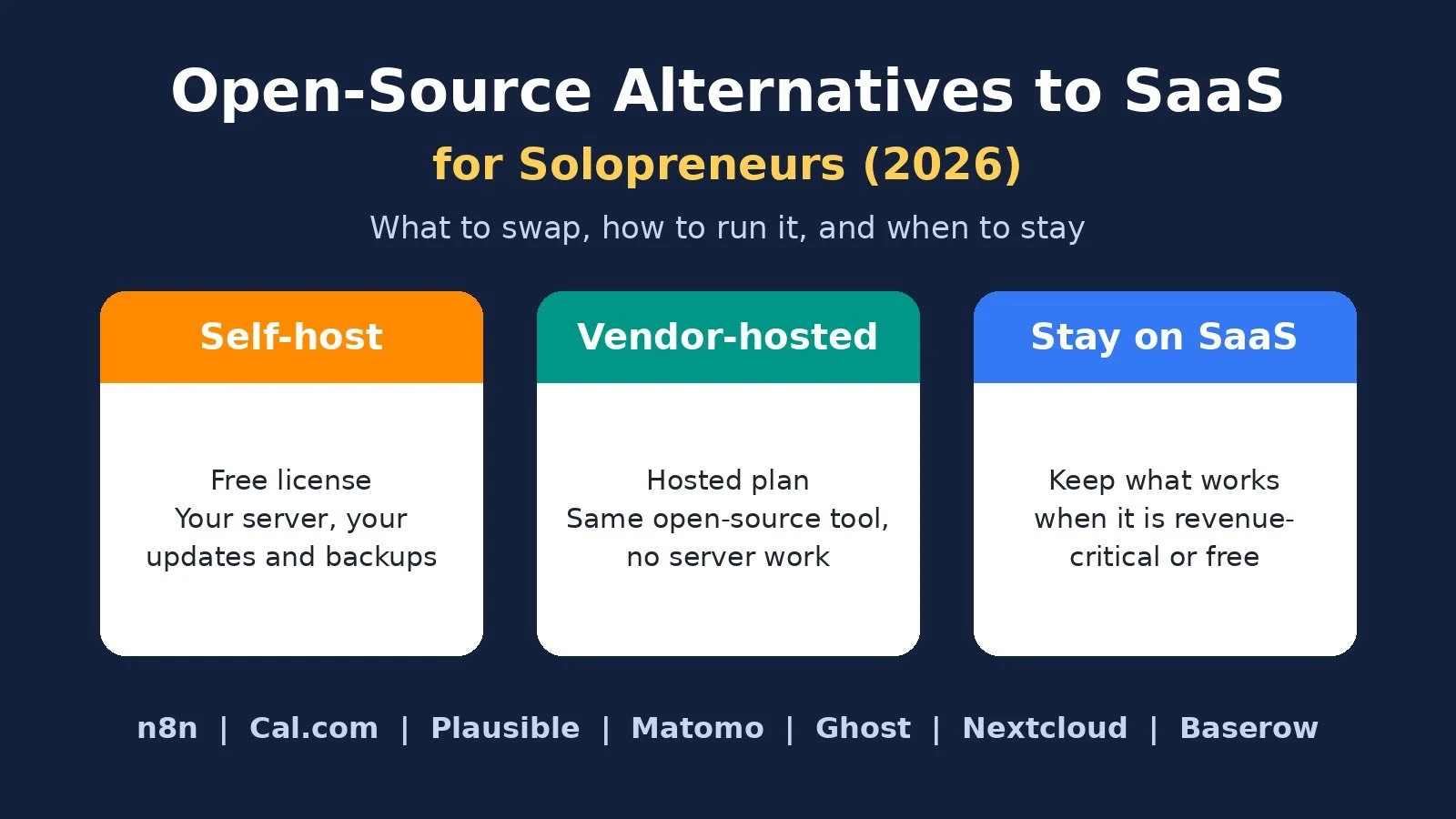
Every tool in this guide can be run three ways, and that choice matters more than the brand:
Self-hosted community edition: free to run on your own server. Updates, backups, security, and uptime are your job.
Hosted by the vendor: the same company runs it for you. You keep the open-source exit door and skip the server work.
Stay on SaaS: keep the closed tool you already use because it works and the bill is fair.
The license can be free. Your time is not.
Quick Comparison
Automation: Common SaaS pick: Zapier; Open-source swap: n8n; Vendor-hosted option: n8n Cloud; Free self-hosted edition: Community Edition
Scheduling: Common SaaS pick: Calendly; Open-source swap: Cal.com; Vendor-hosted option: Cal.com Free and Teams; Free self-hosted edition: Cal.diy (personal, non-production use)
Web analytics: Common SaaS pick: Google Analytics; Open-source swap: Plausible or Matomo; Vendor-hosted option: Plausible Cloud, Matomo Cloud; Free self-hosted edition: Plausible CE, Matomo On-Premise
Blog and newsletter: Common SaaS pick: Site builder plus newsletter tool; Open-source swap: Ghost; Vendor-hosted option: Ghost(Pro); Free self-hosted edition: Ghost (MIT license)
File storage: Common SaaS pick: Dropbox or Google Drive; Open-source swap: Nextcloud; Vendor-hosted option: Nextcloud One, provider accounts; Free self-hosted edition: Nextcloud server (AGPL)
Spreadsheet database: Common SaaS pick: Airtable; Open-source swap: Baserow; Vendor-hosted option: Baserow Cloud; Free self-hosted edition: Baserow self-hosted (mostly MIT)
All prices below were checked on official pricing pages on October 22, 2026. Confirm before you pay.
What the Entry Plans Cost
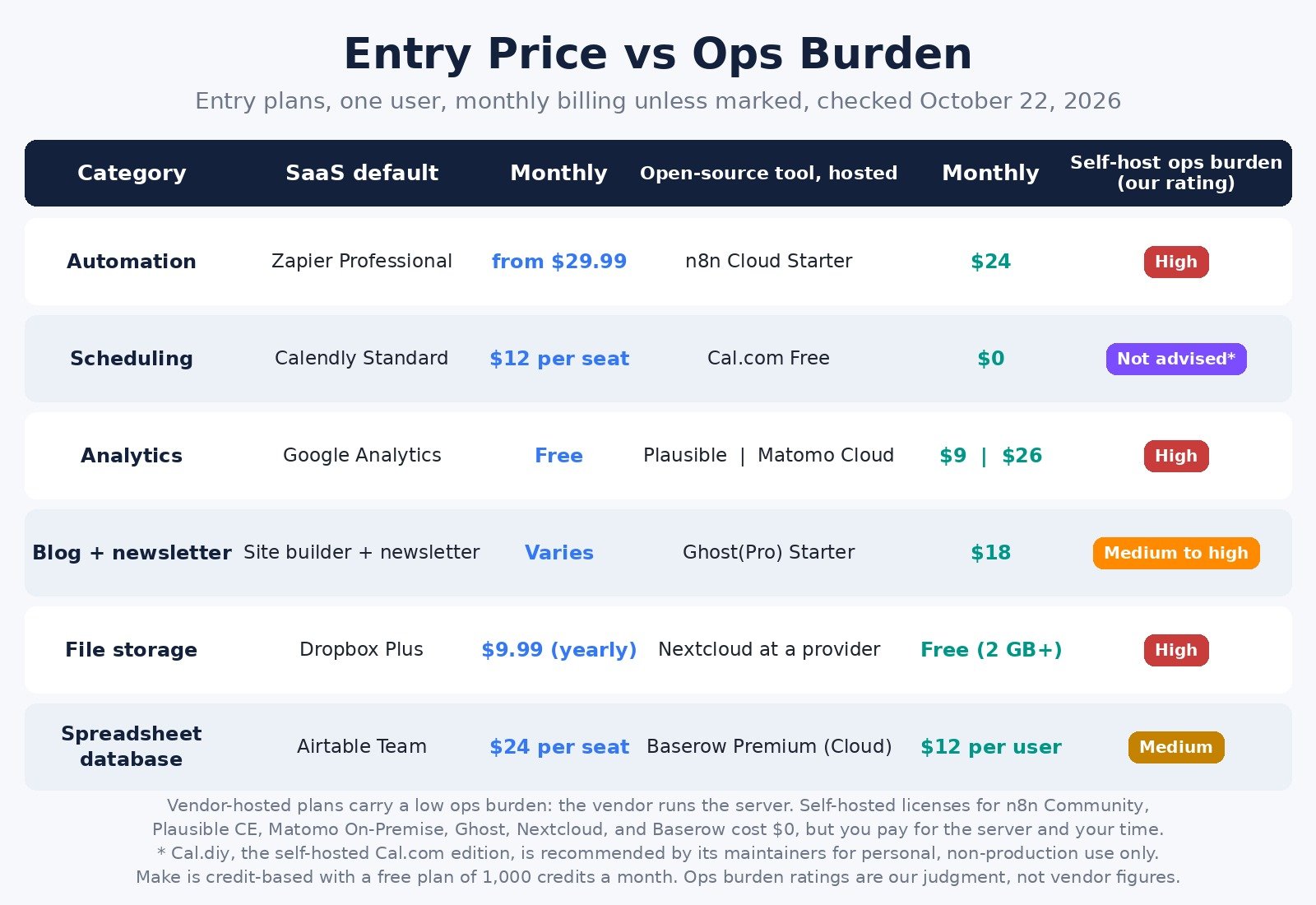
Monthly billing, cheapest paid plan, one user, unless noted. Yearly billing is cheaper wherever it is offered.
Automation: SaaS entry plan: Zapier Professional from $29.99; Open-source tool, hosted: n8n Starter $24 (2,500 executions); Self-hosted license: $0
Scheduling: SaaS entry plan: Calendly Standard $12 per seat; Open-source tool, hosted: Cal.com Free, $0 for individuals; Self-hosted license: $0
Analytics: SaaS entry plan: Google Analytics, free for most solos; Open-source tool, hosted: Plausible Starter $9; Matomo Cloud $26 at 50,000 hits; Self-hosted license: $0
Blog and newsletter: SaaS entry plan: Varies by builder; Open-source tool, hosted: Ghost(Pro) Starter $18 (1,000 members); Self-hosted license: $0
File storage: SaaS entry plan: Dropbox Plus $9.99, billed yearly (2 TB); Open-source tool, hosted: Free Nextcloud provider account (2 GB or more); Self-hosted license: $0
Spreadsheet database: SaaS entry plan: Airtable Team $24 per seat; Open-source tool, hosted: Baserow Premium $12 per user; Self-hosted license: $0
A $0 license is not a $0 tool. Self-hosting adds a server, backups, and your hours, and none of those appear on a pricing page. That is why the hosted column is often smarter.
1. Automation: n8n Instead of Zapier
Who it fits: solos whose automations run often or have many steps.
What it replaces: Zapier, where every step in a Zap uses tasks. Zapier Free includes 100 tasks a month, and Professional starts from $29.99 a month, or $19.99 billed yearly.
Pricing model: per workflow execution, regardless of how many steps it has. When I checked n8n.io/pricing, Starter was $24 a month, or $20 billed annually, for 2,500 executions. Pro was $60, or $50 billed annually, for 10,000. All plans include unlimited users and workflows. Self-hosted without a license key, n8n runs as the free Community edition.
Ops burden: low on n8n Cloud, high when self-hosted. The one-line setup requires Docker.
Stay on SaaS if: you want the easiest visual builder and no servers. Then Make is the managed option I recommend for most solos. It bills in credits, most actions use 1 credit, and Free includes 1,000 a month. Core is $16 a month ($12 yearly) for 10,000 credits a month. My Make vs Zapier comparison and Zapier alternatives guide cover that side.
Pick it if: your Zaps are long and your task count keeps climbing. Start with n8n here, and read how to self-host n8n when you want to own it.
2. Scheduling: Cal.com Instead of Calendly
Who it fits: consultants, coaches, and service businesses who need more than one meeting type.
What it replaces: Calendly, whose Free plan covers one event type and one calendar connection. Standard was $12 per seat a month, or $10 billed yearly.
Pricing model: per user. When I checked cal.com/pricing, the Free plan for individuals included unlimited event types and calendars, Stripe and PayPal payments, and a 1-click import of Calendly events. Teams was $12 per user a month billed yearly.
Ops burden: low on the hosted plans. The self-hosted community edition is now a separate MIT project called Cal.diy, and its README says it is "strictly recommended for personal, non-production use."
Stay on SaaS if: one event type covers you and clients already know your Calendly link.
Pick it if: you need several meeting types or paid bookings. Use the hosted Free plan, not a self-hosted copy, for anything that books paying clients. See Cal.com's plans here.
3. Web Analytics: Plausible or Matomo Instead of Google Analytics
Who it fits: solos who want simple traffic numbers or care about privacy.
What it replaces: Google Analytics. This swap is about a simpler dashboard and owning your data, not saving money.
Pricing model: by traffic. When I checked plausible.io, Plausible Cloud Starter was $9 a month or $90 a year for one site and up to 10,000 monthly pageviews. Plausible Community Edition is free and AGPL licensed. Matomo Cloud at 50,000 hits a month was USD 26 a month or USD 260 a year, excluding tax. Matomo On-Premise Community is free.
Ops burden: low on either cloud plan, high when self-hosted. Plausible says Community Edition users handle "installation, maintenance, upgrades, server capacity, uptime, backup, security" themselves.
Stay on SaaS if: you rarely open your analytics now.
Pick it if: you want one clean page of traffic (Plausible) or deeper reports with the option to move between cloud and your own server later (Matomo).
4. Blog and Newsletter: Ghost
Who it fits: creators whose business runs on content, a newsletter, and memberships.
What it replaces: a site builder plus a separate newsletter tool.
Pricing model: by plan and members. When I checked ghost.org/pricing, Starter was $18 a month, or $15 billed yearly, with a custom domain, email newsletter, and 1,000 members. Publisher was $35, or $29 billed yearly, adding paid subscriptions. Ghost itself is MIT licensed and can be self-hosted.
Ops burden: low on Ghost(Pro), medium to high self-hosted. Ghost recommends an Ubuntu server with at least 1GB of memory.
Stay on SaaS if: your current site works and publishing is not the core of your business.
Pick it if: content and members are the business. See Ghost's plans here.
5. File Storage: Nextcloud Instead of Dropbox or Google Drive
Who it fits: solos who want client files on infrastructure they choose.
What it replaces: Dropbox or Google Drive. When I checked dropbox.com/plans, Dropbox Basic was free with 2 GB, and Plus was $9.99 a month billed yearly for one person and 2 TB.
Pricing model: the Nextcloud server is free and AGPL licensed. Paid Enterprise subscriptions start at 100 users, so skip those. For one person, nextcloud.com lists three routes: self-host with the All-in-One Docker image, a free single-user account at a partner provider with 2 GB or more of storage, or Nextcloud One, a managed service at €18 a month for one user with 500 GB, or €15 billed yearly.
Ops burden: low at a provider, high self-hosted. Disks, backups, and security updates become your job.
Stay on SaaS if: your files live next to your email in Google Workspace, or clients expect Dropbox links.
Pick it if: you want files and sharing on a server you or a provider you trust controls. See Nextcloud here.
6. Spreadsheet Database: Baserow Instead of Airtable
Who it fits: solos who run content calendars, client lists, or leads in a spreadsheet-style database.
What it replaces: Airtable. When I checked airtable.com/pricing, Free allowed 1,000 records per base, and Team was $24 per seat a month, or $20 billed annually.
Pricing model: per user. When I checked baserow.io/pricing, Cloud Free was $0 with 3,000 rows and 2GB of storage per workspace. Premium was $12 per user a month, or $10 billed yearly, with 50,000 rows. Baserow's FAQ says the self-hosted version "will never have row, storage, or API request limitations" and that almost all of its code is MIT licensed. Premium features still need a paid license.
Ops burden: low on Baserow Cloud, medium self-hosted with Docker. Its FAQ says a cloud workspace can be exported and imported into a self-hosted instance, so you can start hosted and move later.
Stay on SaaS if: clients or collaborators already work inside your Airtable bases.
Pick it if: you outgrew a free record limit or want a path to owning your data. See Baserow here.
When to Stay on SaaS
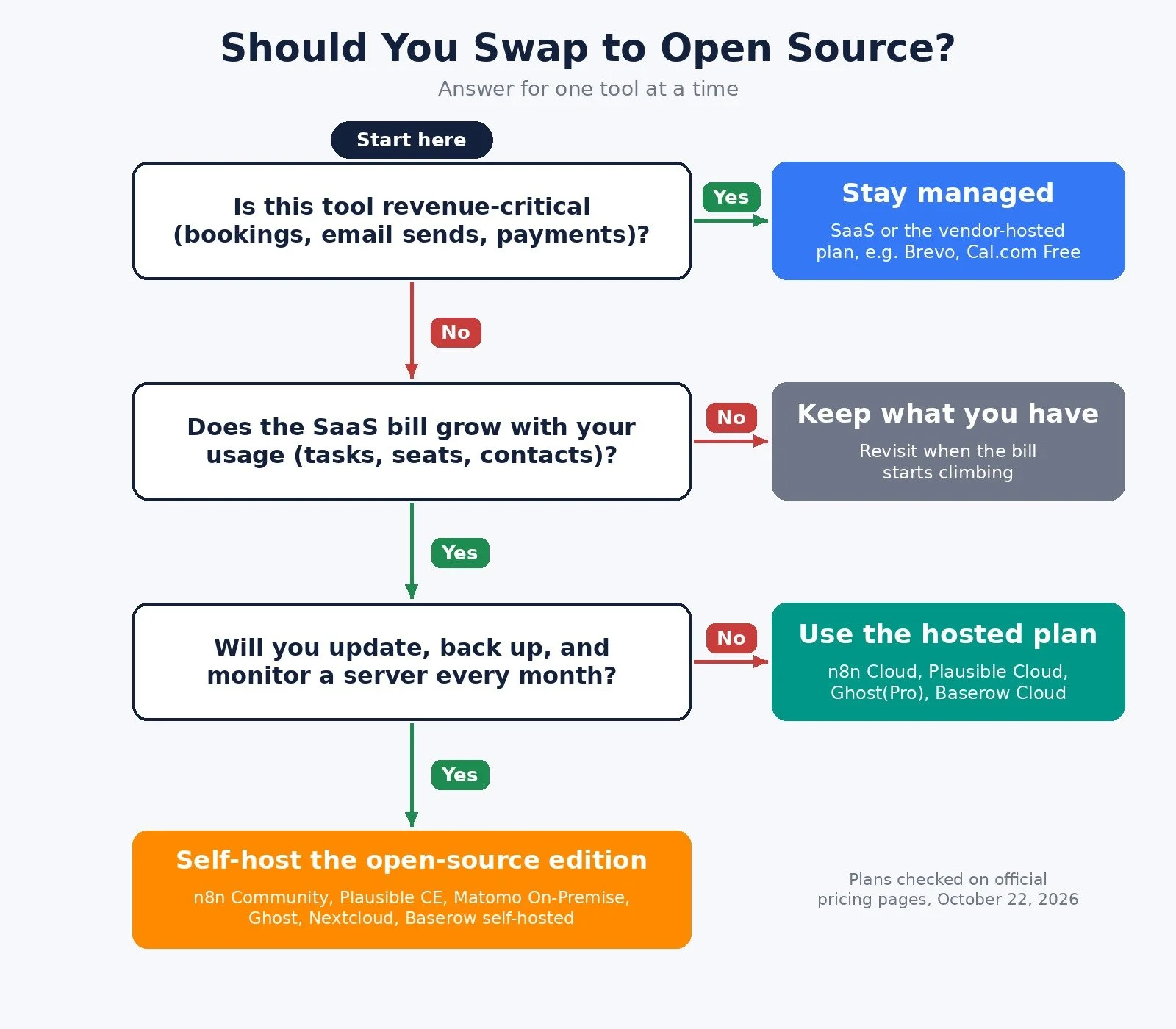
Stay on SaaS, or on the vendor's hosted plan, when any of these are true:
The workflow is revenue-critical. A broken booking page or email send costs more than the subscription.
You will not patch and back up a server every month. Use the hosted plan.
The free tier already covers you. Calendly Free, Google Analytics, and Brevo Free are hard to beat.
The swap only covers half the job. Partial replacements add tools instead of removing them.
Email sending is the clearest case. Self-hosted email software still needs a sending service, and deliverability becomes your job. If email brings in revenue, Brevo is the managed option I recommend. When I checked brevo.com/pricing, Free allowed up to 300 emails a day, and Starter was $9 a month for 5,000 emails a month. My Brevo email marketing tutorial shows the three emails to set up first.
CRM is close behind. If your pipeline is small and lives where you already work, switching costs attention, not just money. A Baserow table or spreadsheet can carry a solo pipeline for a long time.
Pick by Situation
Many-step automations and a rising task bill: Pick: n8n Cloud; Why: Billed per execution, not per step
Automation with no servers and the easiest builder: Pick: Make; Why: Managed, visual, free plan
Several meeting types as one person: Pick: Cal.com Free; Why: Unlimited event types for 1 user
Simple, privacy-friendly traffic numbers: Pick: Plausible Cloud; Why: One-page dashboard
Content and members are the business: Pick: Ghost(Pro); Why: Site, newsletter, and memberships
Client files on infrastructure you choose: Pick: Nextcloud; Why: Provider or own server
Outgrowing Airtable's record limits: Pick: Baserow Cloud; Why: More rows, self-host path
Email drives revenue and you have never run a mail server: Pick: Brevo; Why: Managed sending, free plan
Before You Self-Host Anything
List every subscription and its monthly cost.
Protect revenue-critical tools. Start with a low-risk category such as analytics.
Try the vendor's hosted plan first.
Write down how you will update, back up, and restore it.
Run old and new side by side for a week, then cancel.
FAQ
Are open-source tools really free?
The license often is. The server, backups, and your time are not.
What is the best open-source alternative to Zapier?
For most technical solos, n8n. It bills per execution, not per step, and has a free Community Edition. For a managed visual tool, Make is easier.
Is there a free open-source alternative to Calendly?
Cal.com has a free hosted plan for individuals with unlimited event types. Its self-hosted edition, Cal.diy, is recommended only for personal, non-production use.
What to Do Next
Find the subscription that grows fastest with your usage. That is your first swap candidate.
If it is automation and you want no servers, start on Make's free plan. If you want ownership, start with n8n.
If it is email, stay managed with Brevo until you are confident running your own sending.
For the wider stack I recommend, browse Best Tools.
If you want help designing a stack that runs without eating your week, I take on automation strategy projects through my services.
Disclosure: some links in this post are affiliate links (Make, n8n, and Brevo). If you sign up through them I may earn a commission at no extra cost to you. It does not change which tool I tell you to pick.
Make more. Spend less. Work less. Swap the tools that bill you for growth, and keep the ones that protect your revenue.