GoHighLevel and Kartra both promise to replace a pile of separate subscriptions with one login. For a one-person business, that promise is real, but the two platforms are built for different kinds of work.
One is built around talking to leads and booking them. The other is built around selling what you know. Pick the wrong one and you pay for features you never open, while the ones you need sit behind a higher plan.
This guide compares them on what matters to a solo owner: price, contact limits, transaction fees, and the kind of business each one fits. If you are still working out which tools to buy first, my solopreneur starter stack guide covers that, and it explains why an all-in-one platform usually comes later.
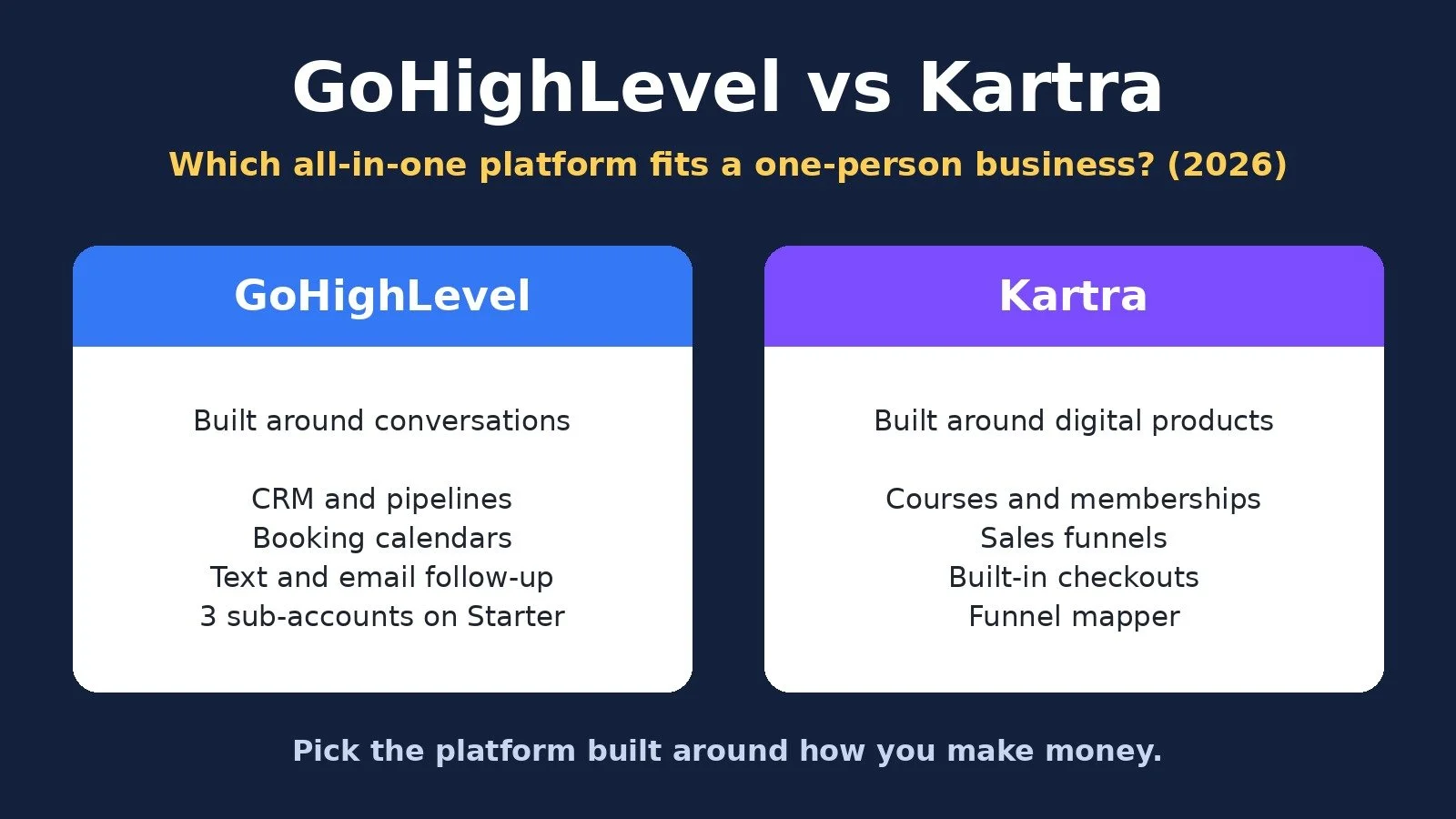
GoHighLevel vs Kartra: The Short Answer
Choose GoHighLevel if your business runs on conversations: booking calls, following up by text and email, managing a sales pipeline, or running more than one brand or client account. Choose Kartra if your business runs on digital products: courses, memberships, and sales funnels with built-in checkout.
Both include pages, email, forms, calendars, and checkout of some kind. The difference is the center of gravity. GoHighLevel starts from the CRM and the conversation. Kartra starts from the product and the funnel that sells it.
What Each Platform Is Built For
GoHighLevel. HighLevel's pricing page lists these core features on every plan: a website and funnel builder, CRM and pipelines, email and SMS marketing, unified conversations, social media management, workflow automation, forms, surveys and quizzes, booking calendars, reputation management, payments and invoicing, courses, communities, and a mobile app. Every plan includes unlimited contacts and unlimited users. Its plans are named for agencies (the Unlimited plan is "built for growing agencies"), and they are organized around "sub-accounts," separate workspaces for each business or client.
Kartra. Kartra's pricing page lists landing pages and websites, sales funnels, email marketing, checkouts, lead management, memberships and courses, video hosting, calendars, and Kartra AI for writing copy. Its plans are organized around contacts, pages, products, and memberships, and its entry plan is labeled "Best For: Solopreneurs, freelancers and creatives launching." It is built for creators and experts who sell their knowledge online.
Pricing Compared
Prices below come from each official pricing page, checked on October 28, 2026, in US dollars. Prices change, so confirm on the official page before you pay.
Monthly billing: GoHighLevel Starter: $97 a month; Kartra Essentials: $59 a month; Kartra Starter: $119 a month
Annual billing: GoHighLevel Starter: $970 a year; Kartra Essentials: $52 a month, billed annually; Kartra Starter: $99 a month, billed annually
Contacts: GoHighLevel Starter: Unlimited; Kartra Essentials: 500; Kartra Starter: 2,500
Email sending: GoHighLevel Starter: Usage-based charges; Kartra Essentials: 10,000 emails and texts a month; Kartra Starter: Unlimited email and SMS
Transaction fees: GoHighLevel Starter: Not listed; Kartra Essentials: 5%; Kartra Starter: 0%
Sub-accounts or domains: GoHighLevel Starter: 3 sub-accounts; Kartra Essentials: 1 custom domain; Kartra Starter: 1 custom domain
Trial or guarantee: GoHighLevel Starter: 14-day free trial; Kartra Essentials: 30-day money back guarantee; Kartra Starter: 30-day money back guarantee
GoHighLevel plans. Starter is $97 a month, or $970 a year on annual billing. The pricing page calls it "perfect for smaller businesses and solo marketers" and lists 3 sub-accounts, unlimited contacts, unlimited users, 24/7 support, and all core features. Unlimited is $297 a month and adds unlimited sub-accounts. Agency Pro is $497 a month and adds SaaS mode for agencies that resell the software. A solo owner almost always belongs on Starter.
Kartra plans. Essentials is $59 a month on monthly billing or $52 a month billed annually. It includes 500 contacts, 10,000 emails a month, 5 pages, 1 product, 1 membership or course, and a 5% transaction fee on your sales. Starter is $119 a month or $99 a month billed annually, with 2,500 contacts, unlimited email and SMS, unlimited pages, products, and memberships, and 0% transaction fees. Growth is $229 a month or $189 a month billed annually, with 12,500 contacts, and it is the plan where Kartra lists its automations, affiliate management, and surveys and quizzes.
The Costs Beyond the Sticker Price
The plan price is not the whole bill on either platform. Each one has a different hidden cost.
GoHighLevel: usage charges. HighLevel's pricing page says usage-based charges apply for phone numbers, SMS, emails sent, and premium AI usage. Its FAQ calls these "usage-based costs for telecommunications and AI services." If you plan to text leads or use the AI features heavily, budget for more than $97 a month. The page also notes that billing begins automatically when the free trial ends unless you cancel.
Kartra: limits and transaction fees. Essentials caps you at 500 contacts and charges 5% on your sales. That fee adds up quickly. On $2,000 of course sales in a month, 5% is $100, which is more than the $60 a month it costs to move from Essentials to Starter on monthly billing. Above $1,200 in monthly sales, the 5% fee alone costs more than the $60 upgrade, so Starter becomes the cheaper plan in practice.
Both: the time cost. An all-in-one platform only saves money if you move your work into it. If you keep paying for your old email tool, scheduler, and page builder while you set it up, you are paying twice. Plan the switch before you start the trial or guarantee window.
Where GoHighLevel Wins
Lead follow-up and booking. If clients book calls with you, GoHighLevel's CRM, pipelines, booking calendars, and unified conversations sit in one place. A lead fills in a form, lands in a pipeline, and gets a text and an email from one workflow.
Unlimited contacts. Every HighLevel plan includes unlimited contacts. If you are building a large list, you do not move up a plan because your list grew. You pay through usage charges when you send instead.
More than one business. Starter includes 3 sub-accounts, so a solo owner can keep separate businesses or brands in separate workspaces on one plan. My guide to running multiple businesses on one GoHighLevel plan walks through that setup.
Service businesses and agencies. Reputation management, social media management, and sub-accounts make GoHighLevel a better fit if you run marketing for local businesses or clients. If you are weighing affiliate, agency, or SaaS models, see my GoHighLevel pricing and business models guide.
Where Kartra Wins
Selling courses and memberships. Kartra is built around products, checkouts, and membership portals. If your main offer is a course, a membership, or a digital product, the selling and delivery live in the same place.
A lower entry price. Essentials costs $59 a month on monthly billing, or $52 a month billed annually, compared with $97 for GoHighLevel Starter. If you are launching your first product to a small list, that difference is real money.
Predictable sending costs. Essentials includes 10,000 emails and texts a month, and Starter includes unlimited email and SMS. You know the bill in advance, as long as you stay inside your contact limit.
Funnel planning. Kartra includes a funnel mapper on every plan and funnel simulation from Growth up. If you think in funnels (opt-in page, sales page, checkout, upsell, membership), Kartra is organized the way you already think. My Kartra review goes deeper on the platform.
Which One Should You Choose? Decision Diagram
Answer each question for your business today, not for the business you plan to have next year.
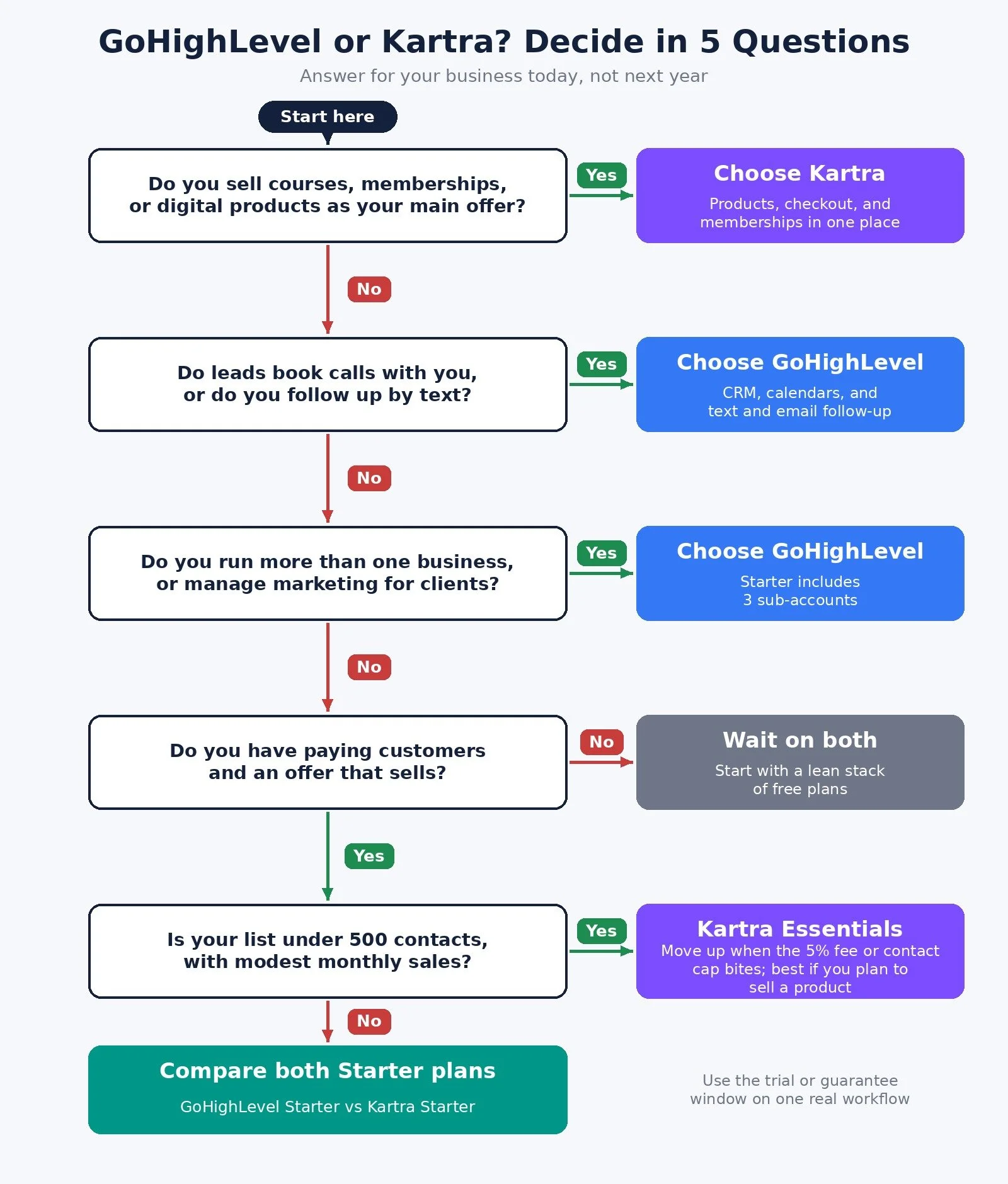
Do you sell courses, memberships, or digital products as your main offer? Yes: choose Kartra. No: go to question 2.
Do leads book calls or appointments with you, or do you follow up by text? Yes: choose GoHighLevel. No: go to question 3.
Do you run more than one business, or manage marketing for clients? Yes: choose GoHighLevel, since Starter includes 3 sub-accounts. No: go to question 4.
Do you already have paying customers and an offer that sells? No: wait on both and start with a lean stack of free plans. Yes: go to question 5.
Is your list under 500 contacts, with modest monthly sales? Yes: start on Kartra Essentials and move up when the 5% fee or the contact cap starts to bite. No: compare GoHighLevel Starter with Kartra Starter side by side.
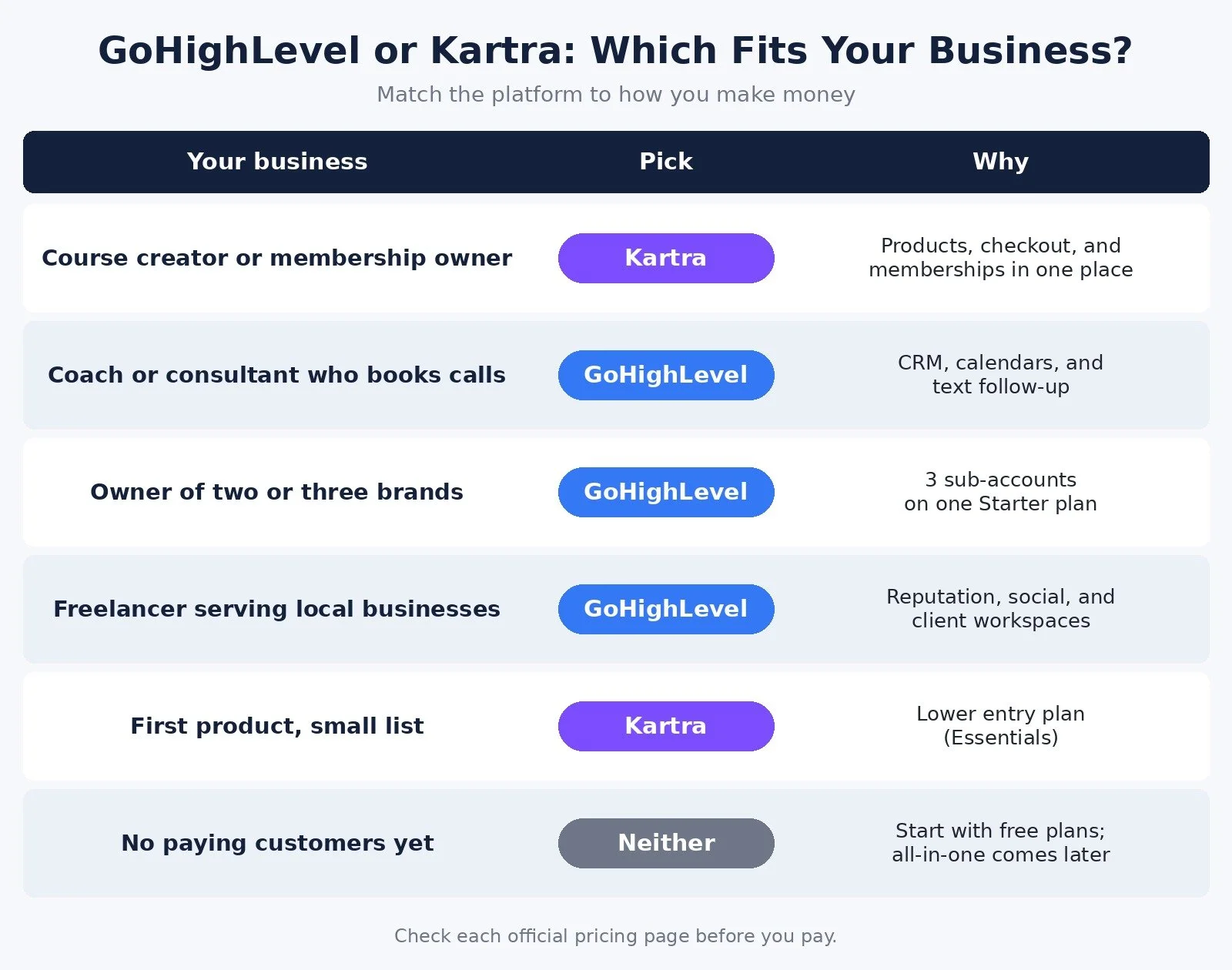
The Recommended Pick for Each Type of Solopreneur
Course creator or membership owner: Pick: Kartra; Plan to start on: Essentials or Starter; Why: Products, checkout, and memberships in one place
Coach or consultant who books calls: Pick: GoHighLevel; Plan to start on: Starter; Why: CRM, calendars, and text follow-up
Owner of two or three brands: Pick: GoHighLevel; Plan to start on: Starter; Why: 3 sub-accounts on one plan
Freelancer serving local businesses: Pick: GoHighLevel; Plan to start on: Starter; Why: Reputation, social, and client workspaces
First product, small list: Pick: Kartra; Plan to start on: Essentials; Why: Lowest entry price of the two
No paying customers yet: Pick: Neither; Plan to start on: Free plans; Why: An all-in-one platform is too early
How to Test Before You Commit
Both platforms give you a window to try them. HighLevel offers a 14-day free trial on any plan, and the trial page reached through my link offers an extended 30-day trial. Kartra lists a 30-day money back guarantee and says you can cancel anytime.
Use that window on one real job, not a tour of every feature:
For GoHighLevel: build one form, one pipeline, and one follow-up workflow that sends a text and an email. Check your usage charges after a week.
For Kartra: build one opt-in page, one sales page, and one checkout for a real product. Run a test purchase and look at how the 5% fee lands on Essentials.
If the platform does not handle that one job well in the first week, it will not get easier when you move everything else in.
You can start a GoHighLevel trial here or see Kartra's plans here.
Common Mistakes When Choosing an All-in-One Platform
Buying before you have an offer. An all-in-one platform makes a working business easier to run. It does not create demand. If nobody is buying yet, free tools are enough.
Comparing sticker prices only. GoHighLevel's usage charges and Kartra's 5% fee on Essentials can each change which plan is cheaper. Estimate a normal month of sends and sales before you compare.
Picking the agency tool for a creator business. GoHighLevel can host courses, and Kartra has calendars. But a platform built around your main job will feel simpler every day. Match the platform to how you make money.
Paying for old tools during the switch. Set a date to cancel the tools the new platform replaces, and move one workflow at a time.
FAQ
Is GoHighLevel or Kartra cheaper for a solopreneur?
Kartra Essentials has the lower entry price at $59 a month on monthly billing, against $97 for GoHighLevel Starter. But Essentials limits you to 500 contacts and charges 5% on sales, while GoHighLevel adds usage charges for texts, emails, and AI. The cheaper option depends on your list size, sales, and how much you send.
Can GoHighLevel host online courses?
Yes. HighLevel's pricing page lists courses and communities among the core features on every plan. Kartra is still the more natural fit if courses and memberships are your main product, because its plans are built around products and checkouts.
Do I need an all-in-one platform as a solopreneur?
Not at the start. Most solo businesses can begin with a free email plan and simple invoicing, then move to an all-in-one platform once they sell a course, run funnels, or manage a busy pipeline. My starter stack guide lays out that order.
What are the best GoHighLevel alternatives for solopreneurs?
If you mainly sell courses, memberships or digital products, Kartra is the closest alternative, because products, checkout and memberships live in one place. If you have no paying customers yet, a stack of free plans will usually serve you better than any all-in-one until your offer sells.
What to Do Next
Write down how your business makes money: selling products, or booking clients.
Walk through the decision diagram above and note which platform it points to.
Estimate one normal month: contacts, emails or texts sent, and sales.
Start the trial or guarantee window and build one real workflow in the first week.
Browse Best Tools for the rest of the tools I recommend for solo businesses.
If you want help setting up funnels, CRM pipelines, and automations that give you your week back, I take on automation strategy projects through my services.
Disclosure: some links in this post are affiliate links (GoHighLevel and Kartra). If you sign up through them I may earn a commission at no extra cost to you. It does not change which platform I recommend for which kind of business.
Make more. Spend less. Work less. Pick the platform built around how you make money, and let the rest wait.