Brevo and Mailchimp are two of the first names a solo owner hears when it is time to start an email list. Both have a free plan, and both charge more as your list grows.
The difference is how they charge you. One prices mostly by how many emails you send. The other prices mostly by how many contacts you keep. That one detail decides which tool stays cheap for your business and which one quietly gets expensive.
This guide compares free plan limits, entry prices, sending caps, and automation, with MailerLite as a third option. If you are still deciding which tools to buy first, my solopreneur starter stack guide covers that order.
Brevo vs Mailchimp: The Short Answer
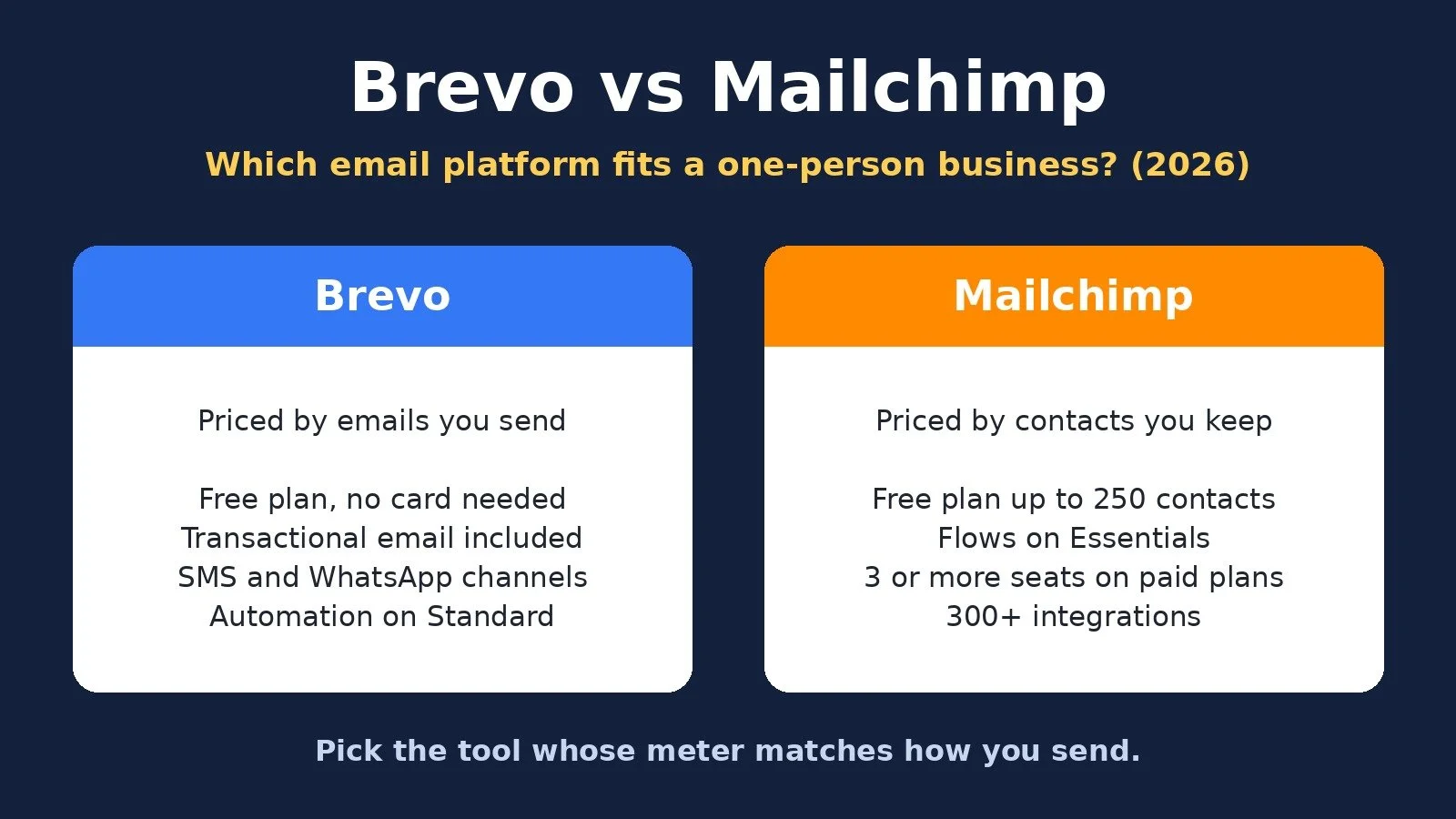
Choose Brevo if you want a free plan with no credit card, low entry prices, and transactional email in the same account, and you send to your list a few times a month. Choose Mailchimp if you want a familiar, polished marketing tool with simple automation on its entry paid plan and you are happy to pay by contact count as your list grows.
Brevo meters your sends. Mailchimp meters your contacts, then sets your sending cap as a multiple of that tier.
What Each Platform Is Built For
Brevo. Brevo's pricing page describes its free plan as "Free forever, no credit card needed" and "Best for individuals and solopreneurs building an online presence." Beyond email campaigns, Brevo sells SMS, WhatsApp, transactional email, a sales CRM, and live chat in the same platform. Its FAQ says every plan includes transactional email features, including APIs and SMTP. Paid plans are priced by monthly email volume, starting from 5,000 emails a month.
Mailchimp. Mailchimp is a marketing platform built around audiences, campaigns, and automation flows. Its pricing page offers four marketing plans: Free, Essentials, Standard, and Premium. Each paid plan is priced by your contact count, and your monthly sending limit is a multiple of that count: 10 times on Essentials, 12 times on Standard, and 15 times on Premium.
MailerLite. MailerLite positions itself as a simpler newsletter tool for creators and small businesses. Its pricing page says "Every paid plan gets our full feature set. You only pay more for a bigger list or more sending." It also includes websites, landing pages, and the option to sell digital products or bookings.
Pricing Compared
Prices below come from each official pricing page, checked on October 29, 2026, in US dollars. Prices change, so confirm on the official page before you pay.
Free plan sending: Brevo: 300 emails a day; Mailchimp: 500 a month, 250 a day max; MailerLite: 2,500 emails a month
Free plan contacts: Brevo: Not listed on the pricing page; Mailchimp: 250 contacts; MailerLite: 250 subscribers
Entry paid plan: Brevo: Starter; Mailchimp: Essentials; MailerLite: Comfort
Entry price, monthly billing: Brevo: $9 a month; Mailchimp: $13 a month (up to 500 contacts); MailerLite: $12 a month (500 subscribers)
Entry price, annual billing: Brevo: $8.08 a month, billed yearly; Mailchimp: No annual option; MailerLite: $10.80 a month, billed yearly
Entry plan sending: Brevo: 5,000 emails a month; Mailchimp: 5,000 sends a month (10 times your tier); MailerLite: 5,000 emails a month (10 times your tier)
Free trial: Brevo: Free plan, no card needed; Mailchimp: 14-day trial of Essentials or Standard; MailerLite: Free plan, 250 subscribers
Brevo plans. The Free plan costs nothing and, according to Brevo's FAQ, lets you send up to 300 emails a day once your account is approved for sending. Starter is $9 a month, or $8.08 a month billed yearly (10% off), and includes 5,000 emails a month. Brevo's published pricing data ties Starter's contact limit to your email tier, starting at 500 contacts at 5,000 emails. Standard is $18 a month, or $16.17 a month billed yearly, and adds marketing automation, A/B testing, one landing page, and removal of the Brevo logo. Professional starts at $499 a month and is built for teams.
Mailchimp plans. The Free plan includes 1 seat, 1 audience, up to 250 contacts, and up to 500 sends a month with a daily maximum of 250. After a 14-day free trial, Essentials starts at $13 a month for up to 500 contacts (5,000 sends a month), with 3 seats and flows of up to 4 steps. Standard starts at $20 a month for up to 500 contacts (6,000 emails a month), with 5 seats. Premium's regular price starts at $350 a month. Annual billing is only offered through sales, for Premium and for Standard at 10,000+ contacts.
MailerLite plans. Free includes 250 subscribers, 2,500 emails a month, 2 seats, and automations. Comfort starts at $12 a month on monthly billing, or $10.80 a month billed yearly, for up to 500 subscribers, and its sending limit is 10 times the top of your subscriber tier. Power starts at $25 a month, or $22.50 a month billed yearly, with unlimited monthly emails under a fair use policy.
The Costs Beyond the Sticker Price
Brevo: sending tiers and add-ons. On Starter, more contacts means buying a bigger email tier, so price your expected list size before you commit. Removing the Brevo logo is included on Standard but sold as a paid add-on on Starter. SMS credits are sold separately on every plan.
Mailchimp: contact-based billing and overages. Mailchimp's FAQ says that after your free trial, if you hit your contact or sending limit, Mailchimp will automatically bill you for the overage. Contacts who never open still count, so clean your list on a schedule.
MailerLite: list size sets the price. MailerLite says you only pay more for a bigger list or more sending, so check the tier that matches the list size you expect, not just today's count.
Where Brevo Wins
A low entry price. Starter is $9 a month versus $13 for Mailchimp Essentials at up to 500 contacts. Standard, with automation and no Brevo logo, is $18 versus $20 for Mailchimp Standard.
Paying for sends. If you email occasionally, a send-based meter can work in your favor. Check the contact limit attached to each Starter tier first.
Transactional email in the same account. Brevo says every plan includes transactional email with APIs and SMTP. Receipts, booking confirmations, and automated follow-ups can run through the same tool as your newsletter. My automated newsletter guide shows what that can look like with an automation platform.
More than email. SMS, WhatsApp, live chat, and a sales CRM live in the same platform, so you can add channels without adding vendors. My Brevo email marketing tutorial covers the three email types most solo businesses need.
Where Mailchimp Wins
Automation on the entry paid plan. Mailchimp Essentials includes automation flows of up to 4 steps. On Brevo, marketing automation is listed as a Standard plan feature, not a Starter feature.
More seats. Essentials includes 3 seats, and Standard includes 5.
Integrations. Mailchimp's pricing table lists 300+ integrations as included on every plan, including Free.
Guided onboarding on Premium. Mailchimp's Premium plan includes dedicated personalized onboarding with up to 4 weekly consultations.
When MailerLite Is the Better Third Option
You want the most generous free sending. MailerLite Free includes 2,500 emails a month for up to 250 subscribers, with automations, a landing page, and 1 digital product or booking.
You sell a small digital product. Free includes 1 digital product or booking, and Comfort includes 5.
You want predictable paid tiers. Comfort's sending limit is 10 times the top of your subscriber tier, and Power removes the monthly email limit under a fair use policy.
Which One Should You Choose? Decision Diagram
Answer for your business today.
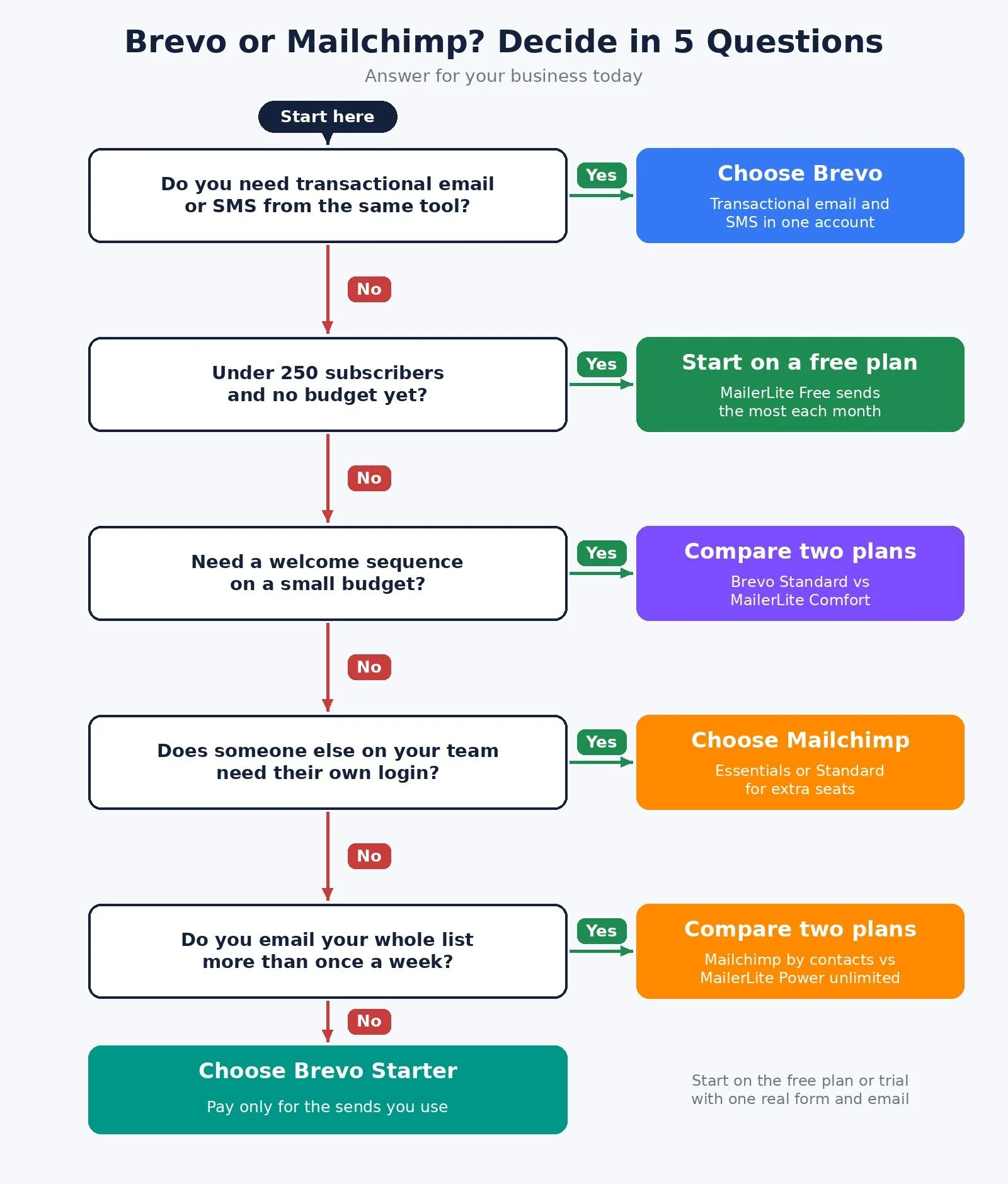
Do you need transactional email (receipts, confirmations) or SMS from the same tool? Yes: choose Brevo. No: go to question 2.
Do you have fewer than 250 subscribers and no budget yet? Yes: start on a free plan; MailerLite Free sends the most each month. No: go to question 3.
Do you need automated sequences, like a welcome series, on a small budget? Yes: compare Brevo Standard with MailerLite Comfort. No: go to question 4.
Does someone else on your team need their own login? Yes: choose Mailchimp Essentials or Standard for the extra seats. No: go to question 5.
Do you email your whole list more than once a week? Yes: compare Mailchimp's contact-based price with MailerLite Power's unlimited sending. No: choose Brevo Starter and pay only for the sends you use.
The Recommended Pick for Each Type of Solopreneur
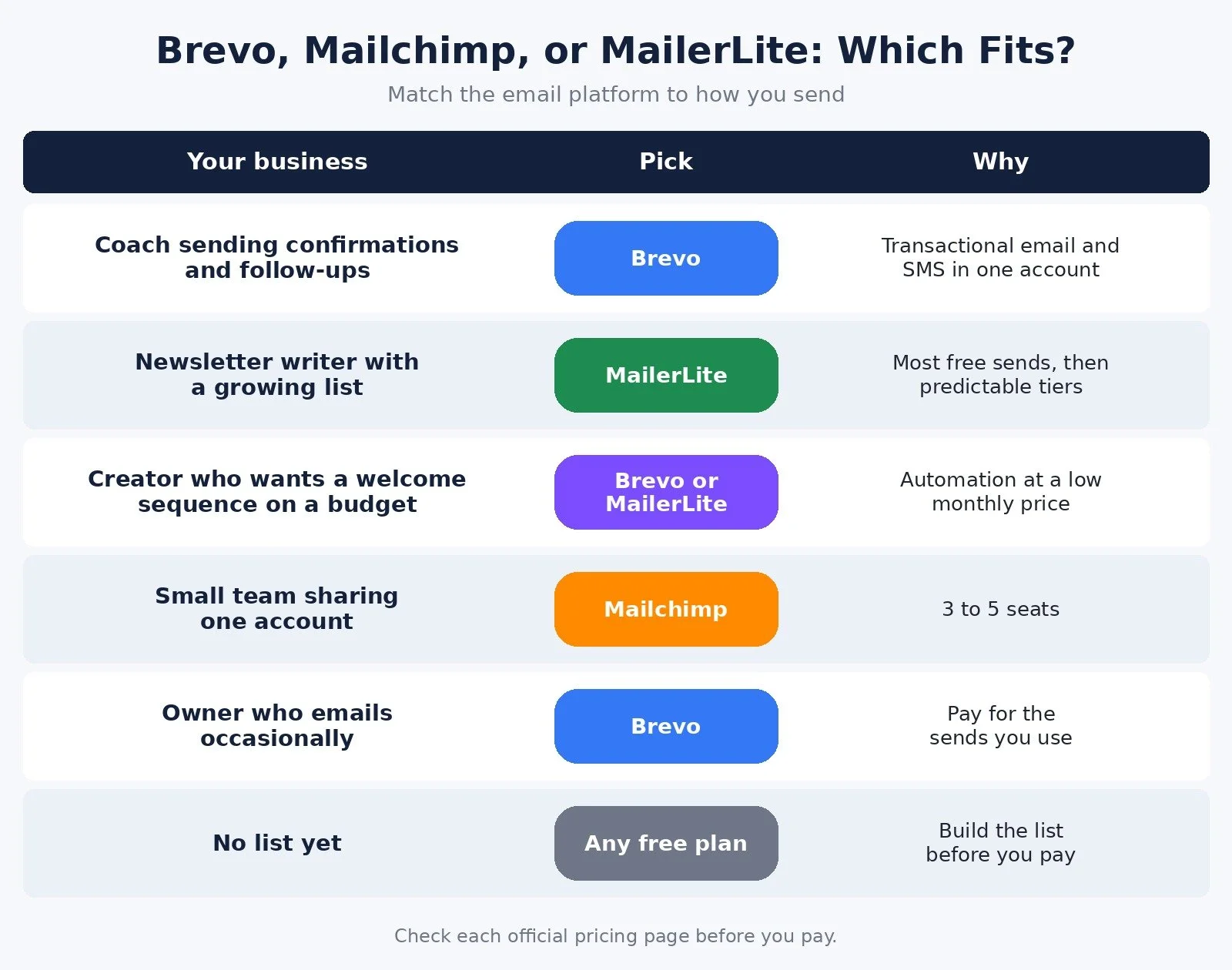
Coach or consultant sending confirmations and follow-ups: Pick: Brevo; Plan to start on: Starter or Standard; Why: Transactional email and SMS in one account
Newsletter writer with a growing list: Pick: MailerLite; Plan to start on: Free, then Comfort; Why: 2,500 free sends, then predictable tiers
Creator who wants a welcome sequence on a budget: Pick: Brevo or MailerLite; Plan to start on: Standard or Comfort; Why: Automation at a low monthly price
Small team sharing one account: Pick: Mailchimp; Plan to start on: Essentials or Standard; Why: 3 to 5 seats
Owner who emails occasionally: Pick: Brevo; Plan to start on: Free or Starter; Why: Pay for the sends you use
No list yet: Pick: Any free plan; Plan to start on: Free; Why: Build the list before you pay
How to Test Before You Commit
All three let you start without paying. Brevo has a free plan with no credit card needed, and MailerLite has a free plan for up to 250 subscribers. Mailchimp offers a 14-day free trial of Essentials or Standard.
Use that window on one real job, not a tour of every feature:
Import a real slice of your list and check how the tool counts those contacts against your plan.
Build one signup form and one welcome email, then sign up yourself and confirm it arrives.
Send one real campaign and look at the plan usage page afterward.
You can create a free Brevo account here. MailerLite and Mailchimp both offer sign up from their official pricing pages.
Common Mistakes When Choosing an Email Platform
Comparing free plans only. A free plan is a starting point. Look at what the first paid tier costs at the list size you expect in 12 months.
Ignoring the meter. Brevo charges by sends, while Mailchimp and MailerLite charge by list size. Match the meter to how you actually email.
Confusing email marketing with inbox management. Sending newsletters and taming your own inbox are different jobs. If your problem is the inbox, my email management tools guide covers that.
FAQ
Is Brevo cheaper than Mailchimp for a solopreneur?
At small list sizes, Brevo's entry price is low: Starter is $9 a month for 5,000 emails, and Standard is $18 a month. Mailchimp Essentials starts at $13 a month for up to 500 contacts. Compare both at your real list size on the official pricing pages.
Is Brevo's free plan really free?
Yes. Brevo calls it "Free forever, no credit card needed." Its FAQ says you can send up to 300 emails a day once your account is approved for sending.
Does Mailchimp still have a free plan?
Yes. Mailchimp's Free plan includes 1 seat, 1 audience, up to 250 contacts, and up to 500 sends a month with a daily maximum of 250. It does not include email scheduling or automation flows.
What are the best Brevo alternatives for solopreneurs?
Mailchimp is the closest alternative if you want more seats and simple automation on its entry paid plan. MailerLite is the better pick if you want the most free sends each month and simple paid tiers.
What to Do Next
Write down your list size today and where you expect it to be in 12 months.
Estimate how many emails you send in a normal month.
Walk through the decision diagram above and note which tool it points to.
Start on the free plan or trial and build one real form and welcome email in the first week.
Browse Best Tools for the rest of the tools I recommend for solo businesses.
If you want help connecting your email platform to your forms, CRM, and automations so follow-ups run without you, I take on automation strategy projects through my services.
Disclosure: the Brevo link in this post is an affiliate link. If you sign up through it I may earn a commission at no extra cost to you. It does not change which tool I recommend for which kind of business.
Make more. Spend less. Work less. Pick the email tool whose meter matches how you send, and let the rest wait.