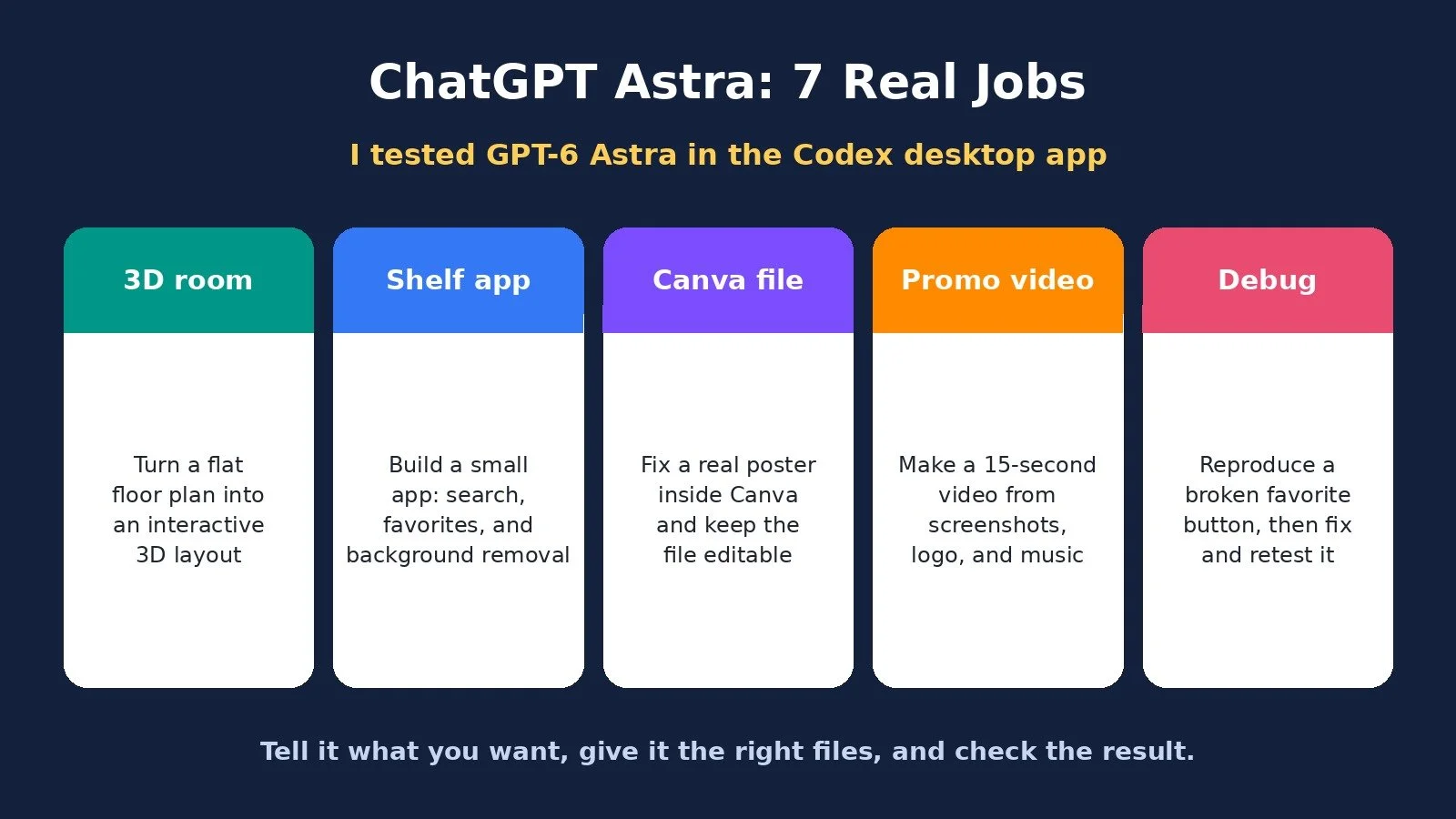
OpenAI’s GPT-6 Astra is supposed to do your work for you from start to finish. I wanted to see if that was real, so I gave ChatGPT Astra seven jobs: a 3D room from a floor plan, a small app, an interactive explainer, a Canva fix, a promo video, a subscription audit, and a bug fix.
I ran all of them inside the Codex desktop app. Astra is the model doing the thinking. Codex is the workspace where it can reach my files and use the tools it needs. Everything I gave it lived in a single folder.
This post walks through exactly what I asked for, what I got back, and how you can try the same kind of work. If you want the wider picture of what GPT-6, Claude, Zapier, and n8n shipped around the same time, I already covered that in AI agents for solopreneurs. This is the hands-on test that came after.
ChatGPT Astra: The Short Answer
ChatGPT Astra can take on real jobs, not just chat, when you tell it the outcome, give it the right files, and check what it gives you back. In my test it built, edited, and fixed work inside Codex, including a Canva file I could still edit and a bug that still worked after I refreshed the page. It is not a replacement for your judgment. A message that says “done” is not a test.
What ChatGPT Astra Is, and How I Used It
OpenAI released Astra on September 3rd. A new model usually means it writes a bit better or codes a bit faster. This time the claim was bigger: it can move between apps, click buttons, fill things in, and keep going without losing track of what you asked for. OpenAI also says it is nearly two times as fast as the previous model.
I have heard some version of “it can do the work for you” with almost every AI launch. So I wanted to give it real work.
Some of that work is everyday stuff, like filling out forms or organizing a calendar. Useful, but I wanted to go further. Sometimes you know exactly what you want done and you do not know how to do it. Other times you know how, and you just do not have the time. That is the work I would love to hand over.
I put together seven jobs. Some asked Astra to build something from scratch. Others asked it to finish something I already had. I sped up some of the processing in the video, but I opened every result on screen.
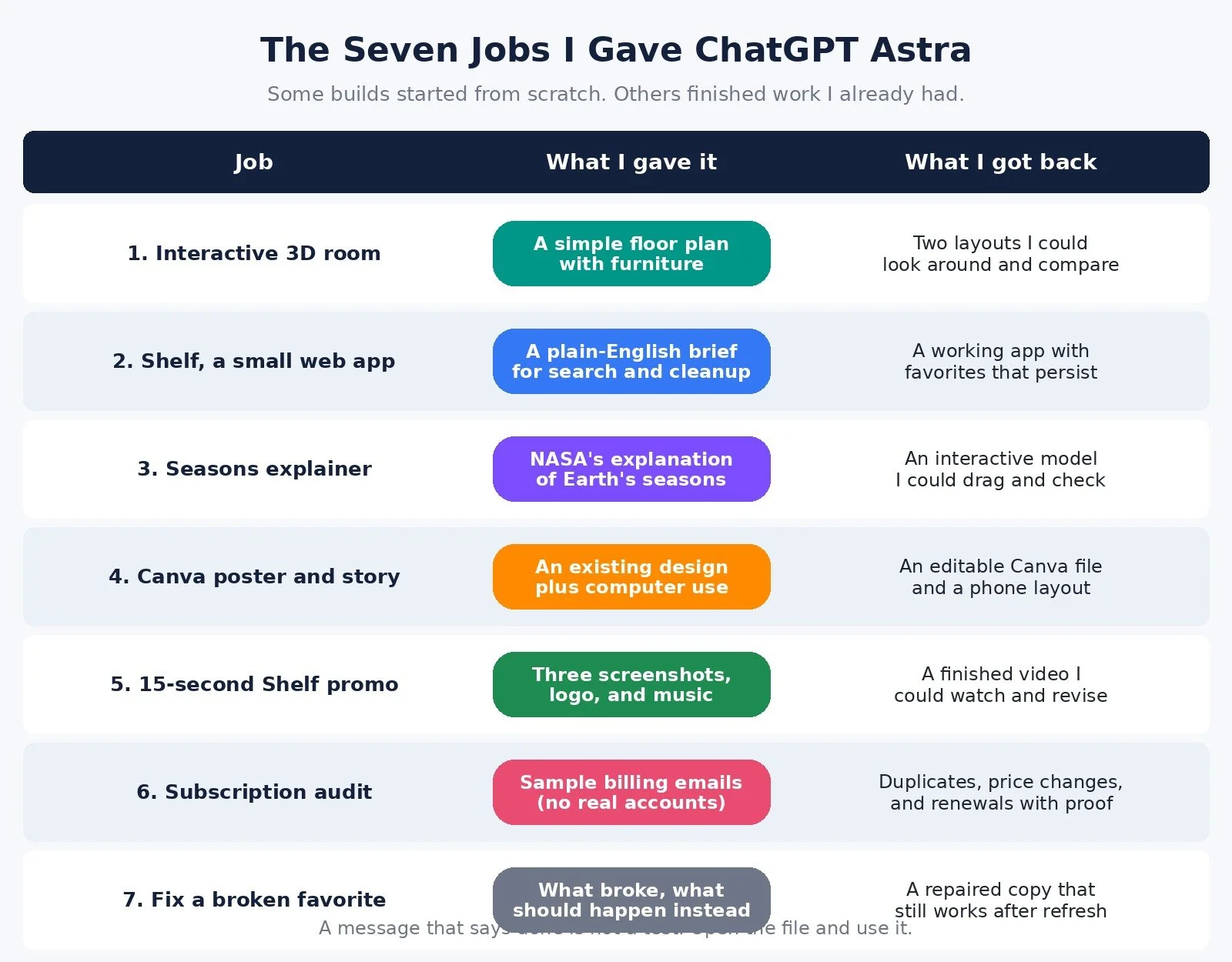
Job 1: Turn a Floor Plan Into an Interactive 3D Room
I started with a simple room plan. It showed the size of the room, where the door and window were, and the furniture I was trying to fit. Normally you stare at a flat drawing and try to guess whether the desk will feel cramped.
I asked Astra to build something I could actually look around before I moved any furniture. It did. I could see the window, the door, and how much space the furniture was taking up.
I did not have to settle for the first version. I ended up with two layouts I could compare side by side. I would not buy furniture based on this alone. I would still check the real measurements. But I tested a different arrangement without dragging a desk across the room.
This does not have to be a room. The useful part is taking something flat and hard to picture and turning it into something you can explore.
Job 2: Build a Small App Called Shelf
This one solves a small problem I hit often. I am putting together a post, I have already downloaded logo files, and I am opening them one by one. Sometimes the file has a white box around it. If that is the only version I have, I want to clean it up once and find the clean version the next time I need it.
I asked Astra to build a small app called Shelf. I wanted a search box, favorites for the images I keep using, and a button that removes a plain white background. Nothing huge. Just one place to keep the files.
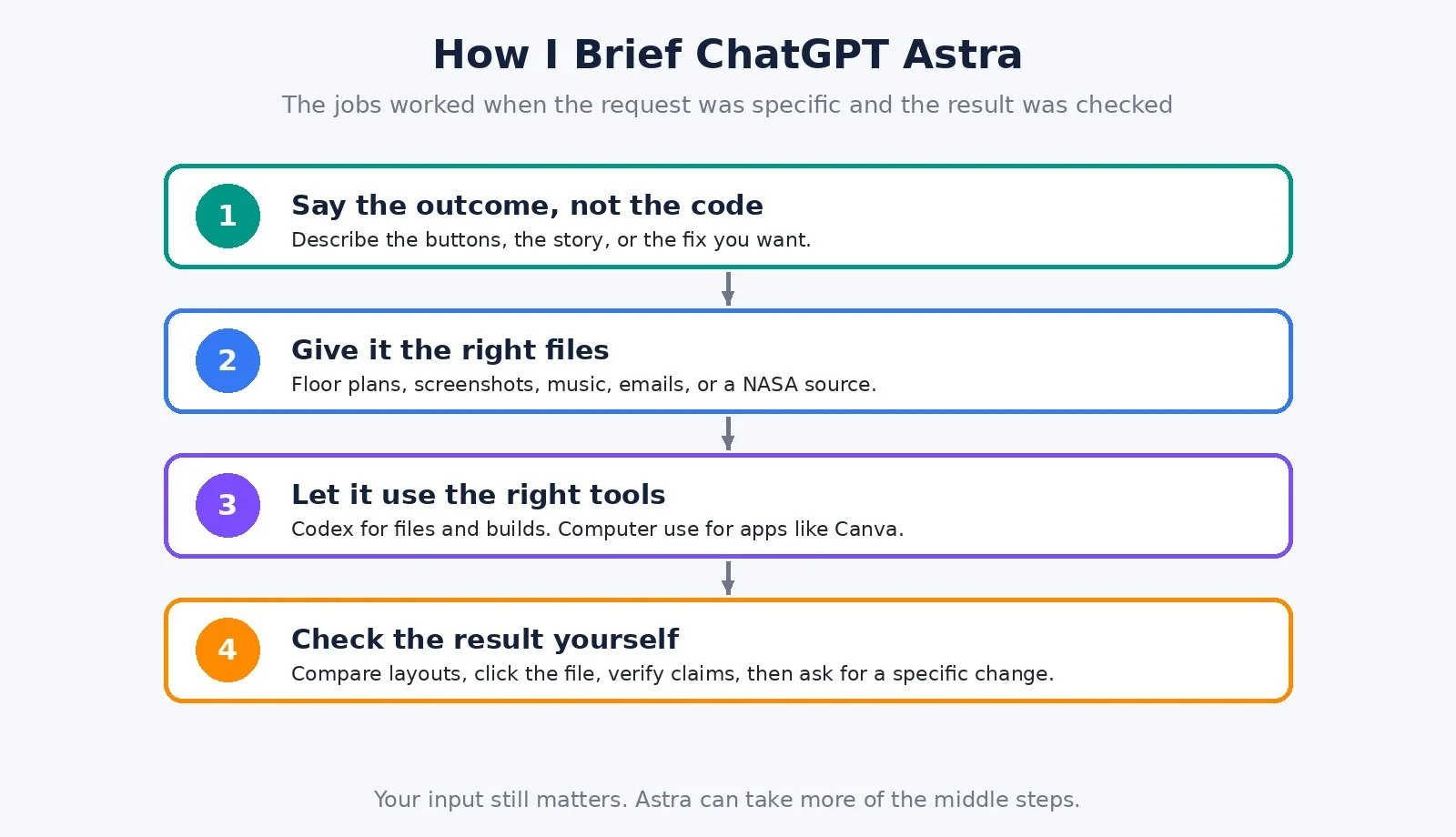
I did not write code or try to sound like a developer. I described what I wanted it to do and the buttons I wanted in front of me.
The result did the job. I could find a logo, remove the white background, and download the clean version. On a colored background, the white rectangle was gone. I could star a file as a favorite so I could find it again later. After a refresh, my favorites were still there, and the clean version was still available.
Yours would probably do something completely different. Start with a small task you keep repeating and describe the buttons you wish you had.
Keep an eye on that star. I come back to it in job 7, because I deliberately broke it.
Job 3: An Interactive Explainer for Earth’s Seasons
Astra can also help you explain a topic, not just build a utility.
Take a question most of us have heard the answer to: why is it summer in the US when it is winter in Australia? Someone tells you the Earth is tilted, and you still cannot picture what is changing.
Instead of asking for a wall of text, I gave Astra NASA’s explanation and asked it to build something I could interact with. In June, the northern hemisphere leans toward the sun. When I dragged the model to December, the southern hemisphere leaned toward the sun. The tilted axis kept pointing in the same direction. What changed was which half of the Earth was leaning toward the sunlight.
Because I could move it back and forth, I could stop on the part I did not understand instead of rewatching a video and hoping it clicked.
AI can still make mistakes. I checked the result against the NASA source. Something can look completely convincing and still be wrong.
This was a fun example, but you could use the same idea for something you are trying to learn or something you have to keep explaining to customers.
Job 4: Fix a Real Design Inside Canva
So far Astra had been building new things. Next I wanted it to work inside an app I already use.
I had a poster for a demo event. All the information was there, but everything was competing for attention. You did not know where to look first. I did not want a picture of a nicer poster. I wanted this actual design fixed inside Canva so I could keep editing it afterward.
For this job I installed and enabled the computer use plugin and approved the browser it would use. That is what lets Astra see the page and control the mouse and keyboard. On a Mac, you may also need to allow screen recording and accessibility if you are prompted.
The result was easier to follow. I read the title first, then everything underneath it. Same information, clearer layout. And I could still click the headline and change the text. It had not flattened the text into an image. It was still an editable Canva file. There was also a matching story version laid out for a phone.
You do not have to start from scratch. You can point Astra at something you already started and got stuck on.
Job 5: A 15-Second Promo Video From Screenshots
Imagine you want to promote the Shelf app and you need a way to show people what it does. For job 5, I wanted an actual video: a 15-second promo for Shelf.
I gave Astra three screenshots, the logo, and a music track we were allowed to use. None of that is a video. There was no footage. Then I told it the story I wanted the video to tell: find an image, remove the white background, save it as a favorite. That is it. It did not need six features and a dramatic intro.
I supplied the images and music. Astra followed that sequence, added the movement, and put the video file together. In the video, I stop talking and play the whole thing.
Now someone can see what Shelf does without me talking them through it. Even more useful, I have something I can react to. Can I read the text before it moves? Is every shot showing something useful? Does it end before it gets boring? Those questions are much easier to answer when there is an actual video in front of you. If shot two needs another second, I ask for that change. I am not trying to describe an entire edit from scratch.
Job 6: Audit Subscriptions From Billing Emails
Everyone hates overpaying for subscriptions. Would you notice if you were paying for the same service twice, on two different email addresses? That is easy to miss when the receipts are buried in your inbox.
These were sample billing emails, so nobody’s real account details went on screen. Astra’s job was to find repeated subscriptions, price changes, and upcoming renewals, then show me the actual email behind everything it flagged. It also had to tell those things apart. Two receipts from two different months do not automatically mean I was charged twice. A renewal does not mean the money has already left my account.
It found the same service on two different accounts, $29 each. I might need both, but now I know it is worth checking. It found a price change from $12 to $19, an extra $7 every month, with both receipts attached. And it found an upcoming renewal, which gives me time to decide before the charge goes through.
The useful part is having the things worth checking in front of me, with the proof already attached.
Job 7: Reproduce a Bug, Fix It, and Retest It
Something can look finished and still fall apart the moment you use it.
Remember the star in Shelf? In the working version, favorites stay saved when I refresh the page. I made a separate test copy and deliberately broke one thing. This version forgets them. I star an image, everything looks fine, and after a refresh the favorite is gone.
This is where building your own app stops being fun if you do not know how to code. You know what went wrong because you just watched it happen, but you have no idea what needs to change underneath.
That is what I gave Astra: what it did, what happened, and what should have happened instead. I asked it to reproduce the problem first, because I wanted it fixing the issue we actually saw instead of guessing at something else. Then the fix had to survive the same action that broke it. A message saying “done” is not a test.
We tried it. Save the image as a favorite, refresh the page, still there. Search still worked. Export still worked. I kept both the broken and repaired copies so I could compare them side by side.
That is the habit I would take into anything you build this way. Actually use it. Press the button. Refresh the page. Open the file it gave you. When something breaks, you have a clear instruction instead of throwing the whole thing away.
ChatGPT Astra Pricing (Checked November 12, 2026)
I did not talk through plan prices in the video, so I am not going to guess what I was on. I checked official pages today.
On the ChatGPT pricing page, GPT-6 Astra is listed as available on Plus and expanded on Pro. It is not listed on Free or Go. Codex is listed as limited on Free and Go, included on Plus, and expanded on Pro. The pricing page itself did not show dollar amounts in the text I could capture, so I verified those on OpenAI’s help center the same day.
ChatGPT Plus is $20 per month, billed monthly, according to OpenAI’s “What is ChatGPT Plus?” help article.
ChatGPT Pro has three monthly tiers, according to “About ChatGPT Pro tiers”: Pro 100 at $100, Pro 200 at $200, and Pro 500 at $500. Ultrafast, including GPT-6 Astra Ultrafast, is listed only on Pro 500.
The pricing page also lists a Go plan. I could not see a current dollar amount on that page today, and Astra was not listed as available on Go.
I used Astra inside the Codex desktop app. OpenAI’s download page is linked in the video description: https://chatgpt.com/download/. The prompts I used are in the prompt guide I linked in the description.
Who This Is For
A good fit if:
You have work you can describe clearly, even if you cannot build it yourself
You can give Astra files, screenshots, or a source to work from
You are willing to open the result, click around, and ask for a specific change
You want help finishing something you already started, like a Canva file or a half-built app
Look at other options, or go slower, if:
You need the model to run with no review. I still had to tell it what I wanted and check the output.
You are on ChatGPT Free or Go and you need Astra specifically. On today’s pricing page, Astra is listed on Plus and Pro, not on those plans.
What Worked and What to Watch
What worked. Plain-English briefs were enough for Shelf. The Canva file stayed editable. The video gave me something I could actually react to. The subscription audit came back with proof attached, not just a claim. The bug fix survived a refresh.
What to watch. I would not buy furniture from a 3D layout without checking measurements. I checked the seasons model against NASA because a convincing demo can still be wrong. And I only trusted the Shelf fix after I used it myself.
FAQ
How do I use ChatGPT Astra?
In this test I used Astra inside the Codex desktop app, with the files in one folder. For the Canva job I also enabled the computer use plugin and approved the browser. On a Mac, allow screen recording and accessibility if you are prompted.
Is ChatGPT Astra on the free plan?
Not according to the ChatGPT pricing page I checked on November 12, 2026. Astra was listed on Plus and expanded on Pro, and not on Free or Go.
Can ChatGPT Astra edit Canva files?
In my test, yes. It revised a real poster inside Canva and left the text editable. It also made a matching story layout for a phone.
Did Astra actually do the work, or just describe it?
It produced things I could open: a 3D layout, a working app, an interactive model, an editable Canva file, a video, an audit with source emails, and a repaired copy of the app. I still had to brief it and check the results.
Where are the prompts?
I put them in the ChatGPT Astra prompt guide linked in the video description.
What to Do Next
Pick one small job you keep repeating, or one file you already started and got stuck on.
Open Codex, put the files in one folder, and describe the outcome and the buttons or result you want.
Open the result, use it, and ask for a specific change if something is off. If you want the same prompts I used, start with the prompt guide.
Browse Best Tools for the rest of the stack I recommend.
If you want help setting up AI and automation in your business, I take on projects through my services.
Make more. Spend less. Work less. Give Astra a real job, then spend your time checking the work that matters.