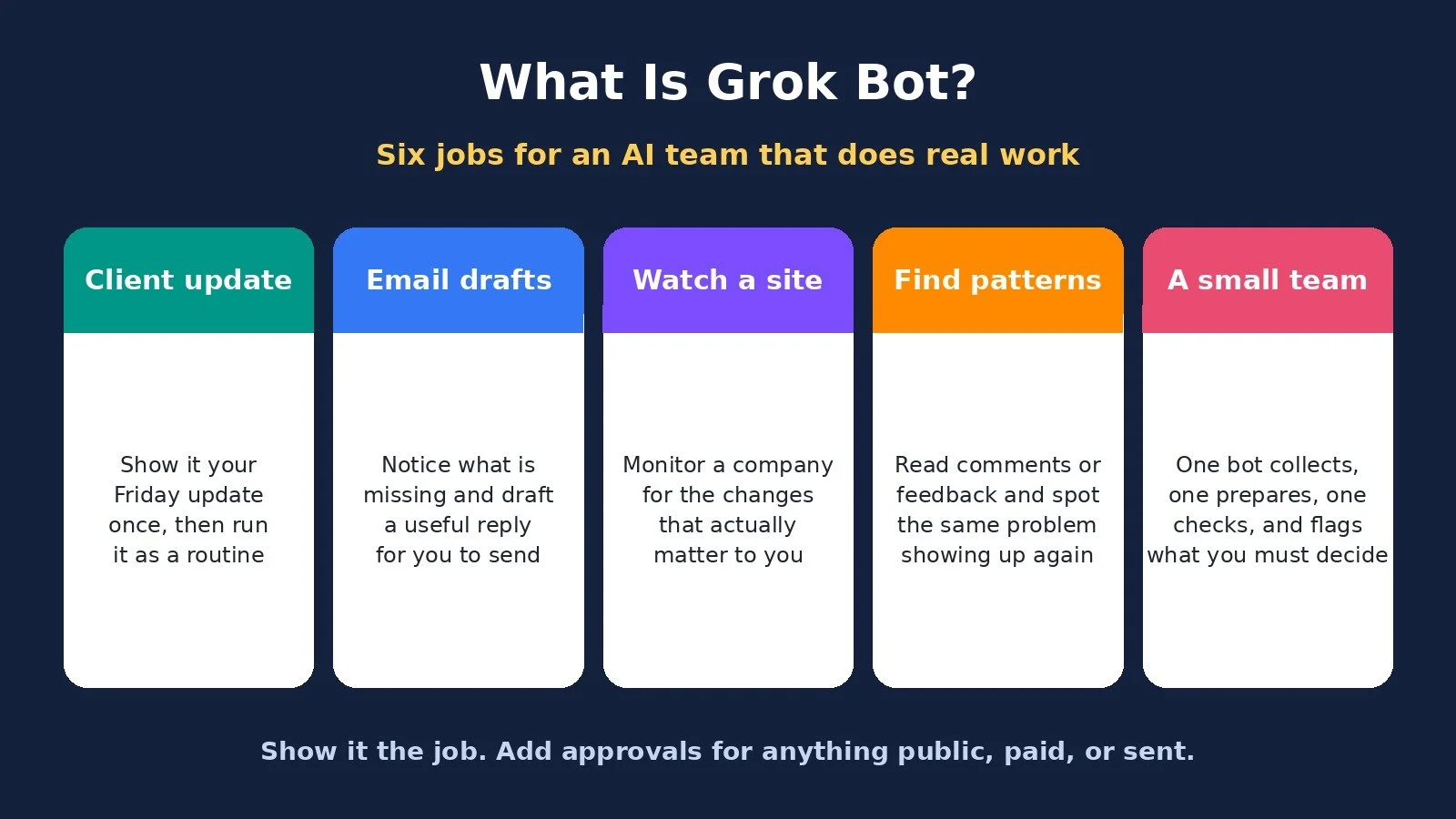
What is Grok Bot? It is not just another chat window. Grok Bot lets you create a team of AI employees that can do real jobs: work on their own, use websites and apps for you, and hand work off from one bot to the next.
In this walkthrough I show six practical ways to use it, from replying to emails and watching for business opportunities to updating a website and having several bots handle different parts of the same project. Training a bot can be as simple as showing it how you already do the job. It can watch the process, learn the steps, and then do it itself.
If you know Grok as the AI you chat with, Grok Bot is different. You give it a job, access to the websites and apps it needs, and it works on a computer in the cloud. Once you set it up, you do not have to sit there telling it what to do at every step. It can work through the job by itself, even when your computer is closed. That is what makes it feel like an AI employee: you give it a role, show it how the job works, and then let it do the work.
If you want the wider context on AI agents across ChatGPT, Claude, Zapier, and n8n, I already wrote AI agents for solopreneurs. This post is the Grok Bot walkthrough.
What Is Grok Bot? The Short Answer
Grok Bot is an AI teammate that runs on a cloud computer, signs into tools, and can work through a job even when your laptop is closed. You can show it how you already do the work, save that as a skill, run it on a routine, and later connect several bots into a team. Official pricing on November 12, 2026 lists Grok Bot as included starting at Premium for $30 a month, with weekly usage limits. Start with one job, keep an approval step for anything you send, publish, or spend, and check current plan details before you pay.
Job 1: A Friday Client Update, Taught by Demonstration
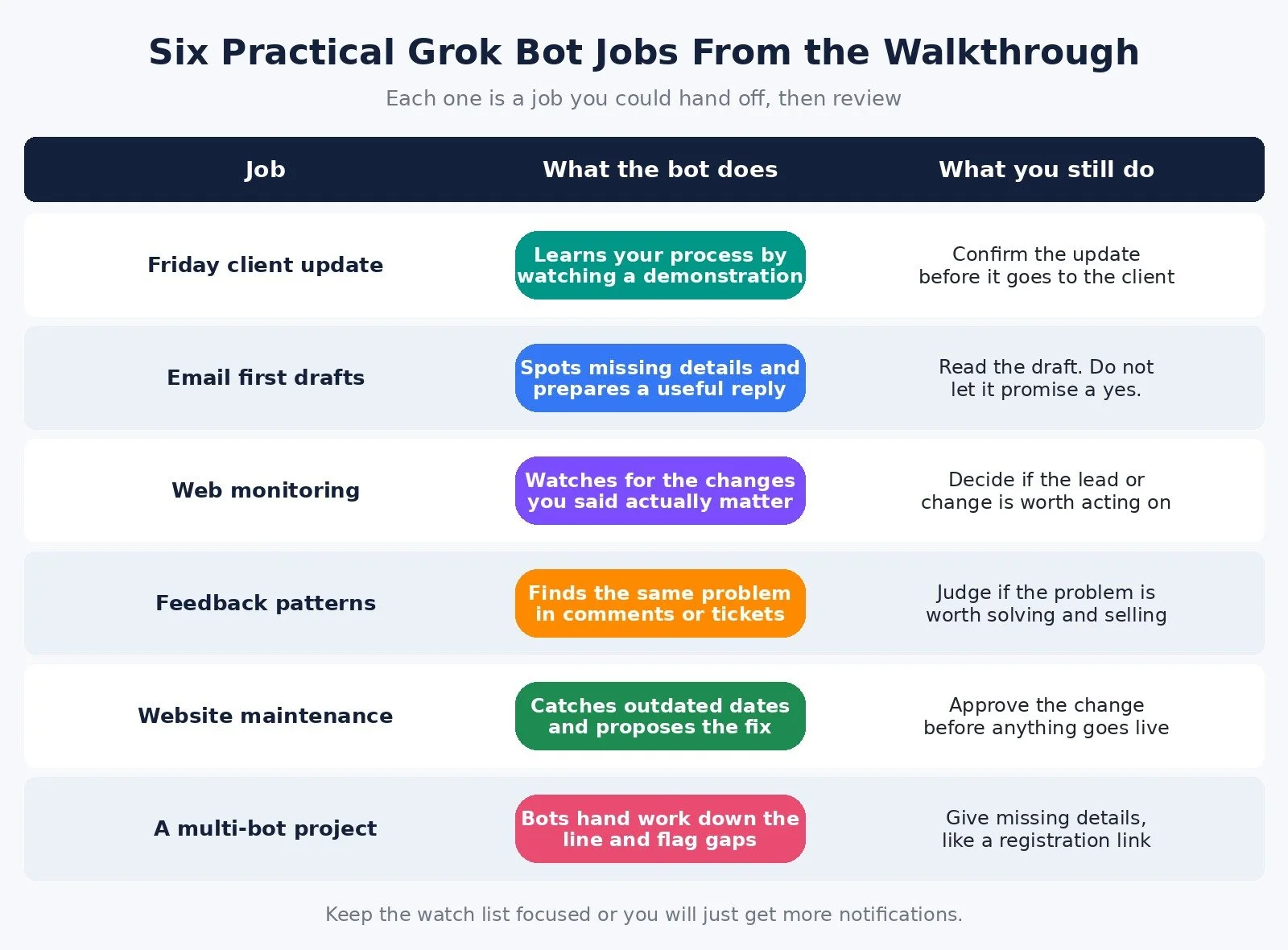
Let's start with a job many business owners already do every week. Every Friday you need to check what got done, see what is still waiting, and send your client an update. You know how to do it. You just do not want to keep doing it manually.
Instead of writing a giant prompt that explains every step, you can show Grok Bot how you do the job. You open Grok Bot's computer view, tell it what you are about to show it, and start the demonstration. Then you go through the process yourself. Grok watches what you do and turns those steps into a skill it can use again.
Take a Friday update like this. The website copy is finished, the email banner is finished, and the homepage design is waiting on the client. So you have two things done, one thing waiting, and the next step is getting the client's approval. That is the job: figure out what changed, turn it into an update, and ask for whatever needs to happen next.
Then test it with a completely different week. If it gives you back last week's answer, it has not actually learned the job. Once it works with fresh information, you can set up a routine to run that skill every Friday. The skill tells Grok what to do. The routine tells it when to do it. You already know how to do the job, so just show it.
Job 2: First Drafts of Email Replies
If you spend a lot of time replying to emails, you can have Grok Bot prepare the first response. I do not mean a generic reply. It can look at the email, figure out what information is missing, and prepare something you can actually use.
Look at a message like: can you redesign our website by October 2nd? Okay, how much of the website? Which pages? What is the budget? October 2nd tells you when they want it, but it does not tell you enough to say yes.
Now look at the reply it prepared. It asked for the current website, which pages need updating, and the budget range. And it left a delivery date open until we actually know the scope. That is useful. I do not want AI writing a long, polished email that confidently promises something I never agreed to.
If you want the replies to sound like you, give it more emails you have already written. If you normally answer in four lines, show it that. That is more useful than telling it to sound like a world-class salesperson.
I would still read the reply before sending it. But now I am checking a useful draft instead of starting from a blank email.
Job 3: Watch a Company or Site for Changes That Matter
The bot does not have to wait for someone to email you. It can go out and watch for things you care about.
Think about a competitor, prospect, company, website, or account you keep checking because you want to know when something changes. You can have Grok Bot do that, and you can tell it what kind of change actually matters. A company launches a new service: that could matter. They change their profile picture: I probably do not care.
In the example, Cedar Works announces a weekly interview series. If I make videos for companies, that could be an opportunity. The bot finds the announcement and tells me why it matches what I asked it to look for.
That does not mean Cedar Works is automatically going to hire me. I still need to look into it. But I did not have to keep checking their website every day waiting for something to happen. The bot found it for me.
You could do this with competitors, prospects, pricing changes, new products, industry news, job postings, or whatever you care about. Just keep the watch list focused. Otherwise you have built yourself an AI that is really good at sending you more notifications.
Job 4: Find Patterns in Customer Feedback
Now say you are not watching specific companies. You are trying to figure out what people actually need. You can give Grok Bot comments, reviews, support tickets, or customer feedback and have it look for patterns. Not "give me a billion-dollar business idea." You are looking for the same problem showing up again and again.
Look at three sample comments. One person cannot find the final file. Another keeps opening an old version. Somebody else does not know whether the design has been approved. You could treat those as three separate complaints. They are really pointing at the same problem: nobody knows which file they are supposed to use.
Now you have something worth testing. Maybe it is one shared page with the current file, a version date, and approval status. Then show it to someone who actually has the problem and see if it would have fixed it. That is a better place to start than building a huge app nobody asked for.
If you are using real comments, keep the original sources so you can go back and see exactly what people said. The bot can find the pattern. You still have to figure out whether the problem is worth solving and whether people will pay for it.
You can imagine running this every time new feedback comes in, so a bot is constantly going through what customers are telling you and pulling out the problems that keep coming up.
Job 5: Catch Outdated Website Details Before They Go Live
You can use the same idea inside your business, especially for things that constantly go out of date.
Everyone talks about using AI to build a website. Somebody still has to maintain the thing after it is built. Dates change, events change, offers change, pages go out of date.
Say Harbor Studio runs an open house every month. Someone has to remember to update the homepage every time the next event comes around. In the example, the approved information says Friday, October 9th at 6:00. The registration page has the right date, but the homepage still says October 2nd. Two pages on the same website are telling people different things.
The bot catches it and proposes the change. It does not need to redesign the whole page. It just fixes the part that is wrong.
For a real website, you give the bot access to whatever platform you use to edit it, and you have it show you the change before anything goes live. Once the process is set up, this is the kind of boring maintenance job you do not have to keep doing yourself.
Job 6: A Small Team of Bots on One Project
Updating the website is only one part of that open house. Someone still has to create the announcement, someone has to check the details, and all of that work has to match.
You do not have to use one Grok Bot for everything. You can create a team, give each bot a different job, and have them work together. One bot does its part, then hands the work off to the next one.
Here is the project version. One bot collects all of the approved event information. The next bot uses that information to prepare the homepage update and the announcement. Then another bot checks everything, makes sure the details match, and pulls out anything that still needs me.
Look at the homepage update and the announcement together. Both have October 9th at 6:00. The announcement includes the approved free-entry detail, but there is still one thing missing: what registration link should we use? We never gave them that information. So the final bot flags it for me instead of making something up.
That is what I want. Do the work you can do, and tell me where you need me.
You can build a team around whatever your workflow looks like. One bot researches, one writes, one updates the website, one checks everything. Because they can hand off to each other, I am not sitting there copying everything between five different chats myself. That is what makes it feel more like an actual team.
Grok Bot Pricing, Limits, and Security (Checked November 12, 2026)
Plan prices have changed since I recorded the October 26, 2026 video. Here is what official pages show today.
On x.ai/bot and cursor.com/pricing, Grok Bot is included starting at Premium:
Premium: $30 per month, billed monthly, with weekly Grok Bot usage included
Super: $100 per month, billed monthly, with 3.5x Premium usage on the Grok Bot page (the Cursor page describes Super as 15x more usage than Plus across the shared pool)
Ultra: $200 per month, billed monthly, with 12x Premium usage on the Grok Bot page (50x more than Plus on the Cursor page)
Cursor also lists Free at $0 and Plus at $8 per month. Grok Bot is not listed as included on Free or Plus. Teams starts at $30 per user per month.
If you are already on an eligible Premium, Super, Ultra, Teams, or Enterprise plan, the Grok Bot site says Grok Bot is included.
Subscriptions come with weekly usage included, with additional usage billed based on token cost. Your allowance refreshes weekly.
Those Cursor usage multipliers are not all describing the same thing, which is why I am quoting each page separately instead of forcing one chart.
Security, from the video. I also flagged something important if you are using this with clients. In the October walkthrough I said your bots share a cloud computer, including its files and browser logins, and that giving each bot a different name does not give every client their own separate private computer. Be careful about which accounts you connect and what information is available there. The Grok Bot marketing page today also says every bot has its own computer, so the product wording may have changed. Check the current security model before you connect client accounts.
For anything involving sending messages, spending money, or publishing something publicly, I would keep an approval step in the workflow.
How to Train Your First AI Hire
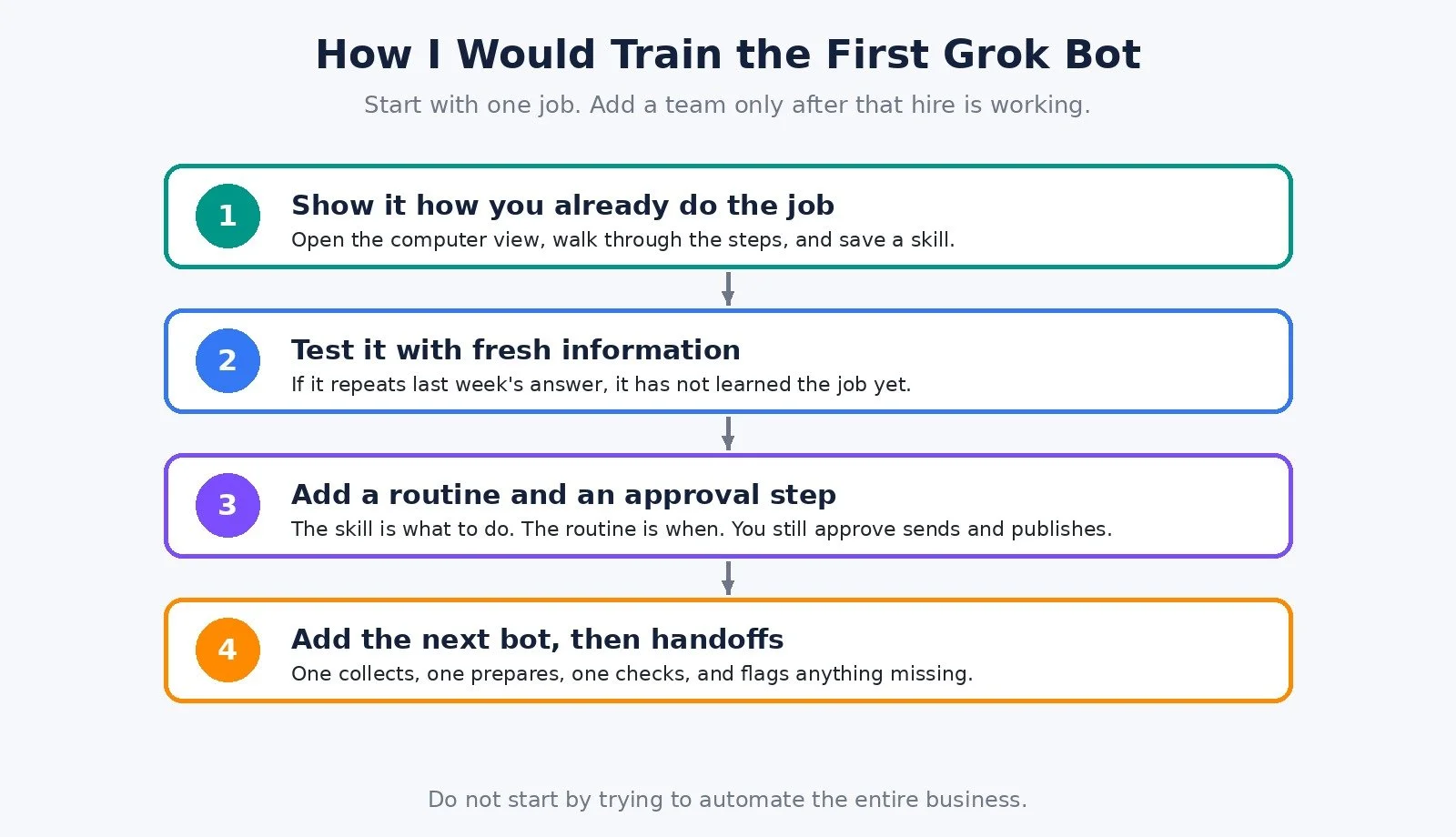
I would think about setting up Grok Bots the same way you think about hiring employees. You probably would not hire 10 people at once. You would start with the most important hire you need right now.
Pick one job in your business that you want off your plate and build that bot first. Show it how to do the job, let it run, then coach it a little. You are going to find edge cases. It will do something slightly wrong, or something will come up that you did not think about. Chat with it, tell it what you want changed, and keep refining the job until you feel comfortable handing off most of it.
If there are parts you still want control over, add approval steps. You can tell it: before you send this, publish this, spend money, or make this change, send it to me first. Treat it like a real employee. Train it, give it feedback, and put guardrails around the things that matter.
Once the first bot is working well, add the next one, and then the next one. Eventually you can build a team where each bot owns a different part of the business. And because the bots can work with each other, if one bot needs something from another bot, they can pass the work back and forth.
Do not start by trying to automate your entire business. Start with your first critical hire, get that bot working properly, then build the team from there.
If you want to try it, the link from the video description is Try Grok Bot.
Who This Is For
A good fit if:
You have a repeating job you can demonstrate, like a Friday update or a site date change
You are willing to read drafts and approve anything that gets sent or published
You want several bots to hand work to each other after the first one is working
Look at other options, or go slower, if:
You need unlimited 24/7 usage for a flat monthly fee. Official pages today describe weekly usage limits, with more usage billed after that.
You were about to connect several clients' logins to one shared environment. Check how isolation works today before you do that.
I also tested ChatGPT Astra on seven real jobs in Codex.
What Worked and What to Watch
What worked. Teaching by demonstration is much closer to how you already work than writing a giant prompt. The email draft asked for missing details instead of inventing a yes. The website example caught a date mismatch and proposed a small fix. The team flagged a missing registration link instead of making one up.
What to watch. Test a skill with fresh information, or you may just get last week's answer again. Keep monitoring lists tight or you will get more noise.
FAQ
What is Grok Bot, in one sentence?
An AI teammate that can use apps and websites on a cloud computer, run jobs on a schedule, and work with other bots, even when your own computer is closed.
How is Grok Bot different from chatting with Grok?
Chat is a back-and-forth conversation. Grok Bot is built around a job, access to tools, and a computer it can keep working on without you sitting there for every step.
How much does Grok Bot cost right now?
On November 12, 2026, x.ai/bot and cursor.com/pricing list Grok Bot as included with Premium at $30 a month, then Super at $100 and Ultra at $200, with weekly usage included. Additional usage is billed based on token cost, and the allowance refreshes weekly.
Can several bots work together?
Yes. In the walkthrough, one bot collected approved event details, one prepared the homepage update and announcement, and one checked the work and flagged a missing registration link instead of inventing it.
Should I let a bot send email or publish a page on its own?
I would not, at least not at first. I would keep an approval step for sending messages, spending money, or publishing anything publicly.
What to Do Next
Pick one repeating job you already know how to do, and write down what "done" looks like.
Try Grok Bot, show it that job, and test the skill with a fresh example.
Add a routine and an approval step before anything is sent, published, or paid for. Only then consider a second bot.
Browse Best Tools for the rest of the stack I recommend.
If you want help setting up AI and automation in your business, I take on projects through my services.
Make more. Spend less. Work less. Hire one AI employee for the job you least want to keep doing yourself, then build the team from there.